
Accessing your datasets
Learn the different mechanisms to access TheirStack datasets — including direct download URLs for quick access and S3 bucket credentials for full historical data exploration.
There are two ways to access your datasets:
- Direct download URL — Quick access to individual dataset files
- S3 Bucket access — Full access to explore the entire bucket and historical datasets
Looking for information about dataset types and what's available? Learn more about our datasets.
Direct download URL
Use direct download URLs when you need quick access to a specific dataset file without setting up programmatic access. This is the most common and straightforward way to access your datasets.
In the TheirStack App, you can see the list of available datasets in the datasets section. There you'll find all the different datasets available for you, along with a direct download button for each one.
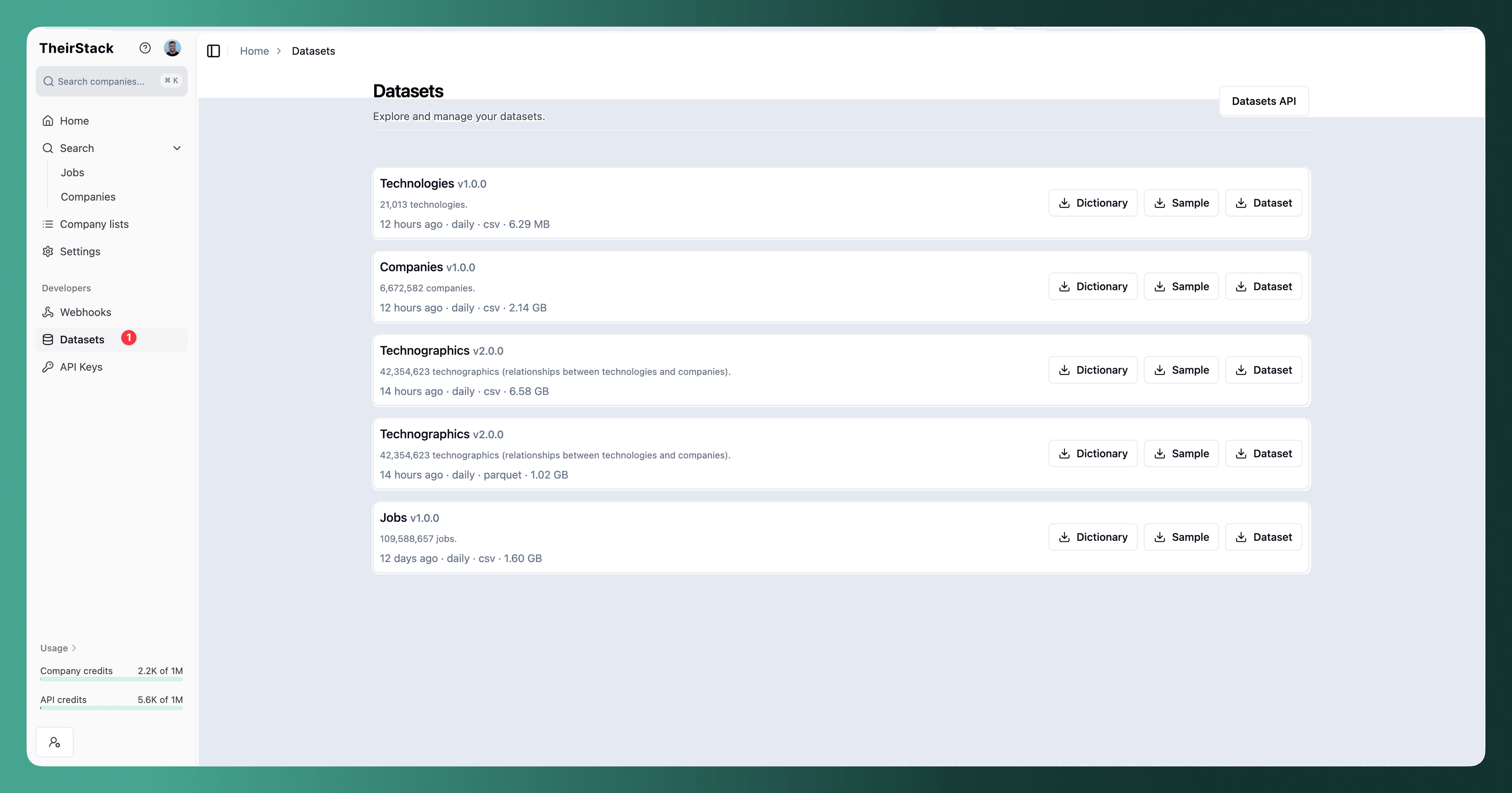
This is the simplest way to get a specific dataset file. Just click the download button, and you'll get a direct link to download the file.
S3 bucket access
If you want to explore the entire bucket of datasets available and access the historical archive of published datasets, you can gain direct access to our S3 bucket. This gives you more flexibility to browse, list, and download multiple files programmatically.
This process consists of three steps:
- Get temporary credentials
- List files
- Download files
There are many ways to access files on S3. Below we explain three common options:
- Python (boto3) — Using the
boto3SDK to list and download files - AWS CLI — Using
aws s3to list and download files - ClickHouse — Using the
s3table function to list files and query its content
Obtaining temporary S3 credentials
To get access to the datasets bucket, you need to make a request to the POST /v1/datasets/credentials endpoint.
curl -X POST "https://api.theirstack.com/v1/datasets/credentials" \
  -H "accept: application/json" \
  -H "Authorization: Bearer <your_token>"
Response fields
This endpoint returns a JSON object with the following fields:
access_key_id— The access key ID for the temporary credentialssecret_access_key— The secret access key for the temporary credentialssession_token— The session token for the temporary credentialsexpiration— The expiration date and time of the temporary credentials (in ISO 8601 format)storage— Storage configuration object containing:bucket_name— The S3 bucket name where the datasets are storedendpoint_url— The S3-compatible endpoint URL to use for accessing the bucketprefixes— One or more prefixes you must include when accessing objects
Example response:
{
    "access_key_id": "a3f8b2c9d1e4f5a6b7c8d9e0f1a2b3c4",
    "secret_access_key": "7e9a2b4c6d8e0f1a3b5c7d9e1f3a5b7c9d1e3f5a",
    "session_token": "ZXlKaGJHY2lPaUpTVXpJMU5pSXNJblI1Y0NJNklrcFhWQ0o5LmV5SmlkV05yWlhRa",
    "expiration": "2026-01-15T14:30:00Z",
    "storage": {
        "bucket_name": "datasets",
        "endpoint_url": "https://example-datasets-url.com",
        "prefixes": [
            "v1_0_0/data/jobs/daily/2025/12/19/",
            "v1_0_0/data/jobs/daily/2025/12/20/",
            "v1_0_0/data/jobs/daily/2025/12/21/",
            ...
        ]
    }
}
Note: These credentials are temporary and will expire at the time specified in the expiration field. You'll need to request new credentials once they expire.
Use the credentials in Python
Once you have the temporary credentials, you can connect to the S3 bucket using the AWS S3-compatible API. The response includes the endpoint_url, bucket_name, and the allowed prefixes in the storage object, which you should use when configuring your client and building object keys. Because the files are stored in Cloudflare R2, you must pass the endpoint_url in your client or CLI commands.
Here is how to set up a client using the values from the API response:
import boto3
import requests

# Get credentials from the API
response = requests.post(
    "https://api.theirstack.com/v1/datasets/credentials",
    headers={"Authorization": "Bearer <your_token>"}
)
response.raise_for_status()
credentials = response.json()

# Use the endpoint_url and bucket_name from the response
client = boto3.client(
    "s3",
    endpoint_url=credentials["storage"]["endpoint_url"],
    aws_access_key_id=credentials["access_key_id"],
    aws_secret_access_key=credentials["secret_access_key"],
    aws_session_token=credentials["session_token"],
)
Export credentials as environment variables
Running these will let you use the credentials for the AWS CLI to list and download files, as explained in the next sections.
eval "$(curl --location --request POST 'https://api.theirstack.com/v1/datasets/credentials' \
  --header 'accept: application/json' \
  --header 'Authorization: Bearer <your_token>' \
  | jq -r '
    "export AWS_ACCESS_KEY_ID=\(.access_key_id)",
    "export AWS_SECRET_ACCESS_KEY=\(.secret_access_key)",
    "export AWS_SESSION_TOKEN=\(.session_token)",
    "export S3_ENDPOINT_URL=\(.storage.endpoint_url)",
    "export S3_BUCKET_NAME=\(.storage.bucket_name)"
  ')"
Listing files
With Python
The credentials response includes one or more allowed prefixes. Always include one of those prefixes in every S3 key you access (for example, customer-1234/). First, list objects for each allowed prefix, then download the keys you need:
for prefix in credentials["storage"]["prefixes"]:
    response = client.list_objects_v2(
        Bucket=credentials["storage"]["bucket_name"],
        Prefix=prefix,
    )

    for obj in response.get('Contents', []):
        print(f"Key: {obj['Key']}, Size: {obj['Size']}")
With the AWS CLI
First, export the temporary credentials as environment variables (shown above). Then run aws s3 ls with the same endpoint:
aws s3 ls "datasets/v1_0_0/data/jobs/daily/2026/01/22/" \
  --endpoint-url "$S3_ENDPOINT_URL"
If you don't want to save them as environment variables, you can inline them for a single command:
AWS_ACCESS_KEY_ID="<access_key_id>" \
AWS_SECRET_ACCESS_KEY="<secret_access_key>" \
AWS_SESSION_TOKEN="<session_token>" \
aws s3 ls "datasets/v1_0_0/data/jobs/daily/2026/01/22/" \
  --endpoint-url "https://80063c3fbf855b628e8167cf2831ce60.r2.cloudflarestorage.com"
With ClickHouse
Once you have the temporary credentials, you can list the full filenames using the s3 table function. For additional options, see the ClickHouse s3 table function docs. Replace the values with your own credentials and session token:
SELECT
    _path,
    _file,
    _size,
    _time
FROM s3(
    'https://80063c3fbf855b628e8167cf2831ce60.r2.cloudflarestorage.com/datasets/v1_0_0/data/jobs/daily/2026/01/22/data.parquet',
    '<access_key_id>',
    '<secret_access_key>',
    '<session_token>',
    'One'
)
Downloading files
After you identify the object you want to download, include one of the allowed prefixes in the Key:
With Python
prefix = credentials["storage"]["prefixes"][0]  # choose one allowed prefix
key_to_download = f"{prefix}path/to/your/file"

client.download_file(
    Bucket=credentials["storage"]["bucket_name"],
    Key=key_to_download,
    Filename="local_file.csv",  # update to your desired local path
)
With the AWS CLI
Download an object by bucket and key, and provide a local filename:
aws s3api get-object \
  --bucket "$S3_BUCKET_NAME" \
  --key "v1_0_0/data/jobs/daily/2026/01/22/data.parquet" \
  "data.parquet" \
  --endpoint-url "$S3_ENDPOINT_URL"
You can also download files directly with the AWS CLI without listing them first. To copy every object in the bucket to your current directory:
aws s3 cp "s3://$S3_BUCKET_NAME" . \
  --recursive \
  --endpoint-url "$S3_ENDPOINT_URL"
For more download patterns and examples, see the AWS S3 download objects guide.
With ClickHouse
You can query the data directly once you have the temporary credentials:
SELECT count(*)
FROM s3(
    'https://80063c3fbf855b628e8167cf2831ce60.r2.cloudflarestorage.com/datasets/v1_0_0/data/jobs/daily/2026/01/22/data.parquet',
    '<access_key_id>',
    '<secret_access_key>',
    '<session_token>'
)
To inspect the schema:
DESCRIBE TABLE s3(
    'https://80063c3fbf855b628e8167cf2831ce60.r2.cloudflarestorage.com/datasets/v1_0_0/data/jobs/daily/2026/01/22/data.parquet',
    '<access_key_id>',
    '<secret_access_key>',
    '<session_token>'
)
To fetch a single row:
SELECT *
FROM s3(
    'https://80063c3fbf855b628e8167cf2831ce60.r2.cloudflarestorage.com/datasets/v1_0_0/data/jobs/daily/2026/01/22/data.parquet',
    '<access_key_id>',
    '<secret_access_key>',
    '<session_token>'
)
LIMIT 1
How is this guide?
Last updated on
Datasets
Access complete jobs, closed jobs, technographics, and company datasets — delivered as Parquet or CSV, with historical coverage and daily or hourly updates via S3.
Job Dataset
Explore all 60 job dataset fields including column names, data types, descriptions, and fill rates showing data completeness metrics for each field