
GuideShows how a TheirStack feature works and how to use it.
How to find companies by industry
Keep or leave out companies by the industry they work in.
Most companies in our data carry an industry, such as Computer Games or Dentists. Pick the industries you want, or the ones to leave out, and get the companies that match. Here's how to do it with TheirStack.
Our industry list follows LinkedIn Industry Codes V2. Each industry has a numeric id and can sit under a parent. Mobile Gaming Apps sits under Computer Games, which sits under Software Development.
Filter by industry ids from the API or the MCP
Using the TheirStack MCP, find game studios with these filters:
- Industry is any of Computer Games (id 109) or Mobile Gaming Apps (id 3131); look the ids up with list_industries
Tell me how many companies match, then list the first 10 with their country and employee count.


curl -X POST "https://api.theirstack.com/v1/companies/search" \
  -H "Authorization: Bearer <YOUR_API_KEY>" \
  -H "Content-Type: application/json" \
  -d '{
    "industry_id_or": [109, 3131],
    "limit": 10,
    "include_total_results": true
}'The example finds game studios, meaning companies in Computer Games or its sub-industry Mobile Gaming Apps. It returns 3,153 companies, among them Electronic Arts, Ubisoft and Riot Games. Swap in your own ids and every step stays the same.
Get the ids from GET /v0/catalog/industries. Its industry parameter searches names, hierarchy and descriptions. For example, industry=games returns Computer Games and Mobile Gaming Apps among its matches. Each match includes its industry_id and parent_id. The catalog doesn't use credits.
Then send the ids in industry_id_or to the Company Search endpoint, POST /v1/companies/search. The Job Search endpoint, POST /v1/jobs/search, takes the same parameter and returns jobs posted by companies in those industries.
To leave industries out, use industry_id_not. Use industry_id_not_or_null instead to drop them but keep companies whose industry we don't know.
In your MCP client, use the TheirStack MCP's list_industries to get the ids. Then search with search_companies or search_jobs. This works in Claude, ChatGPT, Cursor or any other MCP client.
Pick industries in the app
- Industryis any of Computer Games, Mobile Gaming Apps
3,153 companies · Nov 19, 2026
| Company | Country | Industry | Employees | Matching jobs |
|---|---|---|---|---|
| Electronic Arts | United States | Computer Games | 31,195 | 12,038 |
| Ubisoft | France | Computer Games | 23,000 | 11,388 |
| Keywords Studios | Ireland | Computer Games | 11,884 | 7,974 |
| Riot Games | United States | Computer Games | 8,388 | 7,777 |
| Epic Games | United States | Computer Games | 11,979 | 5,361 |
Open a company search and add Industry
- Open a new company search and click Add filter.
- Choose Industry and keep "is any of".
- Type a word in the search box, such as "games", to narrow the list.
Tick the industries you want
- Each industry shows how many companies it has.
- An industry with sub-industries has an arrow. Open it to see them.
- Ticking a parent ticks all its sub-industries too. Untick the ones you don't want.
- For the example, tick Computer Games. Mobile Gaming Apps comes with it.
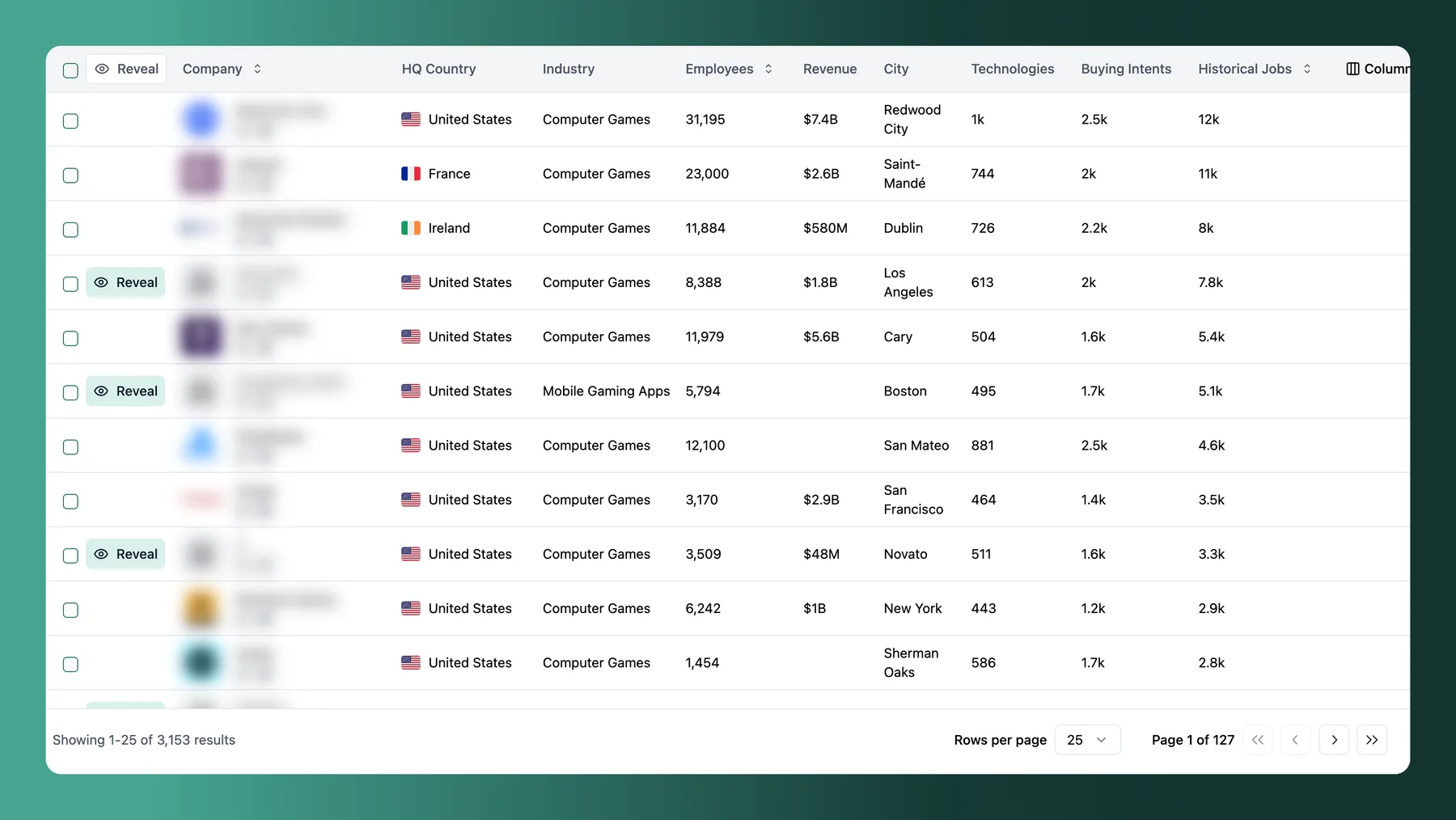
The results list each company with its industry in the Industry column.
Leave industries out instead
- Click the filter's operator and switch it to "is not any of" to drop the industries you ticked.
- Pick "is unknown or not any of" to drop them but keep companies with no industry.
Filter jobs by the company's industry
- In a job search, the same filter is called Company Industry.
- It keeps jobs posted by companies in the industries you tick.
- It offers "is any of" and "is not any of".
The industry filter in the app, the API and the MCP
| App | API parameter | MCP tool |
|---|---|---|
| Industry list in the filter | GET /v0/catalog/industries | list_industries |
| Industry: is any of | industry_id_or | search_companies |
| Industry: is not any of | industry_id_not | search_companies |
| Industry: is unknown or not any of | industry_id_not_or_null | search_companies |
| Company Industry in a job search | industry_id_or, industry_id_not | search_jobs |
What the industry filter matches, and what it doesn't
- A company has one industry, and it matches when that industry is one of the ids you sent.
- The API doesn't add sub-industries for you. A parent id matches only companies tagged with that exact id, so add the ids whose
parent_idpoints to it. The app adds them when you tick a parent. - Companies with no industry are left out by "is any of" and by
industry_id_not. Only "is unknown or not any of" (industry_id_not_or_null) keeps them. - The app's job search has no "is unknown or not any of". The Job Search endpoint and
search_jobsdo acceptindustry_id_not_or_null. industry_orandindustry_nottake names but are deprecated. An id points to one industry, however its name is spelled.- Your own industry list won't match ours. Map your categories to our ids once, then reuse them.
- If the list is too broad, add one more filter, such as HQ Country or Employees.
FAQ
Send the industry ids in industry_id_or to POST /v1/companies/search, and get the ids from GET /v0/catalog/industries. The catalog takes a search word in its industry parameter. It returns each industry's id, its parent, and how many companies and jobs it has.
Yes. Put its id in industry_id_not_or_null, or pick "is unknown or not any of" on the app's Industry filter. industry_id_not and "is not any of" drop companies with no industry as well.
Yes, our industry catalog comes from LinkedIn Industry Codes V2, and the industry filters accept those codes as ids. GET /v0/catalog/industries and the MCP's list_industries list them with our company counts.
Send all of their ids in one industry_id_or list, and a company matches if it's in any of them. Search the catalog with a broad word, such as "health", to see the close ones together, with their hierarchy.
Yes. Add company_technology_slug_or next to industry_id_or, or the Technology filter next to Industry in the app. A company has to match both filters to be returned.
TheirStack: integrations with AI assistants, automations and CRMs
TheirStack works with the AI assistants, automation tools and CRMs you already use: ask Claude or ChatGPT through the MCP server, send new matches to Clay, n8n, Make or Zapier by webhook, and create leads in Salesforce or HubSpot.
AI assistants
Ask Claude, ChatGPT, Cursor or any MCP client to search jobs, companies and tech stacks through the TheirStack MCP server.
MCP server
https://api.theirstack.com/mcpAutomations
TheirStack sends every new matching company by webhook as soon as it finds it, to your automation platform or through it into your CRM and sales tools.
CRMs and sales tools
 VS Code
 Windsurf
 Cline
 OpenCode
 Gemini
 Hermes
 OpenClaw
 Clay
 n8n
 Make
 Zapier
 Databar
 Salesforce
 HubSpot
 Attio
 Pipedrive
 Apollo
 Instantly
 ContactOut
Find the companies in the industries you sell to
Pick industries to include or leave out, and see every company that matches.
Start free: 200+ free credits.
How is this guide?
Last updated on
How to Exclude Specific Companies from a Search
Step-by-step guide to creating a blacklist of companies and excluding them from your company search results using TheirStack's company list filters.
How to find companies by size and revenue
Keep only the companies with the headcount and revenue you sell to.