
GuideShows how a TheirStack feature works and how to use it.
How to find companies by size and revenue
Keep only the companies with the headcount and revenue you sell to.
TheirStack records an employee count for many companies, and an estimated annual revenue in USD for fewer. Set a range on either one to keep only the companies of the size you sell to. Here's how to do it with TheirStack.
What the Employees and Revenue filters do
Each filter takes a minimum, a maximum or both. Employees is the number of people at the company. Revenue is its estimated annual revenue in US dollars. Both bounds include the value you set, so a minimum of 50 keeps a company with exactly 50 employees.
The same two filters work in company search and in job search. In a job search, they filter by the company that posted the job.
Search by size and revenue with the API and the MCP
Using the TheirStack MCP, search companies with these filters:
- Minimum employees: 50
- Maximum employees: 500
- Minimum annual revenue: 10000000 USD
Return the total count, then the first 10 companies with their employee count and annual revenue.


curl -X POST "https://api.theirstack.com/v1/companies/search" \
  -H "Authorization: Bearer <YOUR_API_KEY>" \
  -H "Content-Type: application/json" \
  -d '{
    "min_employee_count": 50,
    "max_employee_count": 500,
    "min_revenue_usd": 10000000,
    "include_total_results": true,
    "limit": 10,
    "page": 0
}'This search finds companies with 50 to 500 employees and at least $10M in revenue. It matches 40,600 companies.
The company search endpoint and the MCP tool search_companies take four size parameters. They are min_employee_count, max_employee_count, min_revenue_usd and max_revenue_usd. Revenue is a whole number of dollars, so $10M is 10000000.
The job search endpoint and the MCP tool search_jobs take the same names. Each parameter also has an _or_null version, such as min_employee_count_or_null. It returns the companies in your range plus the ones whose figure we don't have.
Results come back one page at a time, so use limit and page to walk through them (pagination).
Set Employees and Revenue in the app
- Employeesis greater than 50
- Employeesis less than 500
- Revenueis greater than $10M
40,600 companies · Nov 20, 2026
| Company | Country | Industry | Employees | Matching jobs |
|---|---|---|---|---|
| BioSpace | United States | Internet News | 166 | — |
| Ladders | United States | Staffing and Recruiting | 130 | — |
| PandoLogic | United States | IT Services and IT Consulting | 220 | — |
| Stability Healthcare | United States | Staffing and Recruiting | 343 | — |
| Vivian Health | United States | Internet Marketplace Platforms | 364 | — |
Open a new company search
- Go to Company Search.
- The filter bar sits above the results table.
The new search opens with no filters, ready for the first one.
Set the employee range
- Click Add filter and pick Employees.
- Choose is greater than and pick 50.
- Add Employees again, choose is less than and pick 500.

The filter bar now shows two Employees chips, one for each end of the range.
Set the minimum revenue
- Click Add filter and pick Revenue.
- Choose is greater than and pick $10M.

The filter bar now holds the full range, with Revenue next to the two Employees chips.
Run the search and check the figures
- Click Search.
- Read each company's size in the Employees and Revenue columns.
- In a job search, the same filters are called Employees and Company Revenue (USD).
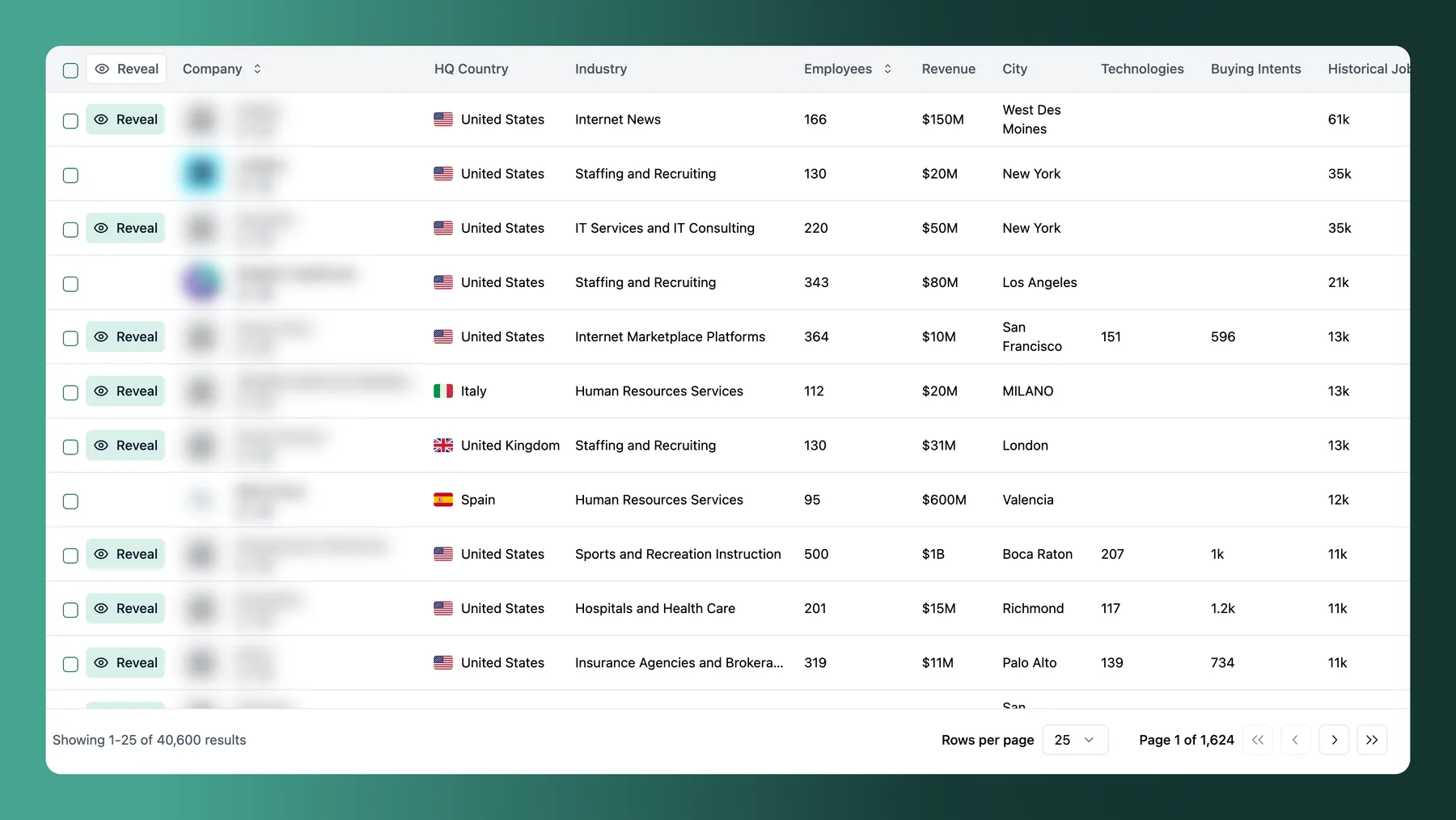
The results table lists each matching company with its employee count and revenue.
Same filter in the app, the API and the MCP
| App filter | API parameter | MCP tool |
|---|---|---|
| Employees, is greater than | min_employee_count | search_companies, search_jobs |
| Employees, is less than | max_employee_count | search_companies, search_jobs |
| Employees, is unknown or greater than / less than | min_employee_count_or_null, max_employee_count_or_null | search_companies, search_jobs |
| Revenue (Company Revenue (USD) in job search), is greater than | min_revenue_usd | search_companies, search_jobs |
| Revenue, is less than | max_revenue_usd | search_companies, search_jobs |
| Revenue, is unknown or greater than / less than | min_revenue_usd_or_null, max_revenue_usd_or_null | search_companies, search_jobs |
What the size filters match and what they don't
- A company matches when its figure sits inside your range, with both bounds included.
- A company with no figure drops out of a plain filter. Only the
_or_nullversions, or the "is unknown or" operators in the app, keep it. - Many companies have no size on record. About three in four companies in our database have no employee count (company statistics).
- Revenue is sparser than headcount, so a Revenue filter drops more companies (integration guide).
- Revenue is an estimate, so treat a company close to your bound as a judgment call.
- The app offers set values, from 10 to 10,000 employees and from $1M to $50B in revenue. The API and the MCP take any whole number.
- Too few results with Revenue? Switch it to is unknown or greater than, or filter by Employees alone.
- To narrow the list further, add HQ Country or Industry.
FAQ
Set Employees to more than 50 and less than 500, and Revenue to more than $10M. In the API or the MCP, send min_employee_count: 50, max_employee_count: 500 and min_revenue_usd: 10000000. This search matches 40,600 companies.
They are left out of the results. min_employee_count and max_employee_count only return companies with a known count inside your range. To keep the unknown ones, send the _or_null version of every bound you set, such as min_employee_count_or_null and max_employee_count_or_null.
Add Employees or Company Revenue (USD) to a job search in the app. Through the API, send the same size parameters to the job search endpoint, or ask the MCP's search_jobs tool.
Keep them when missing a company costs you more than reviewing one that doesn't fit. Leave them out when every result must fit your segment. This matters most with Revenue, the sparser of the two figures.
Yes, and a company must pass both filters to match. There is no single definition of mid-market or enterprise, so use the headcount and revenue limits your team sells by.
TheirStack: integrations with AI assistants, automations and CRMs
TheirStack works with the AI assistants, automation tools and CRMs you already use: ask Claude or ChatGPT through the MCP server, send new matches to Clay, n8n, Make or Zapier by webhook, and create leads in Salesforce or HubSpot.
AI assistants
Ask Claude, ChatGPT, Cursor or any MCP client to search jobs, companies and tech stacks through the TheirStack MCP server.
MCP server
https://api.theirstack.com/mcpAutomations
TheirStack sends every new matching company by webhook as soon as it finds it, to your automation platform or through it into your CRM and sales tools.
CRMs and sales tools
 VS Code
 Windsurf
 Cline
 OpenCode
 Gemini
 Hermes
 OpenClaw
 Clay
 n8n
 Make
 Zapier
 Databar
 Salesforce
 HubSpot
 Attio
 Pipedrive
 Apollo
 Instantly
 ContactOut
Search companies by size and revenue
Set the headcount and revenue range you sell to and get the companies that fit it.
Start free: 200+ free credits.
How is this guide?
Last updated on
How to find companies by industry
Keep or leave out companies by the industry they work in.
How to Find Companies With the Most Open Jobs
Learn how to find companies hiring at scale — those with more than a set number of open jobs — using the matching-jobs filter in Company Search, then export them for outbound.