
GuideShows how a TheirStack feature works and how to use it.
How to find companies running a vulnerable technology
List the companies whose job posts name the products a new vulnerability affects.
When a vulnerability is disclosed, its advisory names the products it affects. Search companies by those products to get the ones whose job posts name them. Here's how to do it with TheirStack.
The example uses CVE-2025-55182, a critical flaw in React Server Components. Its advisory lists Next.js and React Router among the affected frameworks. Swap in the products from your own advisory and every step stays the same.
Search the affected products from the API or the MCP
Use the Company Search endpoint, POST /v1/companies/search. Put each affected product's slug in company_technology_slug_or. A company matches when its job posts name any one of them.
To find the slugs, use the technology catalog endpoint or the MCP's find_technologies_and_topics tool. Catalog lookups don't use credits. If a product isn't there, the MCP's request_technology tool asks us to add it.
In Claude, ChatGPT, Cursor or any other MCP client, the TheirStack MCP runs the search with its search_companies tool.
Using the TheirStack MCP, find the companies running a technology hit by CVE-2025-55182, with this filter:
- Technology is any of Next.js or React Router (look up their slugs first)
Tell me how many companies match, then list the first 10 with each technology's confidence, job count and last date found.


curl -X POST "https://api.theirstack.com/v1/companies/search" \
  -H "Authorization: Bearer <YOUR_API_KEY>" \
  -H "Content-Type: application/json" \
  -d '{
    "company_technology_slug_or": ["next-js", "react-router"],
    "expand_technology_slugs": ["next-js", "react-router"],
    "limit": 10,
    "include_total_results": true
}'expand_technology_slugs adds a technologies_found field to each company. It includes each product's confidence, job count and first and last date found.
To read the job posts that name the product, send the same slugs in job_technology_slug_or to the Job Search endpoint. Add the company's domain in company_domain_or and a date filter such as posted_at_max_age_days.
To get new matches later, save the search with the MCP's create_saved_search tool or the saved searches endpoint. Then add a webhook to it with create_webhook, or run it again whenever you want.
Build the search in the app
- Technologyis any of Next.js, React Router
77,148 companies · Nov 18, 2026
| Company | Country | Industry | Employees | Matching jobs |
|---|---|---|---|---|
| FullStack Labs | United States | Construction | 700 | 964 |
| Greeka.com | Greece | Travel Arrangements | 27 | 833 |
| EPAM Systems | United States | IT Services and IT Consulting | 68,097 | 549 |
| Scribd, Inc. | United States | — | 451 | 448 |
| CI&T | United States | IT Services and IT Consulting | 8,856 | 483 |
Add every product the advisory names
- Open a new company search and click Add filter.
- Pick Technology, keep is any of and add each affected product.
- For CVE-2025-55182 that's Next.js and React Router.
- Pick the product itself, not the toolchain around it. Vite matches every Vite user, not only those running the affected plugin.
A product doesn't come up when you type it? It isn't in our catalog yet. Ask us to add it from the MCP, as the section above shows.
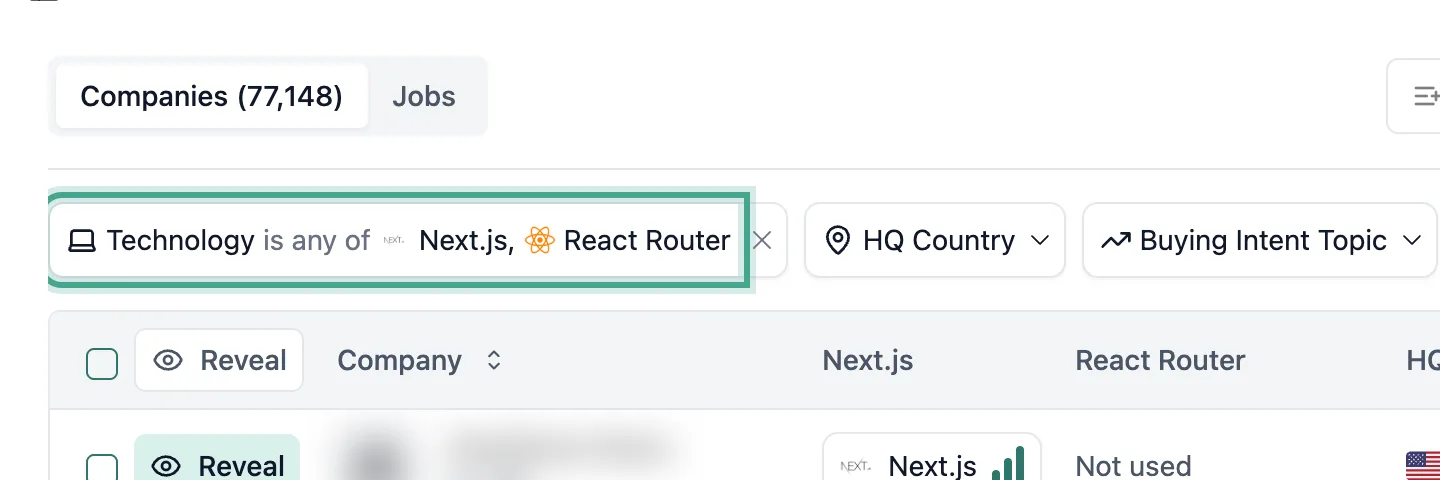
The Technology filter matches companies whose job posts name Next.js or React Router.
Check the job posts behind each match
- Each product you filtered by gets its own column, with a High, Medium or Low confidence.
- Hover over a cell to see how many job posts name the product, with a link to them.
- The same card shows the first and last date we found it.
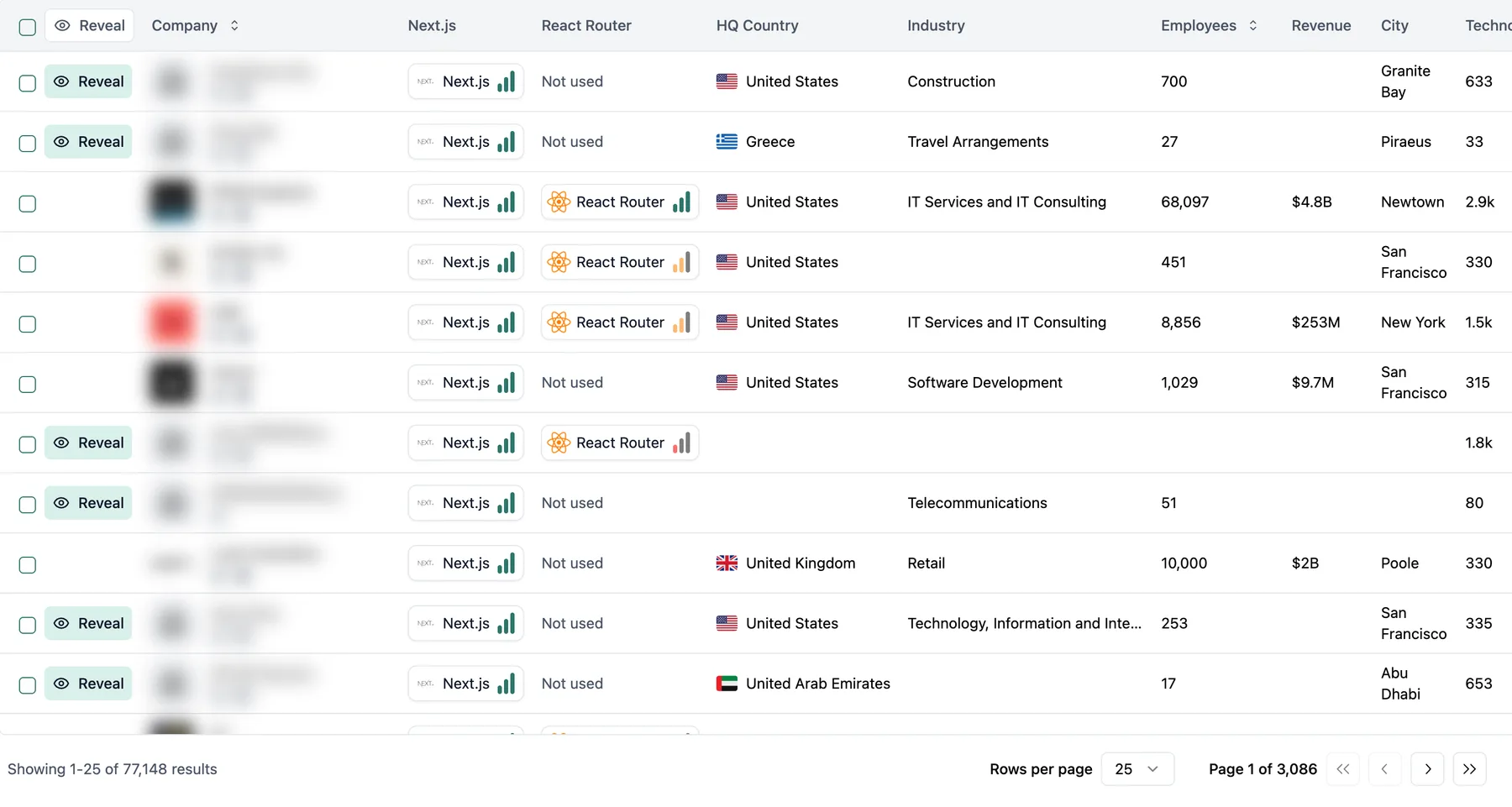
Each company appears once. Its Next.js and React Router columns show how sure we are that it uses each one.
Save the search and get new matches
- Click Save below the filters. The search keeps its filters and you can reopen it from Home to see the latest matches.
- For an email alert, open the saved search's three dots menu on Home. Choose "Enable daily alert" or "Enable weekly alert".
- For a webhook, click Webhooks on the saved search, then Create Webhook. It sends a Company.New event once for each new company that matches.
- From the API or the MCP, run the saved search again, as the first section shows.
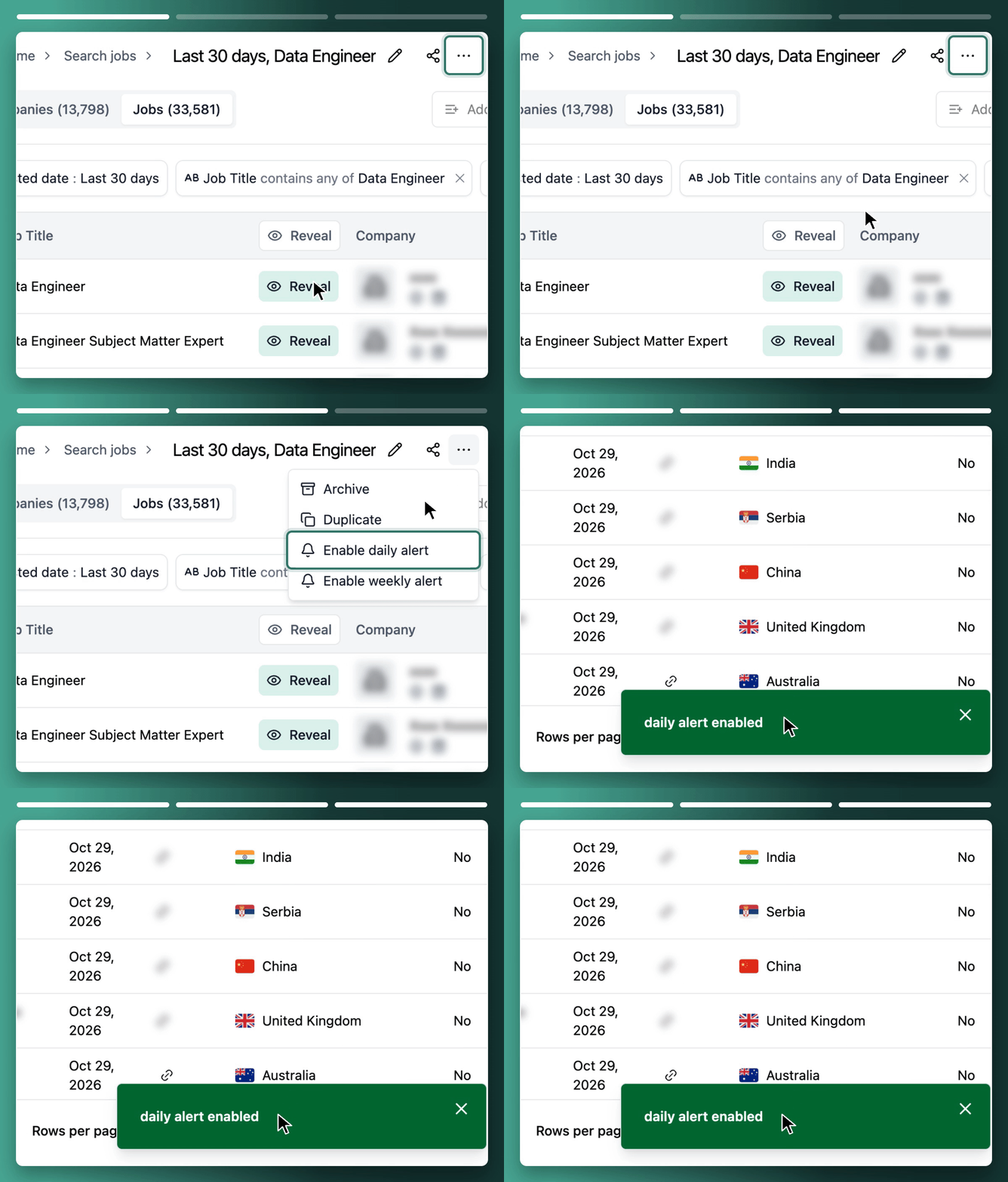
The alert is turned on from the three dots menu next to the saved search on the Home page.
The same filters in the API, the MCP and the app
| App label | API parameter | MCP tool |
|---|---|---|
| Technology (is any of) | company_technology_slug_or | find_technologies_and_topics, then search_companies |
| Keyword confidence | tech_filters.confidence_or | search_companies |
| Save | POST /v0/saved_searches | create_saved_search |
What a search by technology finds, and what it doesn't
- It finds companies whose job posts name an affected product. Each match carries its confidence, job count and first and last date found.
- It doesn't know versions. A company on a patched release matches the same as one on an affected release.
- It doesn't know patch status, or whether a company uses the affected feature. Many React Router users don't run React Server Components at all.
- A company that never names the product in a job post won't show up. Treat the list as a floor, not every company exposed.
- Software agencies that build with the product for clients match too. Check the industry column before you write to them.
- Some affected products aren't in our catalog. Waku and Parcel, also named for CVE-2025-55182, weren't on 18 Nov 2026.
- Email alerts are set up in the app. From the API or the MCP, new matches arrive through a webhook on the saved search.
- Too many matches? Add HQ Country or Employees for where you sell, Keyword confidence High, or Last date found if you only want companies that named the product recently.
- No matches? Check each product's spelling in the Technology filter.
FAQ
Run a TheirStack company search with Technology set to "is any of" every affected product. Add HQ Country and Employees only if you sell to certain countries or sizes.
Hover over the library's column for a company in the results. The card shows how many job posts name it, with a link to those posts.
Save the company search and open its three dots menu on Home. Choose "Enable daily alert" or "Enable weekly alert". A webhook on the saved search sends each new company as it matches.
Yes. Send the product slugs in company_technology_slug_or to POST /v1/companies/search, or ask any MCP client connected to TheirStack. The MCP's find_technologies_and_topics tool looks up the slugs first.
TheirStack: integrations with AI assistants, automations and CRMs
TheirStack works with the AI assistants, automation tools and CRMs you already use: ask Claude or ChatGPT through the MCP server, send new matches to Clay, n8n, Make or Zapier by webhook, and create leads in Salesforce or HubSpot.
AI assistants
Ask Claude, ChatGPT, Cursor or any MCP client to search jobs, companies and tech stacks through the TheirStack MCP server.
MCP server
https://api.theirstack.com/mcpAutomations
TheirStack sends every new matching company by webhook as soon as it finds it, to your automation platform or through it into your CRM and sales tools.
CRMs and sales tools
 VS Code
 Windsurf
 Cline
 OpenCode
 Gemini
 Hermes
 OpenClaw
 Clay
 n8n
 Make
 Zapier
 Databar
 Salesforce
 HubSpot
 Attio
 Pipedrive
 Apollo
 Instantly
 ContactOut
Find the companies a new vulnerability hits
Search companies by every product the advisory names, and save it to get new matches.
Start free: 200+ free credits.
How is this guide?
Last updated on
Find hidden candidates with niche technology experience
Use TheirStack technographic data to identify companies using a specific platform in your target market, then cross-reference with LinkedIn Recruiter to surface candidates whose hands-on expertise doesn't appear on their profile.
How to search companies by the software holding their data
Find companies holding support tickets, sales records or usage data by searching the software that produces it, minus companies you already contacted.