
Limit how much a webhook can send
Set a daily event limit on a webhook so it never sends, or charges, more than you budgeted. Learn how the limit works, when records are dropped, and how to size it against what your search matches per day.
A webhook sends every record that matches its saved search. If the search is broad, or you point it at the whole history of a search instead of only at new records, that can be a lot of credits in a short time.
You can bound it with a daily event limit (max_events_per_day): the most new records the webhook takes on in a day, resetting at midnight UTC. For a job webhook that is a number of jobs. Each job it takes on can send its job.new and, when the job closes, its job.closed, so a job costs at most two credits. The closures arrive on the day each job closes, so a day's charges can include closures of jobs taken on earlier.
It is empty by default, which means no limit. You can set it when you create a webhook, change it later, and send it through the API on POST /v0/webhooks and PATCH /v0/webhooks/{id}.
Records over the limit are not charged
The limit is applied when we take records on, before any credit is spent. A job stopped by the limit is not sent or watched, so you pay nothing for it: no job.new today and no job.closed when it closes later. The limit caps what the webhook costs you and not just what it delivers.
This is also why pausing a webhook is not a substitute. Credits are charged when we scan for matches, not when we deliver them, so a webhook you deactivate at your budget and reactivate later charges the whole waiting backlog on its next scan.
Records over the limit are dropped, not queued
Each day sends that day's records only. If your limit is 100 and the search matched 150 records today, the other 50 are not sent, and they are not saved for tomorrow either, not even if tomorrow matches 30 and has room to spare.
This is on purpose. We only know that a day had spare room once the day is over, so a record carried over could not go out before the end of the following day. It would reach you about two days after we found it and cost the same credit as a fresh one. In most webhook use cases a two day old hiring signal is worth much less than a new one, so we keep the feed current instead.
If you need every match, raise the limit or narrow the search.
Sizing the limit
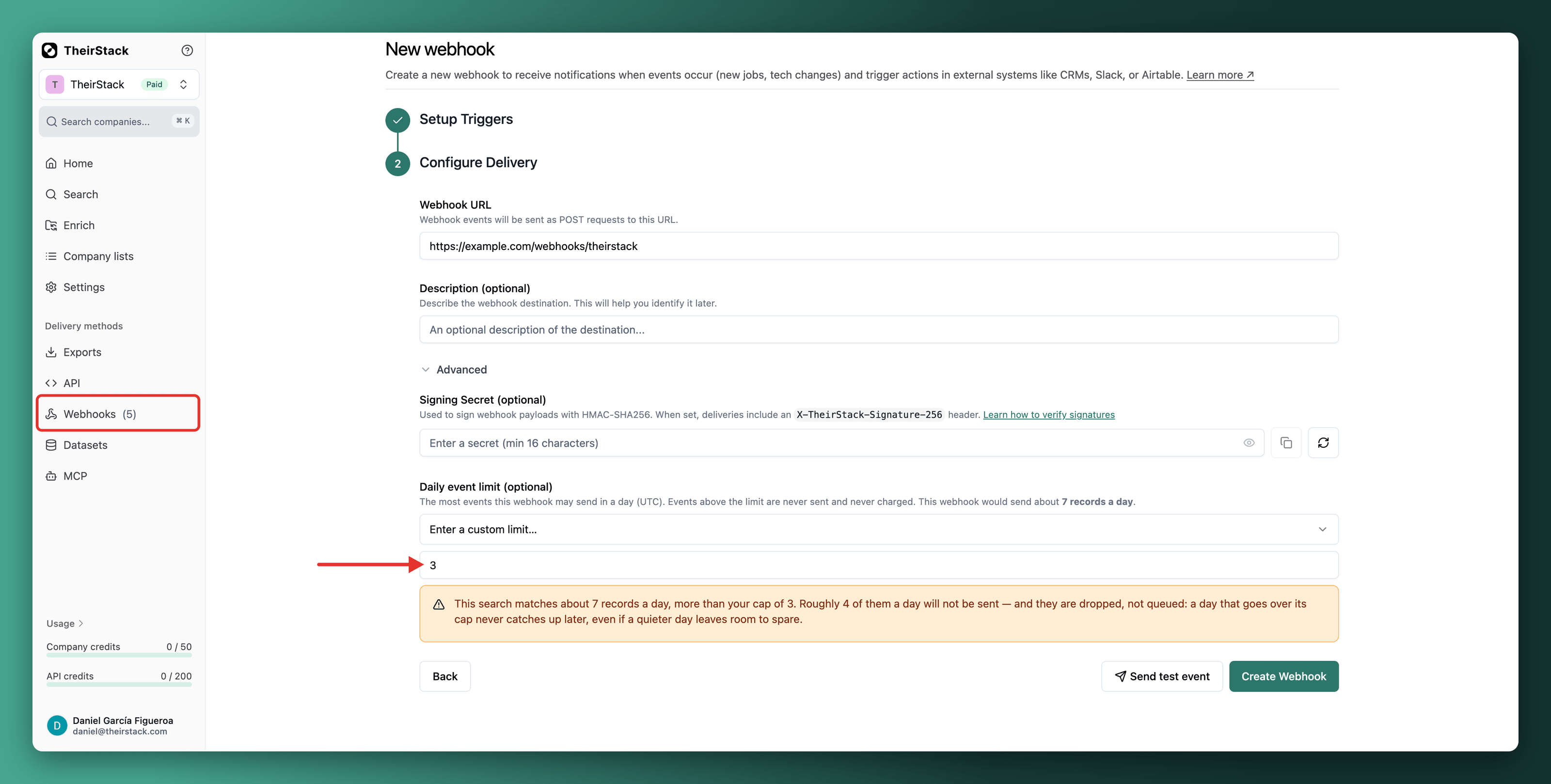
When you set a daily limit, the app shows how many records the search has matched per day over the last week, and warns you if your limit is below that, with the number of records a day you would lose. You can still save it. Getting less than everything is a normal thing to want, and the warning is there so that it is a decision instead of a surprise.
You can read the same estimate from the API:
curl "https://api.theirstack.com/v0/webhooks/volume-estimate?search_id=123" \
-H "Authorization: Bearer $THEIRSTACK_API_KEY"{
"search_id": 123,
"records_last_7_days": 1050,
"avg_records_per_day": 150,
"credits_per_record": 1,
"avg_credits_per_day": 150
}The estimate counts records by when we discovered them, which is when a webhook fires, and not by the date the source says the job was posted.
A webhook with trigger once per company is estimated in companies rather than in jobs, and in new ones: a company fires once and never again, so what matters is how many companies the search newly reaches each day, not how many it matches in total. The first scan may find 500 companies and the next one 3.
A company webhook has no daily estimate at all, and the app says so instead of guessing. It fires when a company starts matching filters about the company itself, such as headcount or the technologies it uses, and nothing records when that became true.
Things worth knowing
- The day is UTC, whatever timezone you work in. The events chart is drawn in your own local day, so the two do not line up: when a webhook has a limit, the chart says so and offers to redraw itself in UTC.
- Closures do not use up the limit. A
job.closedbelongs to a job the webhook took on earlier, so it goes out the day the job closes without counting against that day's limit. - A job is watched for 30 days. Its
job.closedis sent if it closes within 30 days of being taken on. After that it is no longer watched, and nothing is charged for it. - A webhook can watch closures only. With
job.closedactive andjob.newoff, the limit is the number of jobs it starts watching each day. Watching is free: you are charged for thejob.closedevents of the jobs that close. - Lowering the limit below what today already took on stops the webhook for the rest of the day. Nothing is refunded, and nothing is owed: those records were delivered.
- Raising the limit takes effect on the next scan. It does not recover the records that earlier scans dropped.
- The lowest limit is 1. A limit of 0 is rejected: to stop a webhook from sending anything, deactivate it instead.
- Credits still come first. If your balance runs out before the limit does, delivery stops there. A job whose
job.newyour balance cannot pay is not taken on, so it never sends ajob.closedeither.
How to set up a webhook
Learn how to set up a webhook to get notified when events occur (new jobs, tech changes, etc) in TheirStack and trigger actions in your external systems like N8N, Zapier, Make, Airtable, etc
Monitor your webhooks
Track your webhook performance with detailed analytics. Learn how to view webhook usage statistics, understand event statuses, and troubleshoot webhook delivery issues using TheirStack's built-in monitoring dashboard.
Limit how much a webhook can send
Set a daily event limit on a webhook so it never sends, or charges, more than you budgeted. Learn how the limit works, when records are dropped, and how to size it against what your search matches per day.
Receive TheirStack events in your webhook endpoint
Learn the essential technical requirements for building webhook endpoints that receive TheirStack job and company data. Covers status codes, retry logic, concurrency handling, and duplicate prevention.
Verify webhook signatures
Learn how to verify that webhook deliveries come from TheirStack by validating the HMAC-SHA256 signature included in each request.
Company.New Webhook
Triggered when a new company matching your saved search criteria is discovered. [Learn more about webhooks](https://theirstack.com/en/docs/webhooks).
Job.Closed Webhook
Triggered when a job matching your saved search criteria expires, is closed, or is removed by the source. Use this event to get real-time notifications when roles are filled, expired, paused, or taken offline.
Job.New Webhook
Triggered when a new job matching your saved search criteria is discovered. [Learn more about webhooks](https://theirstack.com/en/docs/webhooks).
How is this guide?
Last updated on
Monitor your webhooks
Track your webhook performance with detailed analytics. Learn how to view webhook usage statistics, understand event statuses, and troubleshoot webhook delivery issues using TheirStack's built-in monitoring dashboard.
Receive TheirStack events in your webhook endpoint
Learn the essential technical requirements for building webhook endpoints that receive TheirStack job and company data. Covers status codes, retry logic, concurrency handling, and duplicate prevention.