
GuideShows how a TheirStack feature works and how to use it.
How to find jobs by location
Keep or leave out job posts by the country, region or city they are in.
Job posts say where the job is. Keep or leave out jobs by the country, region or city they are in. Here's how to do it with TheirStack.
There are two location filters. Job Country takes whole countries. Job Location takes any place in our catalog of over 4.2 million locations, from a continent to a town.
Search jobs by location with the API and the MCP
Using the TheirStack MCP, search jobs with these filters:
- Job location: any of Berlin (Germany), Munich (Germany), Vienna (Austria)
Return the number of matching jobs, then the first 10.


curl -X POST "https://api.theirstack.com/v1/jobs/search" \
  -H "Authorization: Bearer <YOUR_API_KEY>" \
  -H "Content-Type: application/json" \
  -d '{
    "posted_at_max_age_days": 90,
    "job_location_or": [{"id": 2950159}, {"id": 2867714}, {"id": 2761369}],
    "include_total_results": true,
    "limit": 10
}'This search finds 224,150 jobs at 30,165 companies in Berlin, Munich and Vienna, across two countries. It runs on the Job Search endpoint (POST /v1/jobs/search) and the MCP's search_jobs tool. Four parameters handle location.
job_country_code_orkeeps jobs in any of the countries you pass, as two-letter ISO codes such as["DE", "AT"].job_country_code_notleaves those countries out.job_location_orkeeps jobs in any of the places you pass, as location ids such as[{"id": 2867714}].job_location_notleaves those places out.
Location ids come from the locations catalog (GET /v0/catalog/locations) or the MCP's find_locations tool. Search it by name, and add country_code when the name exists in several countries. Each result has an id, a display_name such as "Munich, Bayern, Germany" and a feature_code. A code starting with PPL is a city or town, and ADM1 is a first-level region such as a state. A search for Munich also returns the districts around it, so check the display_name before you copy an id.
Each job in the response carries a locations list with the id and display_name of every place it is in.
Search jobs by location in the app
- Job Locationany of Berlin, Munich, Vienna
224,150 jobs · Nov 20, 2026
| Company | Job title | Country | Posted |
|---|---|---|---|
| Volkssolidarität Landesverband Berlin | Hausmeister (m/w/d) Gemeinschaftsunterkunft | Germany | Nov 20, 2026 |
| Vitanas GmbH & Co. KGaA | Pflegefachkraft / Qualitätsbeauftragter (m/w/d) | Germany | Nov 20, 2026 |
| E. Breuninger GmbH & Co. | Engineering Manager (m/w/d) Team Content // Remote möglich | Germany | Nov 20, 2026 |
| dm drogerie markt Österreich | Kosmetiker:in & Fußpfleger:in für 20-25 Stunden in 1220 Wien | Austria | Nov 20, 2026 |
| Oasis Europe srl | Business Development Representative | Germany | Nov 20, 2026 |
Open a new job search
- Go to Job Search.
- Job Location is already in the filter bar above the results, ready to fill.

A new job search shows Job Location in its filter bar before you set any value.
Pick the places in Job Location
- Click Job Location. Its operator is is any of.
- Type each place and pick it from the list, here Berlin, Munich and Vienna.
- The list shows each place with its region, such as Munich, Bayern. Pick the city, not a district with a similar name.
- For whole countries, click Add Filter and pick Job Country instead.

The filter bar now shows Job Location set to Berlin, Munich and Vienna.
Leave out a place, if you need to
- Click Add Filter and pick Job Location again. It comes in with is not any of.
- Pick the places to leave out, such as one state inside a country you kept.
Run the search
- Click Search.
- Each row is a job in one of the places you picked, with its location in its own column.
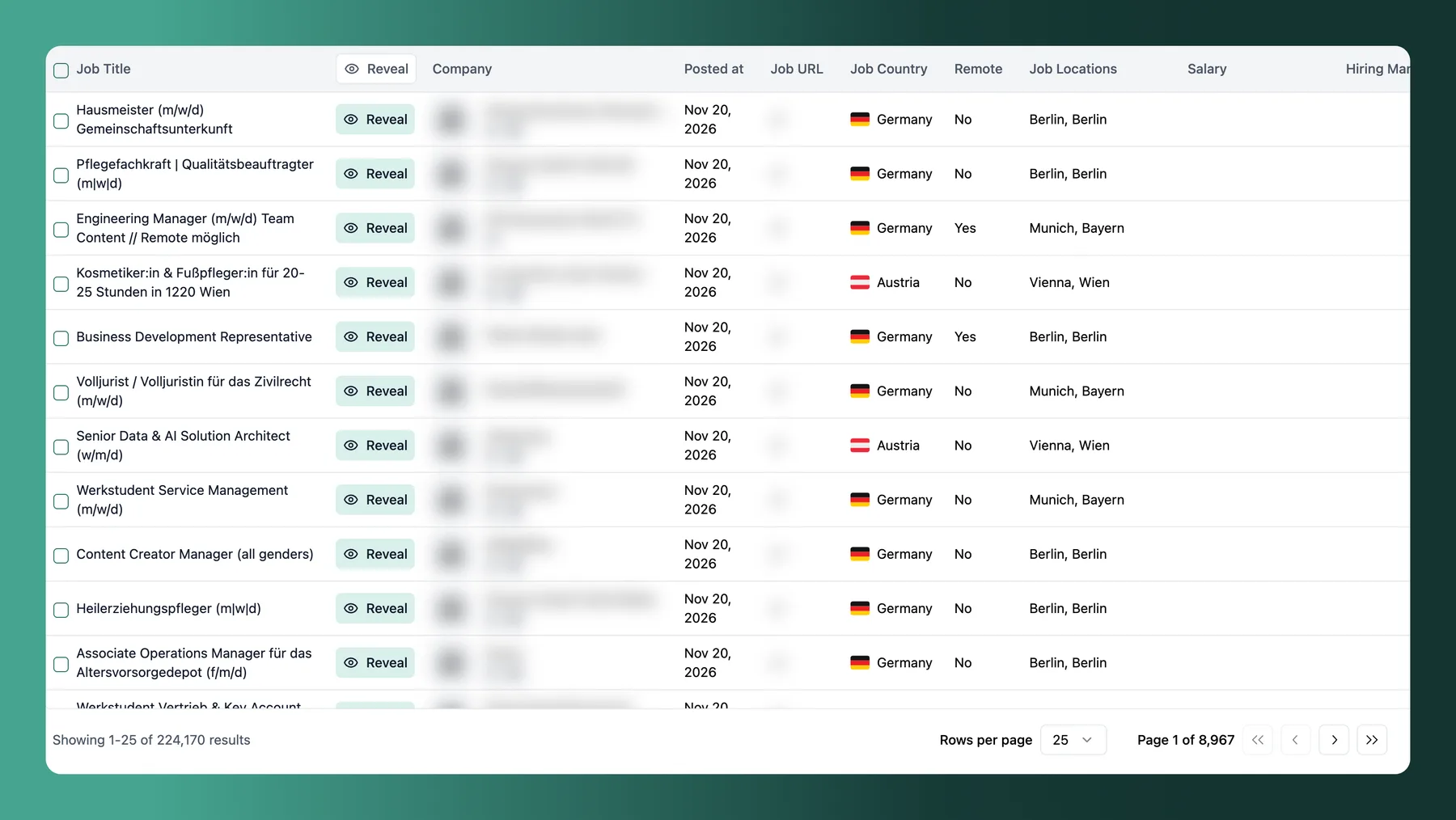
The results list only jobs located in Berlin, Munich or Vienna.
A job matches where it is, not where its company is based
Both filters look at the place the job is in. A German company's job in Vienna matches Vienna and Austria. To filter by where the company has its headquarters, use Company HQ Country (company_country_code_or in the API). The two combine, so you can ask for jobs in Germany at companies based in the United States.
A place matches every place inside it. Bavaria returns jobs in Munich and every other Bavarian town, and Europe returns jobs in every European country. Matching uses the place itself, not the words in the post. A job listed in "80539 München" matches Munich.
The same filters in the app, the API and the MCP
| App label | API parameter | MCP tool |
|---|---|---|
| Job Country | job_country_code_or, job_country_code_not | search_jobs |
| Job Location | job_location_or, job_location_not | search_jobs, with ids from find_locations |
| Company HQ Country | company_country_code_or, company_country_code_not | search_jobs |
What works and what doesn't
- A job with several locations matches when any of them is in a place you picked.
- A job only matches a city when its post names that city or a place inside it.
- Job Country and Job Location work together. Keep places with one and leave places out with the other, or use Job Location for both.
- The older text filter on the location,
job_location_pattern_or, is deprecated. Use location ids instead. - To narrow the search, add a job title or a technology to it.
FAQ
Pass the place's id in job_location_or in the TheirStack Job Search API, such as [{"id": 2867714}] for Munich. Get the id by name from GET /v0/catalog/locations or the MCP's find_locations tool. A region's id returns every job inside it, so you don't need to list its cities.
Job country is where the job is, and company HQ country is where its company has its headquarters. A job in Berlin at an American company matches Job Country Germany and Company HQ Country United States.
Yes. Pass the countries in job_country_code_or, such as ["DE", "AT", "CH"], and the region's id in job_location_not. In the app, set Job Country to those countries. Then add Job Location with is not any of and the region.
No, a city returns jobs in that city only. Towns around it are places of their own. Add them one by one to cover a metro area, or pick the region that contains them.
Add Workplace type set to remote, plus Job Country or Job Location for the country. A remote job matches when its post names a place in that country. Many remote posts limit who can apply only in their text. This guide on truly remote jobs shows how to search for that.
TheirStack: integrations with AI assistants, automations and CRMs
TheirStack works with the AI assistants, automation tools and CRMs you already use: ask Claude or ChatGPT through the MCP server, send new matches to Clay, n8n, Make or Zapier by webhook, and create leads in Salesforce or HubSpot.
AI assistants
Ask Claude, ChatGPT, Cursor or any MCP client to search jobs, companies and tech stacks through the TheirStack MCP server.
MCP server
https://api.theirstack.com/mcpAutomations
TheirStack sends every new matching company by webhook as soon as it finds it, to your automation platform or through it into your CRM and sales tools.
CRMs and sales tools
 VS Code
 Windsurf
 Cline
 OpenCode
 Gemini
 Hermes
 OpenClaw
 Clay
 n8n
 Make
 Zapier
 Databar
 Salesforce
 HubSpot
 Attio
 Pipedrive
 Apollo
 Instantly
 ContactOut
Find the jobs in the places you care about
Open the Berlin, Munich and Vienna search, then swap in your own cities, regions or countries.
Start free: 200+ free credits.
How is this guide?
Last updated on