
GuideShows how a TheirStack feature works and how to use it.
How do I find new clients for my marketing agency?
Learn how to turn job posts for SEO, paid media and content roles into new agency clients with TheirStack.
Look for companies hiring in-house for the marketing work your agency sells. Search job posts for those roles, leave out recruiting agencies, and get the companies behind them. Here's how to do it with TheirStack.
Search for in-house marketing jobs from the API or the MCP
Using the TheirStack MCP, search jobs with these filters:
- Job title contains any of seo, paid media, ppc, paid social, content marketing, performance marketing
- Company type: direct employer, not recruiting agencies
Tell me how many jobs and companies match, then list the first 10 with the company and job title.


curl -X POST "https://api.theirstack.com/v1/jobs/search" \
  -H "Authorization: Bearer <YOUR_API_KEY>" \
  -H "Content-Type: application/json" \
  -d '{
    "job_title_or": ["seo", "paid media", "ppc", "paid social", "content marketing", "performance marketing"],
    "company_type": "direct_employer",
    "posted_at_max_age_days": 90,
    "limit": 10,
    "include_total_results": true
}'This search finds 67,387 jobs at 31,643 companies. Each one is a company hiring for SEO, paid media or content work itself. Swap the titles for the services you sell, and every step stays the same.
Send the request to the Job Search endpoint, POST /v1/jobs/search. Put your roles in job_title_or and set company_type to direct_employer. Use limit and page to move through the results (pagination).
In Claude, ChatGPT, Cursor or any other MCP client, the TheirStack MCP runs the same search with its search_jobs tool. Ask it in plain words, as in the prompt above.
Turn a job post into an outbound message
Each job comes back with its full description, and it tells you how to open the conversation: the channels, tools and targets the company is hiring someone to own. Write to them about that work, while the role is still open. Ask your agent to draft the first message:
Using the TheirStack MCP, search jobs with these filters:
- Job title contains any of seo, paid media, ppc, paid social, content marketing, performance marketing
- Company type: direct employer, not recruiting agencies
For the first 5 jobs, read the job description and write a short first email to the company for each. Open with the role they're hiring for and the work it names, offer to cover that work while the role is open, and end with one question. Under 90 words, no buzzwords.
A home textiles brand hiring an Amazon PPC lead, for example, lists Sponsored Products, Sponsored Brands and Sponsored Display, ACoS and TACoS targets, and a large US catalogue. A first message could read:
Subject: Your Amazon PPC lead role

Hi [first name], I saw you're hiring a lead to run Sponsored Products,
Brands and Display across your US catalogue, against ACoS and TACoS targets.
We run Amazon ads for D2C brands. We could take on the account until your
new lead starts, then hand it over with the campaigns and reporting in place.
Would that help while you hire?
From the API, the same text is in each job's description field.
To run the search again later, save it with the MCP's create_saved_search tool or the saved searches endpoint, POST /v0/saved_searches.
Find the companies hiring for your services in the app
- Job titlecontains any of seo, paid media, ppc, paid social, content marketing, performance marketing
- Company typeDirect employer
67,387 jobs · Nov 23, 2026
| Company | Job title | Country | Posted |
|---|---|---|---|
| Vcare Consultancy | PPC Executive / Production Planning - Umbergaon | India | Nov 23, 2026 |
| Beta Byte Technologies | SEO Executive | India | Nov 23, 2026 |
| Oncreation | Performance Marketing | Egypt | Nov 23, 2026 |
| Ridhi Block Print | Amazon Growth & Analytics Lead (Amazon PPC) | India | Nov 23, 2026 |
| D2B | Senior Performance Marketing Specialist - 679 | Philippines | Nov 23, 2026 |
Add the roles your agency could cover
- Open a new job search and click Add filter.
- Add Job title, choose "contains any of" and type one role per line.
- Use the words companies put in their job titles, such as seo, paid media, ppc, paid social, content marketing, performance marketing.
- Keep only the services you sell. A PPC agency can drop the content roles.

The filter bar shows the Job title filter with the marketing roles your agency could take over.
Leave out recruiting agencies
- Add Company type and pick Direct employer.
- Recruiting agencies post jobs for their clients. This filter keeps the company that does the hiring.
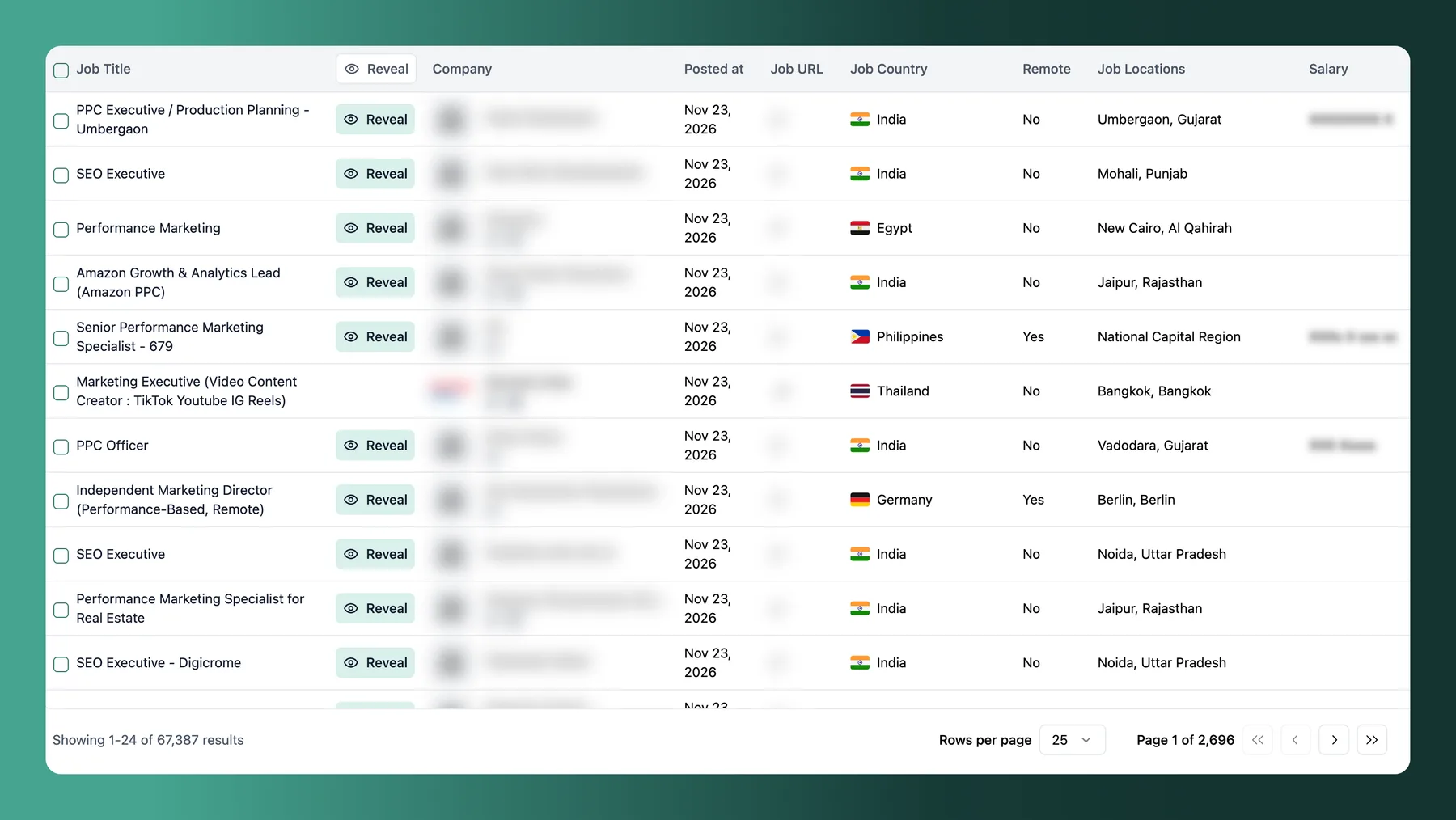
The results list each in-house marketing job, with the company, location and date posted.
Read a few jobs before you reveal
- Results start in preview mode, with company names blurred.
- Click a job title to read the posting. Check that the work it describes is work you do.
- If the jobs fit, reveal the companies or export them. If not, change the job titles.
Revealing and exporting use credits. Each option shows its cost before you confirm.
Save the search and turn on an email alert
- Click Save and give the search a name you'll recognize.
- On the Home page, open the three dots menu next to it.
- Choose "Enable daily alert" or "Enable weekly alert".
- Daily alerts arrive every morning. Weekly alerts arrive every Monday morning.
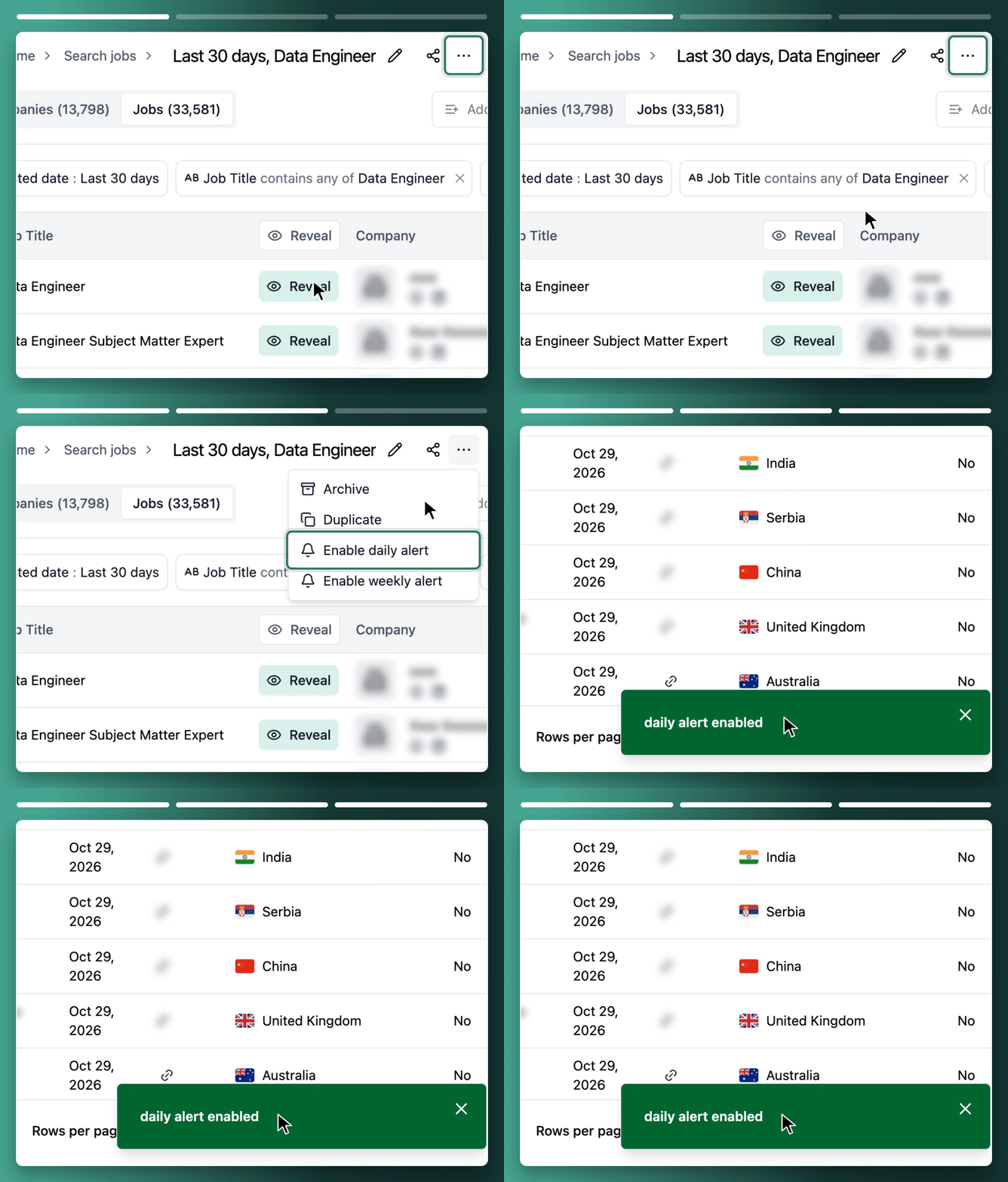
The alert is turned on from the three dots menu next to the saved search on the Home page.
Send each new company to your CRM with a webhook
A webhook sends new matches to your own system as they're found. That can be a CRM, Slack, n8n, Make, Zapier or a Google Sheet.
- Save the search, click Webhooks in the top right corner, then Create Webhook (setup steps).
- Turn on Trigger once per company. A company with five matching jobs then sends one event.
- Each event is a
job.newpayload with the job and the company that posted it. - From the API or the MCP, create the same webhook with
POST /v0/webhooksor thecreate_webhooktool. - Set a daily event limit to cap how many events it sends.
- A failed delivery is retried every hour for 48 hours.
The same filters in the API, the MCP and the app
| App label | API parameter | MCP tool |
|---|---|---|
| Job title (contains any of) | job_title_or | search_jobs |
| Company type (Direct employer) | company_type: "direct_employer" | search_jobs |
| Save search | POST /v0/saved_searches | create_saved_search |
| Webhook | POST /v0/webhooks | create_webhook |
What the search finds, and what it doesn't
- A job title matches when it has all the words of one of your entries, in any order. "content marketing" also finds "Marketing (Digital & Content)".
- Any one entry is enough. Add each way companies name the role, such as "ppc" and "paid search".
- Company type is our own classification, and it's best effort. A few agencies can still slip through as direct employers.
- Other marketing agencies hiring SEO or ads staff are direct employers too. To drop them, exclude companies whose Company description mentions agency.
- Titles match in one language. Add the role names for each market you sell in.
- A company that hasn't posted a job for the work won't show up, even if it needs help.
- Email alerts exist only in the app. From the API or the MCP, new matches arrive through a webhook on the saved search.
FAQ
Search for companies hiring in-house for the work you sell, such as SEO, paid media or content roles. A company posting that job needs the work done now. In TheirStack, run a job search with those titles in Job title and Company type set to Direct employer.
Watch who opens jobs for that work. A company hiring a PPC manager or an SEO specialist has work it can't cover yet. An agency can take on that work while the role is still open.
An open in-house job for the service you sell is the clearest signal you can search. Save the job search in TheirStack and choose "Enable weekly alert". Every Monday morning you get the new companies by email.
Yes. Send the titles in job_title_or with company_type set to direct_employer to POST /v1/jobs/search. Or ask any MCP client connected to TheirStack, which uses the search_jobs tool.
TheirStack: integrations with AI assistants, automations and CRMs
TheirStack works with the AI assistants, automation tools and CRMs you already use: ask Claude or ChatGPT through the MCP server, send new matches to Clay, n8n, Make or Zapier by webhook, and create leads in Salesforce or HubSpot.
AI assistants
Ask Claude, ChatGPT, Cursor or any MCP client to search jobs, companies and tech stacks through the TheirStack MCP server.
MCP server
https://api.theirstack.com/mcpAutomations
TheirStack sends every new matching company by webhook as soon as it finds it, to your automation platform or through it into your CRM and sales tools.
CRMs and sales tools
 VS Code
 Windsurf
 Cline
 OpenCode
 Gemini
 Hermes
 OpenClaw
 Clay
 n8n
 Make
 Zapier
 Databar
 Salesforce
 HubSpot
 Attio
 Pipedrive
 Apollo
 Instantly
 ContactOut
See which companies are hiring for the work you sell
Open the search for in-house SEO, paid media and content roles, then swap in the services your agency offers.
Start free: 200+ free credits.
How is this guide?
Last updated on