
Monitoring open jobs from current and past customers
How to know which companies from a given list are actively hiring. This can help SaaS companies detect new needs of their current customers for potential upsells, and also recruitment companies to find old customers that are hiring again and could be easier to sell to than if they were completely new customers.
The problem
Are you a recruiting company?
If so, you know it is a tough industry. Every month, revenue starts at zero dollars and you have to build up your way from there. Winning new customers is hard and you hear "no" many times. However, reconnecting with former clients can often be more straightforward and successful. They already know your work and trust you. TheirStack can help you make these reconnections easier by informing you when these past clients are hiring again.
Are you a SaaS company?
In this case, long-term, net retention revenue is key to building a long-standing, healthy, compounding business. If you have NRR > 100% it means that over time you're making more money from the same customers.
The way to do this is to figure out new problems your customers are having, and either build new products to solve them or help your customers solve them with your software in ways they weren't aware of.
By digging into their job posts, one can infer the problems a company is running into.
Monitoring jobs manually
To monitor that for all your past customers, you'd have to
check all the job boards and all the companies' career pages
and do it regularly, at least weekly. Otherwise, jobs may already be filled, you could have lost them to a competitor or they could have solved their problem by the time you contact the company.
The bigger your customer list is, the longer this process would take. And you should check out all the jobs posted, until the last page.
Doing this manually is tedious and time-consuming.
Yet it's important and has to be done, or you risk leaving lots of money on the table on the table if you don't do it.
Monitoring which companies are hiring
With TheirStack you can filter our worldwide jobs database by the company names and domains of your current or former clients, letting you:
- See the results visually on our UI
- Export the data in CSV and Excel
- Get alerts sent daily or weekly to your email with all the jobs and companies found
- Make the same searches via API
- Send new opportunities to Slack, Hubspot, Salesforce and many more with our Make and Zapier integrations.
TheirStack gives you 2 options or seeing the information
-
Doing a job search: by searching our jobs database directly, you'll see all the details of each job, including the specific sections of the job description that are relevant to you (if you're filtering by technologies or keywords in the description). Check our Job Search guide to learn more about this, and some of the most important filters you can apply. To do this, go to the Jobs section, clicking on Jobs in the navbar
-
Doing a company search: we'll group all the jobs from each company and just return a list of companies, with a small section where you can see some of the jobs found from each company.
In the rest of this guide, we'll show you how to do the second option. All the job filters are available in both views.
Do a company search
To do so, follow these steps
- Go to app.theirstack.com and open a new company search
- Remove the existing filters, by clicking on the X next to each filter.
- Add a Company name filter, and then paste the names of all your past customers, one per line.
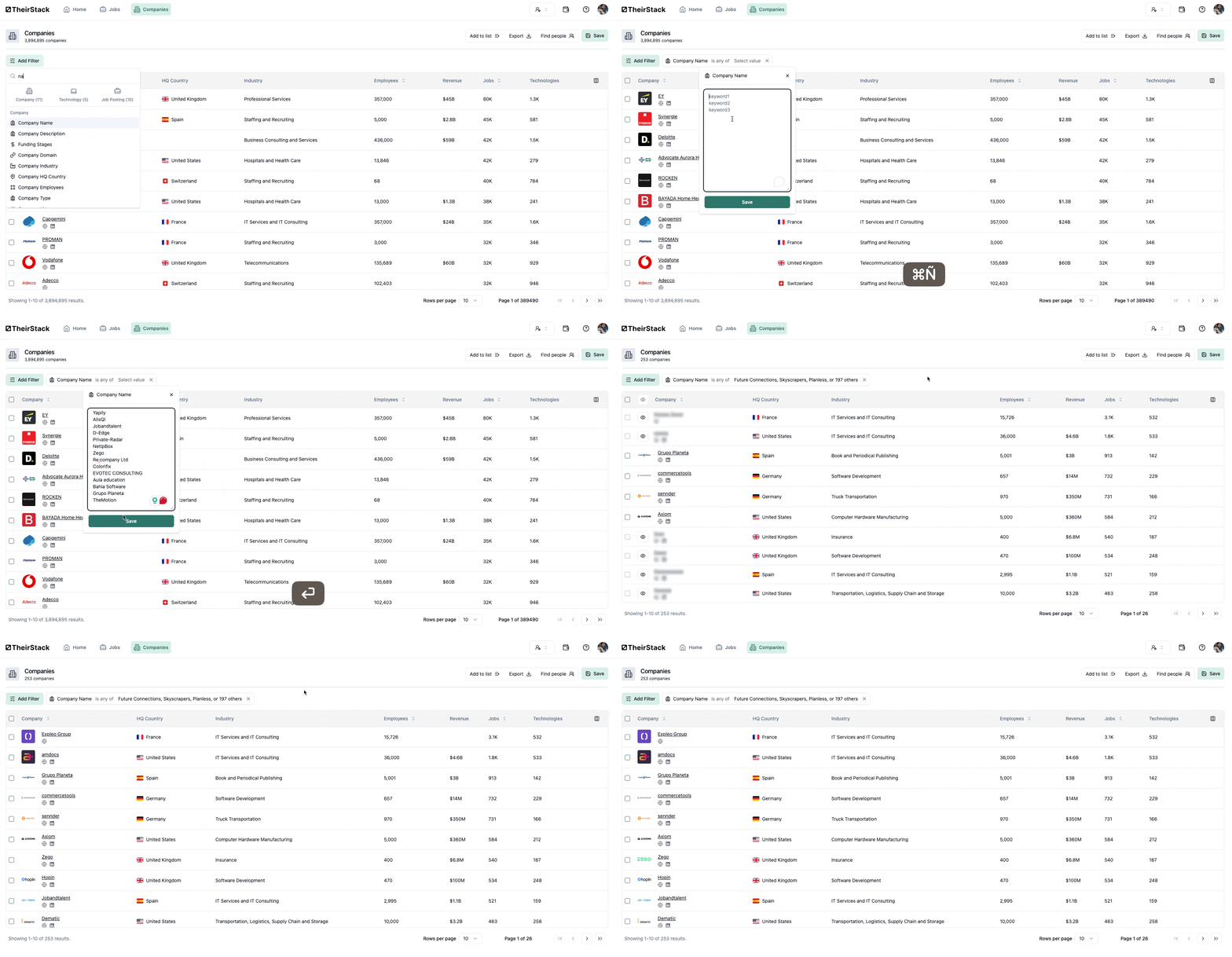
- Add a Job Posting -> Date Posted filter and set it to 30, for example, to see which of the companies have posted jobs in the last 30 days.
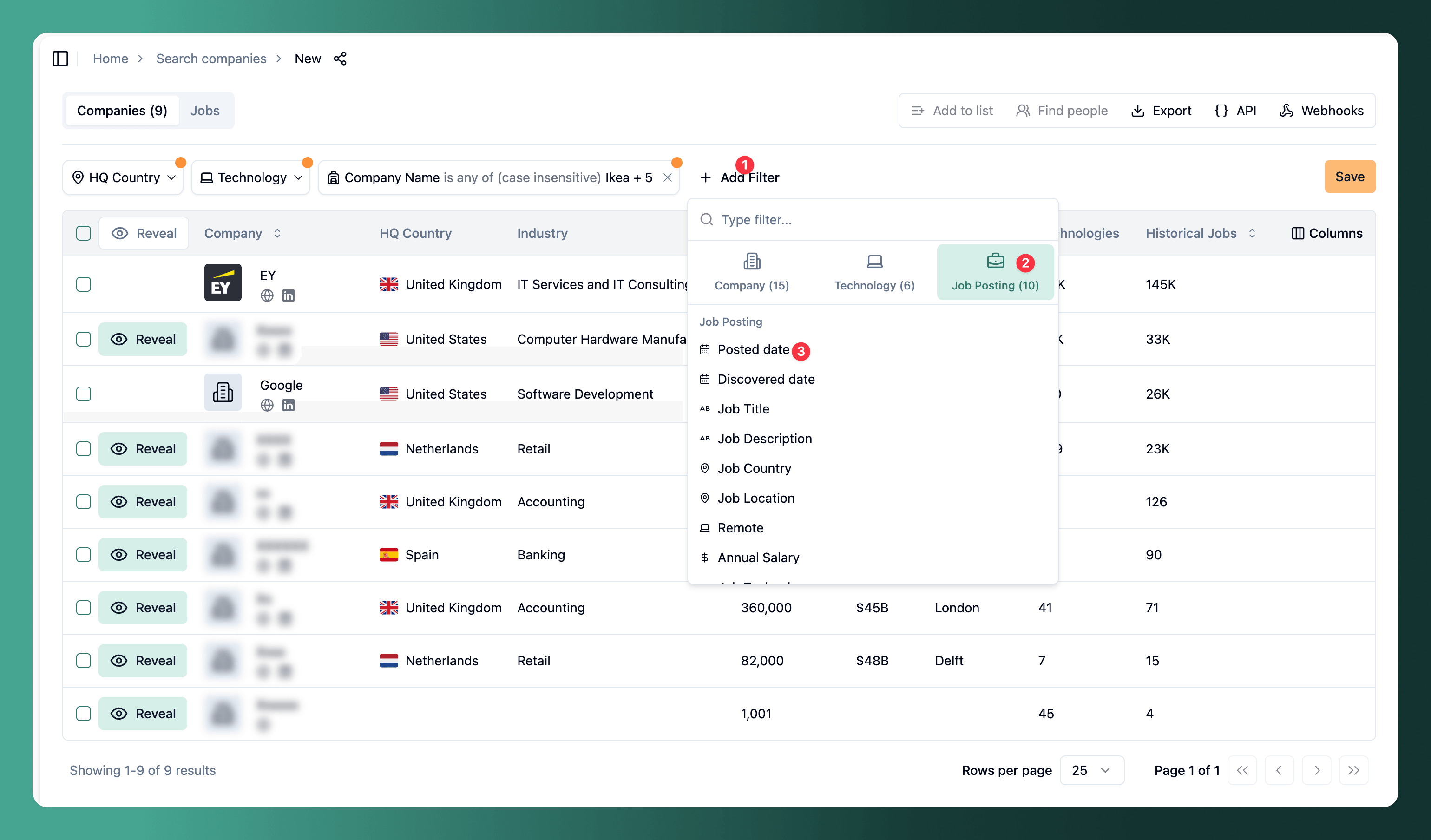
As you see, a new Jobs column will be shown, where you can see the jobs each company has posted.
-
To get as many matches as possible, add a Company domain filter and paste the domains or URLs of your past customer. Sometimes the name of the company in our database doesn't match exactly the name that you pass, but the domain does. As you see, if you do this the number of companies for which we found jobs almost tripled (going from 68 to 176, out of 200 companies)
-
Save the search by clicking on the Save button in the top right corner of the screen and give a name to it by clicking on its name and setting a new one.
-
(Optional) If you specialize in tech jobs, you can also add a Job title filter and paste the jobs from this guide. You'll then only see the companies hiring tech profiles.
How is this guide?
Last updated on
How Marketing Teams Can Use Hiring Data to Improve Targeting and Find Better Leads
Discover how to leverage job posting data as a marketing signal — identify companies with active budget, tailor campaigns by role and tech stack, and build higher-intent lead lists.
Integration guide for sales intelligence software
This guide provides detailed instructions on integrating TheirStack into your product, including all possible connectors, marketing content and best practices.