
GuideShows how a TheirStack feature works and how to use it.
How to find companies by keywords in their job descriptions
Find companies by what they write in their job posts.
Companies describe the tools and projects they're hiring for in their job posts. Search those descriptions for your keywords and get the companies behind them. Here's how to do it with TheirStack.
Search job descriptions from the API or the MCP
The example finds companies whose finance or operations teams want to move off manual spreadsheets. Swap in your own phrases and job titles, and every step stays the same.
Use the Company Search endpoint, POST /v1/companies/search. Job filters go inside job_filters, which needs a date filter such as posted_at_max_age_days. Put the phrases you want in job_description_contains_or and the ones to leave out in job_description_contains_not.
In Claude, ChatGPT, Cursor or any other MCP client, the TheirStack MCP runs the same search with its search_companies tool.
Using the TheirStack MCP, find companies whose open finance or operations jobs mention moving off manual spreadsheets, with these filters:
- Jobs posted in the last 30 days that are still open
- Job description contains any of "manual spreadsheets", "replace spreadsheets", "move off spreadsheets", "move away from spreadsheets", "spreadsheet based processes"
- Job description does not contain "our client" or "on behalf of our client"
- Job title contains any of finance, FP&A, controller, accounting, operations
Tell me how many companies match, then list the first 10 with how many matching jobs each has.


curl -X POST "https://api.theirstack.com/v1/companies/search" \
  -H "Authorization: Bearer <YOUR_API_KEY>" \
  -H "Content-Type: application/json" \
  -d '{
    "job_filters": {
      "posted_at_max_age_days": 30,
      "is_closed": false,
      "job_description_contains_or": ["manual spreadsheets", "replace spreadsheets", "move off spreadsheets", "move away from spreadsheets", "spreadsheet based processes"],
      "job_description_contains_not": ["our client", "on behalf of our client"],
      "job_title_or": ["finance", "FP&A", "controller", "accounting", "operations"]
    },
    "limit": 10,
    "include_total_results": true
}'On 17 Nov 2026, this search found 42 companies. Each has an open job matching a listed phrase and a selected job title.
To read the sentence that matched, send the same job filters to the Job Search endpoint, POST /v1/jobs/search. Each job comes back with matching_phrases, the sentences from its description that contain your phrases. For example: "matching_phrases": ["Replace manual spreadsheets and slow planning cycles with faster, more accurate decisions"].
To run it again later, save it with the MCP's create_saved_search tool or the saved searches endpoint.
Build the search in the app
- Job descriptioncontains any of manual spreadsheets, replace spreadsheets, move off spreadsheets, move away from spreadsheets, spreadsheet based processes
- Job descriptiondoes not contain any of our client, on behalf of our client
- Job titlecontains any of finance, FP&A, controller, accounting, operations
- Job posted datelast 30 days
- Job Closedis closed → No
42 companies · Nov 17, 2026
| Company | Country | Industry | Employees | Matching jobs |
|---|---|---|---|---|
| Hidden company name | United Kingdom | Software Development | 165 | 3 |
| Hidden company name | United States | Education Administration Programs | 730 | 2 |
| Hidden company name | Denmark | IT Services and IT Consulting | 648 | 2 |
| Hidden company name | United States | Food and Beverage Services | 234 | 2 |
| Hidden company name | United States | Telecommunications | 148 | 2 |
Open a company search and add your buyers' phrases
- Open a new company search and click Add filter.
- Add Job description, choose "contains any of" and type 5 to 10 phrases.
- Pick what a hiring manager writes: the regulation, the standard, the task your product does, the tool it replaces.
- "manual spreadsheets" and "replace spreadsheets" show up in job posts. "Financial planning platform" rarely does.
No phrases yet? The keyword research skill reads your product's website and returns phrases that match real job posts.
Add the job titles that own the problem
- Add Job title, choose "contains any of" and type finance, FP&A, controller, accounting and operations.
- Add Job posted date and pick the last 30 days.
- Add Job Closed and set it to No, so every match is a job that's still open.
Leave recruiting agencies out
- Add Job description again, choose "does not contain any of" and type "our client" and "on behalf of our client".
- Agencies use these phrases when they post jobs for their clients. Leaving them out keeps the company that does the hiring.
Is your topic in our buying intents directory? Then you can add Buying intent topic instead of typing phrases.
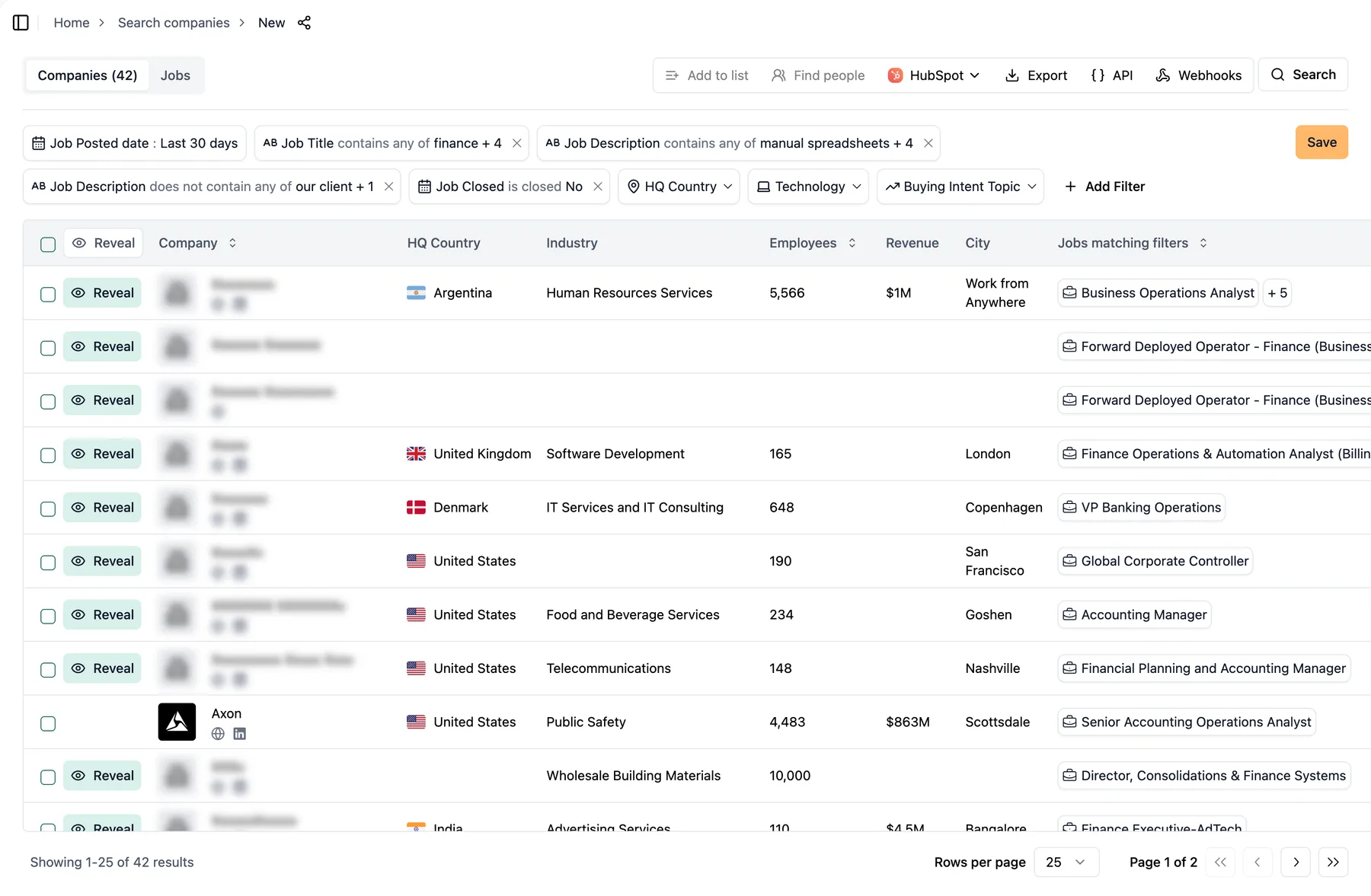
The search lists each company once, with its number of matching jobs in the Jobs matching filters column.
Read a few matching jobs before you reveal
- Results start in preview, with company names blurred.
- Open the Jobs tab. The Matching Phrases column shows the sentence from each job that matched, with your phrase highlighted.
- If they read like your buyers, reveal or export. If not, change the phrases or job titles.
A good match names the work you help with. MobiKwik's Senior Manager, Finance Operations will move reporting from manual spreadsheets to automated pipelines. At Mainstream Fiber Networks, the Financial Planning and Accounting Manager will reduce manual spreadsheets in NetSuite reporting.
Save the search and turn on an email alert
- Save the search under a name your team will recognize.
- On the Home page, open the three dots menu next to it.
- Choose "Enable daily alert" or "Enable weekly alert".
- Daily alerts arrive every morning. Weekly alerts arrive every Monday morning.
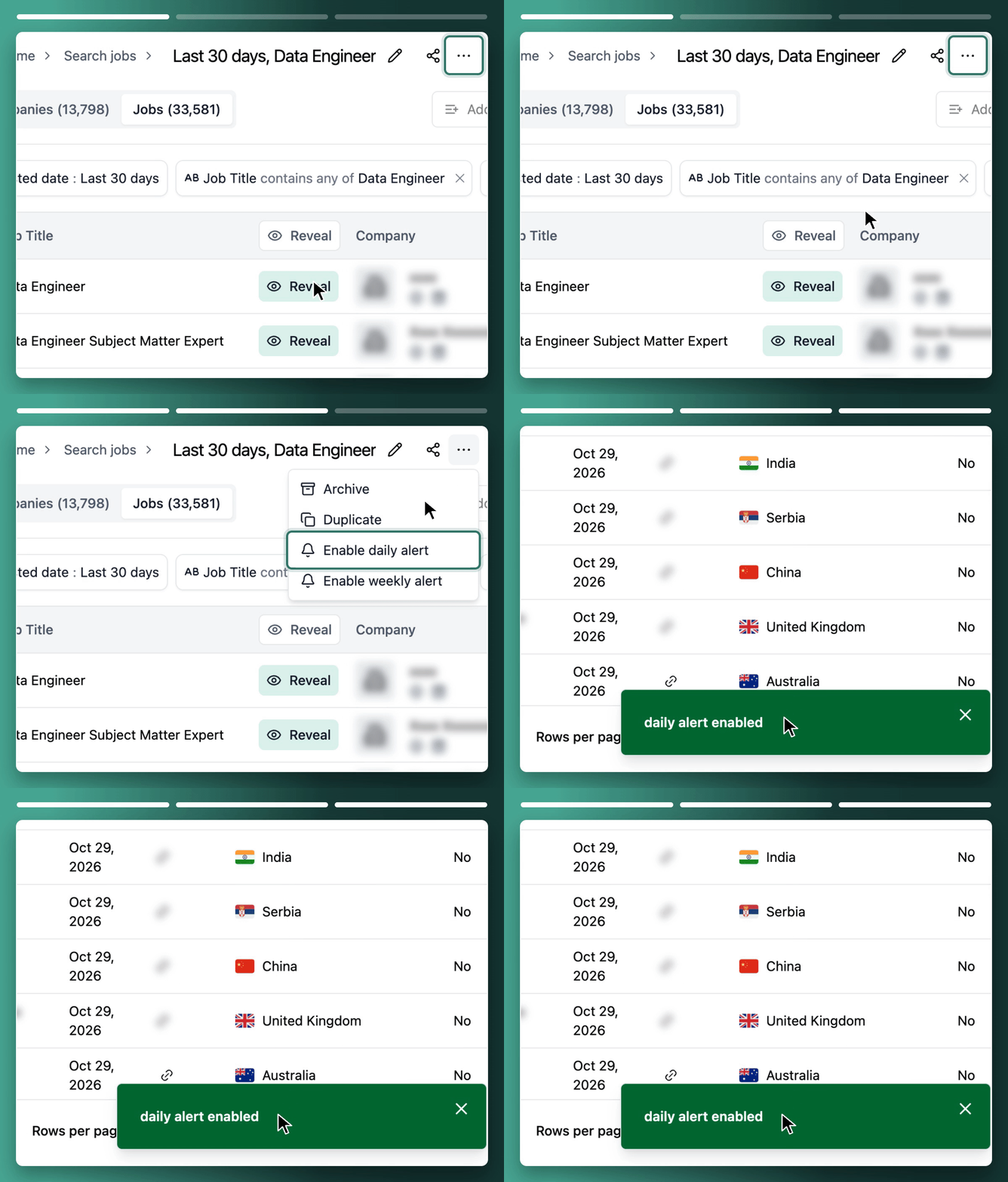
The alert is turned on from the three dots menu next to the saved search on the Home page.
Already have some of these companies in your CRM? Add them to a company list and set Company list to "is not in". The alert then only brings new ones.
The same filters in the API, the MCP and the app
| App label | API parameter | MCP tool |
|---|---|---|
| Job description (contains any of) | job_filters.job_description_contains_or | search_companies |
| Job description (does not contain any of) | job_filters.job_description_contains_not | search_companies |
| Job title (contains any of) | job_filters.job_title_or | search_companies |
| Job posted date | job_filters.posted_at_max_age_days | search_companies |
| Job Closed | job_filters.is_closed | search_companies |
| Save search | POST /v0/saved_searches | create_saved_search |
What the job description filter matches, and what it doesn't
- It matches whole words, ignoring case and accents. "manual spreadsheet" and "manual spreadsheets" are separate entries.
- A phrase matches when its words sit next to each other, in the same order.
- A hyphen counts as a space. "manual spreadsheet" also finds "manual spreadsheet-based reporting".
- Any one phrase is enough. You can't require two phrases in the same job, so put the second idea in Job title.
- An excluded phrase drops the whole job, even when a phrase you want also appears.
- Some software vendors describe their own product with your phrases, such as "we replace manual spreadsheets". Skip them when you read the results.
- Phrases match in one language. Add the wording for each market you sell in.
- A company with the problem but no open job for it won't show up.
- Email alerts exist only in the app. From the API or the MCP, new matches arrive through a webhook on the saved search.
FAQ
Run a TheirStack company search with your buyers' phrases in Job description. Add the role that owns the problem in Job title. Each company comes back once, with how many of its open jobs matched.
Add a second Job description filter with "does not contain any of" and type "our client" and "on behalf of our client". Recruiting agencies use these phrases when they post jobs for their clients.
Save the company search, then choose "Enable weekly alert" from its three dots menu on the Home page. Every Monday you get the new matches by email.
Yes. Send the phrases in job_description_contains_or inside job_filters to POST /v1/companies/search, or ask any MCP client connected to TheirStack. Both can save the search and add a webhook for new matches.
TheirStack: integrations with AI assistants, automations and CRMs
TheirStack works with the AI assistants, automation tools and CRMs you already use: ask Claude or ChatGPT through the MCP server, send new matches to Clay, n8n, Make or Zapier by webhook, and create leads in Salesforce or HubSpot.
AI assistants
Ask Claude, ChatGPT, Cursor or any MCP client to search jobs, companies and tech stacks through the TheirStack MCP server.
MCP server
https://api.theirstack.com/mcpAutomations
TheirStack sends every new matching company by webhook as soon as it finds it, to your automation platform or through it into your CRM and sales tools.
CRMs and sales tools
 VS Code
 Windsurf
 Cline
 OpenCode
 Gemini
 Hermes
 OpenClaw
 Clay
 n8n
 Make
 Zapier
 Databar
 Salesforce
 HubSpot
 Attio
 Pipedrive
 Apollo
 Instantly
 ContactOut
Find the companies whose job ads name your buyer's problem
Search job descriptions for your buyers' phrases and get new matching companies by email, webhook or in the app.
Start free: 200+ free credits.
How is this guide?
Last updated on
How to do job description keyword research
Find the phrases your buyers write in job posts, and test each one on live jobs before you search for companies.
Identifying companies with problems your software solves
Learn how to use job postings to discover companies actively hiring for tasks your software automates. Find your ideal customers by analyzing [[total_jobs]] job descriptions for specific pain points and manual processes.