
How to monitor job postings automatically
Learn how to automatically monitor job postings and get real-time alerts when companies post new jobs. Set up automated job tracking with webhooks to Slack, CRM, or any system.
What is automatic job monitoring?
Automatic job monitoring means getting notified the moment companies post new jobs that match your criteria—without manually checking job boards every day.
Instead of refreshing LinkedIn, Indeed, or company career pages, you set up alerts once and receive notifications in real-time via Slack, email, your CRM, or any other system.
Timing matters. Whether you're in sales or recruiting, being first to know about a new job posting gives you a competitive advantage.
You can also monitor the other side of the lifecycle: when jobs are removed. See How to track closed job postings to get alerts when roles are filled or cancelled.
Why monitor job postings automatically?
Sales prospecting
When a company posts a job, it signals three things: budget, need, and timing.
A company hiring a "Data Engineer with Snowflake experience" has budget for data infrastructure. If you sell data tools, this is a warm lead. The job posting tells you exactly what they need before they even know you exist.
Recruiting agencies
Track companies actively hiring in your specialty. When you see a new opening, you can reach out to place candidates before competitors know the role exists.
IT services and consulting
Job postings reveal development needs. A company hiring multiple React developers likely has a backlog of frontend work—and may consider outsourcing to move faster.
Competitive intelligence
Monitor competitors' hiring patterns to understand their strategy. Are they scaling sales? Building a new product line? Expanding to new markets? Job postings reveal it all. When those postings disappear, closed jobs signal the next move — a team quietly wound down, a product direction abandoned, or a key hire made.
How to set up automatic job monitoring
TheirStack's webhooks let you get real-time notifications when new jobs match your criteria. Here's how to set it up:
Create a job search with your criteria
Go to Job Search and add filters for the jobs you want to monitor:
- Job title: e.g., "Data Engineer", "Sales Manager", "DevOps"
- Location: Country, state, or city
- Company filters: Industry, size, funding stage, technologies used
- Job description keywords: Specific skills or tools mentioned
Save the search
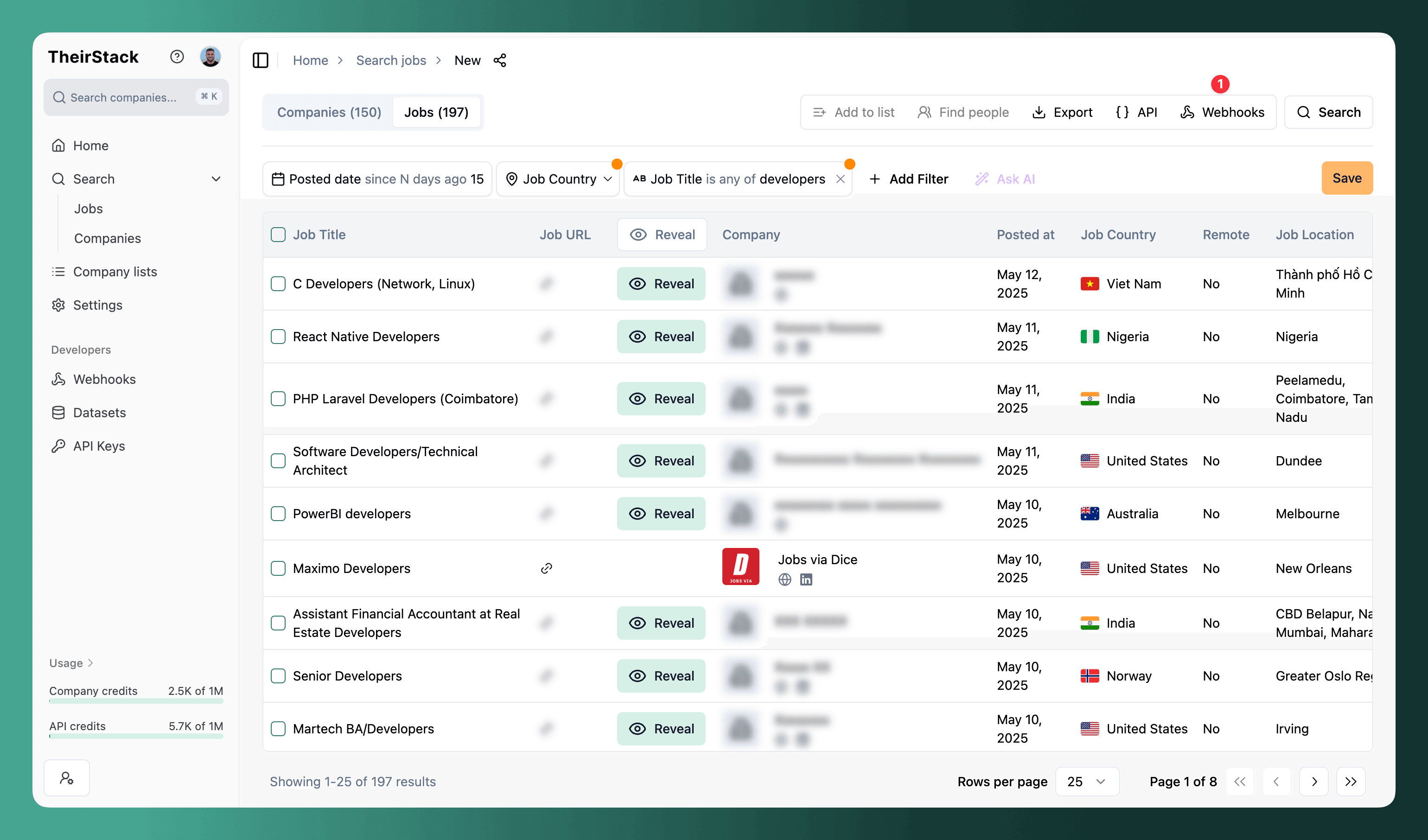
Click the Save button to save your search. The search must be saved before you can create a webhook.
Create a webhook from the saved search
Click the Webhooks button in the top right corner of your saved search.
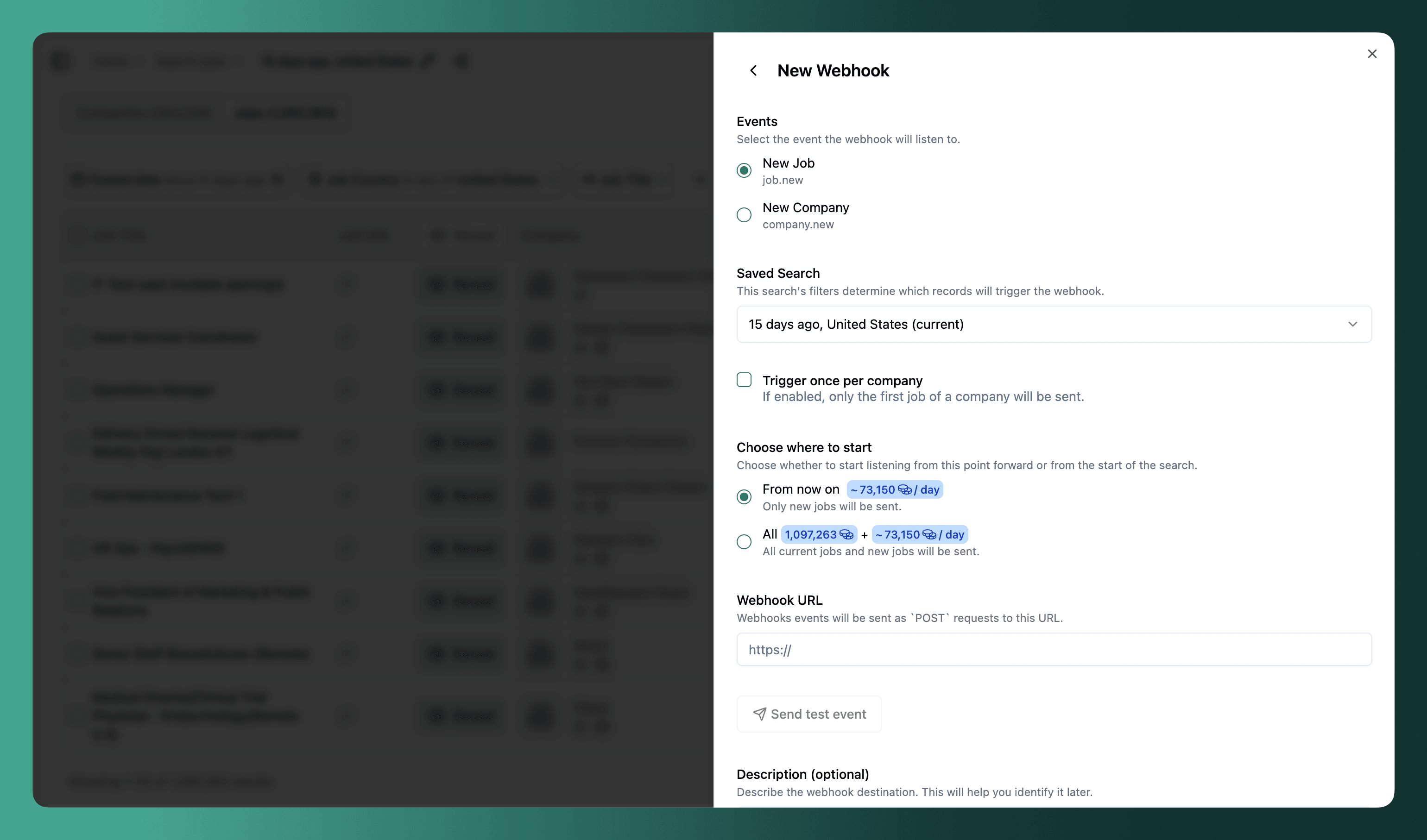
Configure webhook settings
-
Trigger once per company: Enable this for sales workflows. You'll get one notification per company, not one per job. Perfect for outreach where you only need to know a company is hiring, not every individual role.
-
Choose where to start:
- From now on: Only new jobs posted after you create the webhook
- All time: Include existing jobs that already match your search, plus all future jobs
-
Webhook URL: The endpoint where you want to receive notifications (your automation tool, CRM, or custom system)
Connect to your destination
Paste the webhook URL from your destination system. Common use cases:
- Notify your team — Send a Slack message or email whenever a matching job is posted
- Create deals automatically — Push to Salesforce or HubSpot to create a lead or deal in your CRM
- Automate outreach — Send to Lemlist or Apollo to kick off an email campaign automatically
- Custom workflows — Use Make, Zapier, or N8N to connect to any system that accepts webhooks
Click "Send test event" to verify your connection works.
Wait for new jobs
Once configured, you'll receive notifications in real-time as new jobs match your criteria.
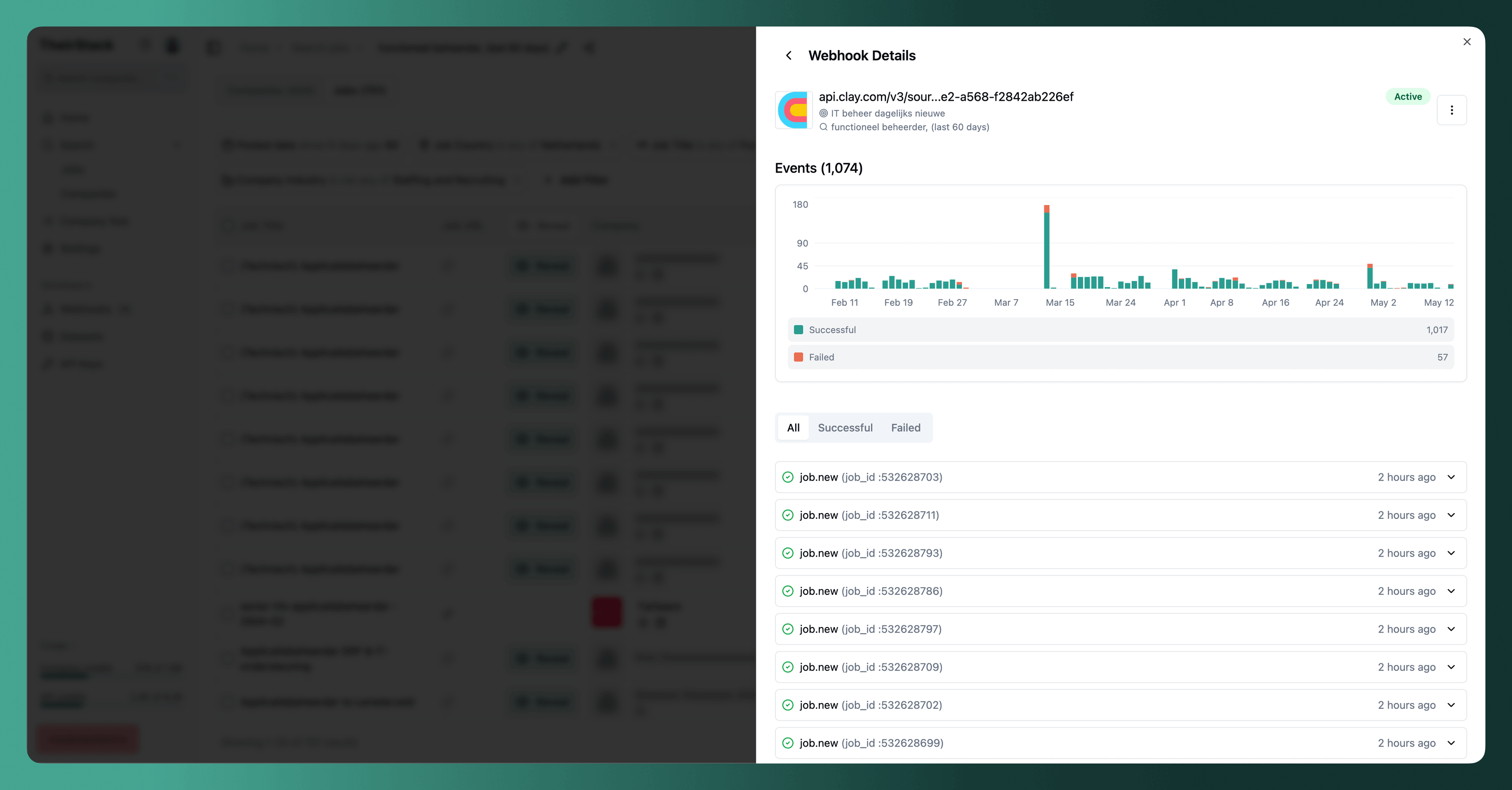
For a detailed walkthrough, see How to set up a webhook.
Where to send job alerts
Slack
Send a message to your team whenever a matching job is posted. See our guide: How to send jobs to Slack.
CRM (Salesforce, HubSpot)
Automatically create a deal or lead when companies post jobs matching your ICP. Use Make or Zapier to connect TheirStack webhooks to your CRM.
Sales engagement (Lemlist, Apollo)
Push matching companies to Lemlist or Apollo to automatically kick off an email campaign — so outreach starts the moment a company shows a hiring signal.
Route webhook events through automation tools to send formatted email alerts to your team.
Custom systems
Build your own integration using the webhook payload. See Webhook event schemas for the data format.
Alternative: Email alerts
For simpler use cases, TheirStack offers built-in email alerts without setting up webhooks:
- Daily alerts: Fresh matches every morning
- Weekly alerts: Summary of new jobs every Monday
See Email Alerts to set this up.
Use case examples
Sales: Monitor companies hiring for roles that use your product
If you sell a testing automation tool, monitor jobs mentioning "manual testing", "QA engineer", or "test automation". These companies have testing needs and budget.
Recruiting: Track jobs in specific industries and locations
Set up alerts for "Software Engineer" jobs in "Berlin" at "Series A-C" startups. Be the first to know when your target companies are hiring.
Research: Monitor technology adoption
Track jobs mentioning specific technologies like "Kubernetes", "Snowflake", or "React Native" to understand market trends and identify companies adopting new tools.
Data coverage
TheirStack monitors job postings from:
- 362k job boards, ATS platforms, and company career pages
- 195 countries worldwide
- 251M active job listings tracked
New jobs are discovered and indexed continuously, so your webhooks fire as soon as we detect new postings.
Further reading
Webhooks
How to set up a webhook
How to send a slack message for every new job found
Email Alerts
How to track closed job postings
How is this guide?
Last updated on
How to Monitor Competitor Hiring
Learn how to track competitor job postings to uncover their strategy, identify expansion plans, and spot market opportunities before anyone else.
Monitor tech stack changes on a target account list
Get real-time alerts when companies on your target account list start hiring for a specific technology — combine TheirStack's technographic data with a target account list and a webhook to catch tech stack adoption signals on the accounts that matter to you.