
How to Enrich a Company List with Technographic Data
Step-by-step guide to enriching your company lists with technographic data on TheirStack — from manual CSV uploads to automated API integration for CRM and sales workflows.
Got a list of companies you'd like to enrich with technographic data? You can handle this both manually and programmatically.
If technology usage is a key factor in defining your Ideal Customer Profile, our enrichment feature helps you add technographic data to your company lists and build effective lead scoring models. Common reasons to enrich a company list:
- Account enrichment — Verify whether a company uses a specific technology to enrich accounts, segment leads, and personalize outreach.
- Lead scoring — Add technology signals to your scoring model so reps prioritize accounts that already use complementary or competitor tools.
- Hiring-based segmentation — Filter companies by the roles they're hiring for to detect buying intent before it shows up anywhere else.
Enrich company list manually
You can access the enrichment page from the Enrich item in the sidebar, or from the Enrich company list card on the Home page.
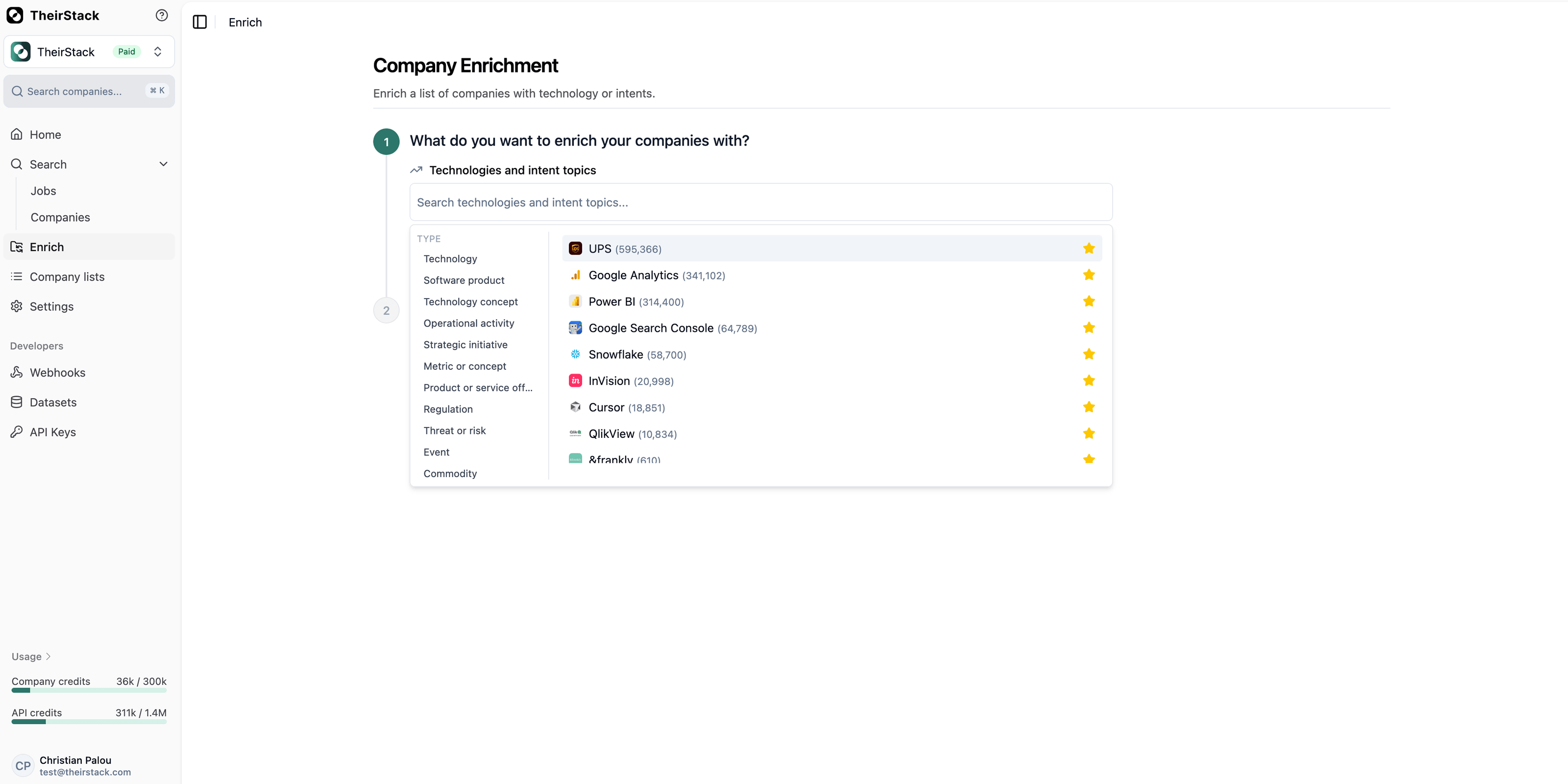
The enrichment wizard guides you through a step-by-step flow. First you choose what to enrich with, then you provide your company list — either via CSV upload or manual entry.
Select technologies
Choose one or more technologies from the catalog. These are the tech stacks that will be checked against each company in your list.
You can search by name, and your favourite technologies appear first for quick access.
Choose your input method
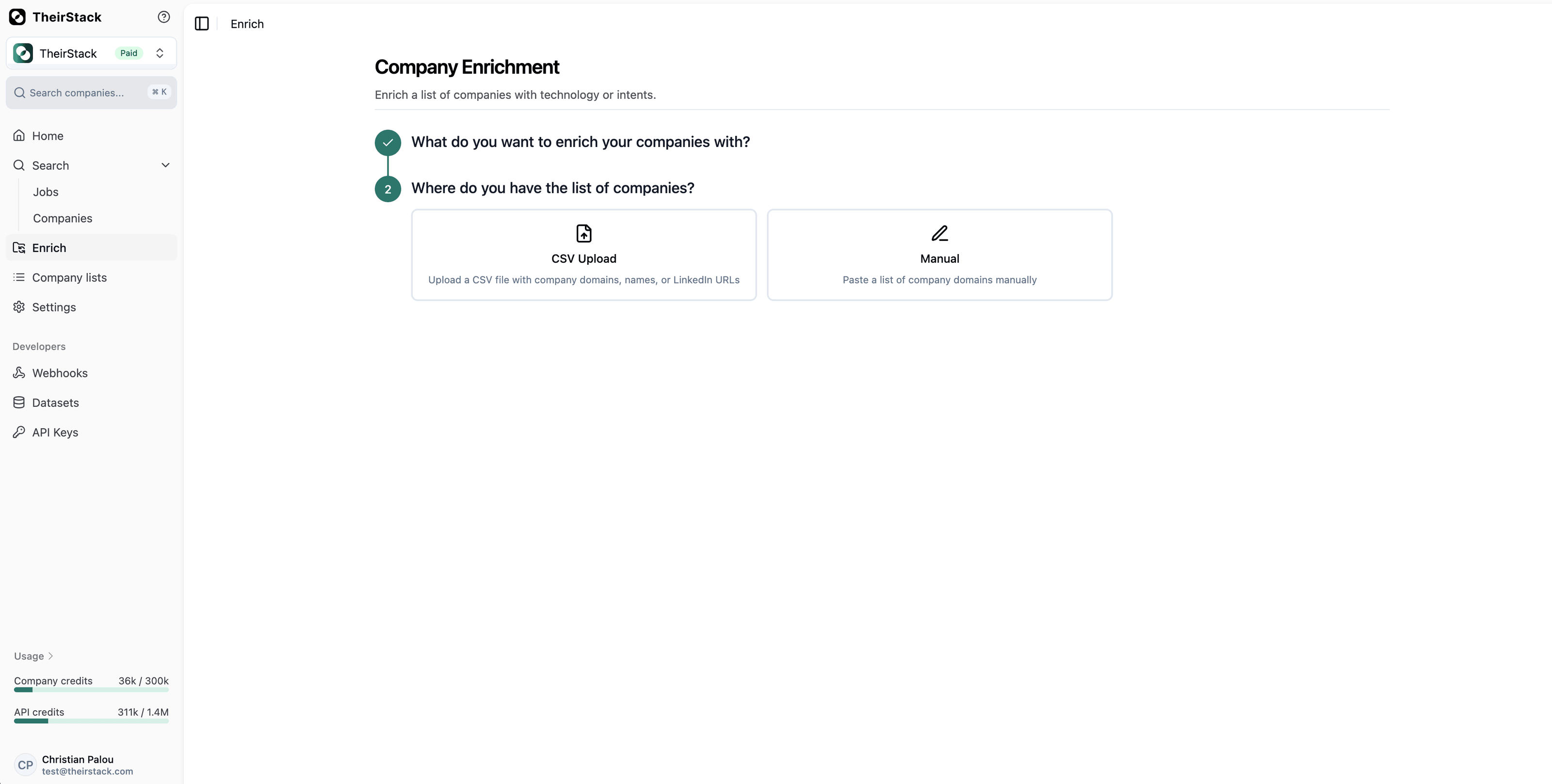
Pick how you want to provide your company list:
- CSV Upload — Upload a CSV file with company domains, names, or LinkedIn URLs.
- Manual — Paste or type a list of companies directly.
Provide your company list
Depending on the input method you chose:
Option A: CSV Upload
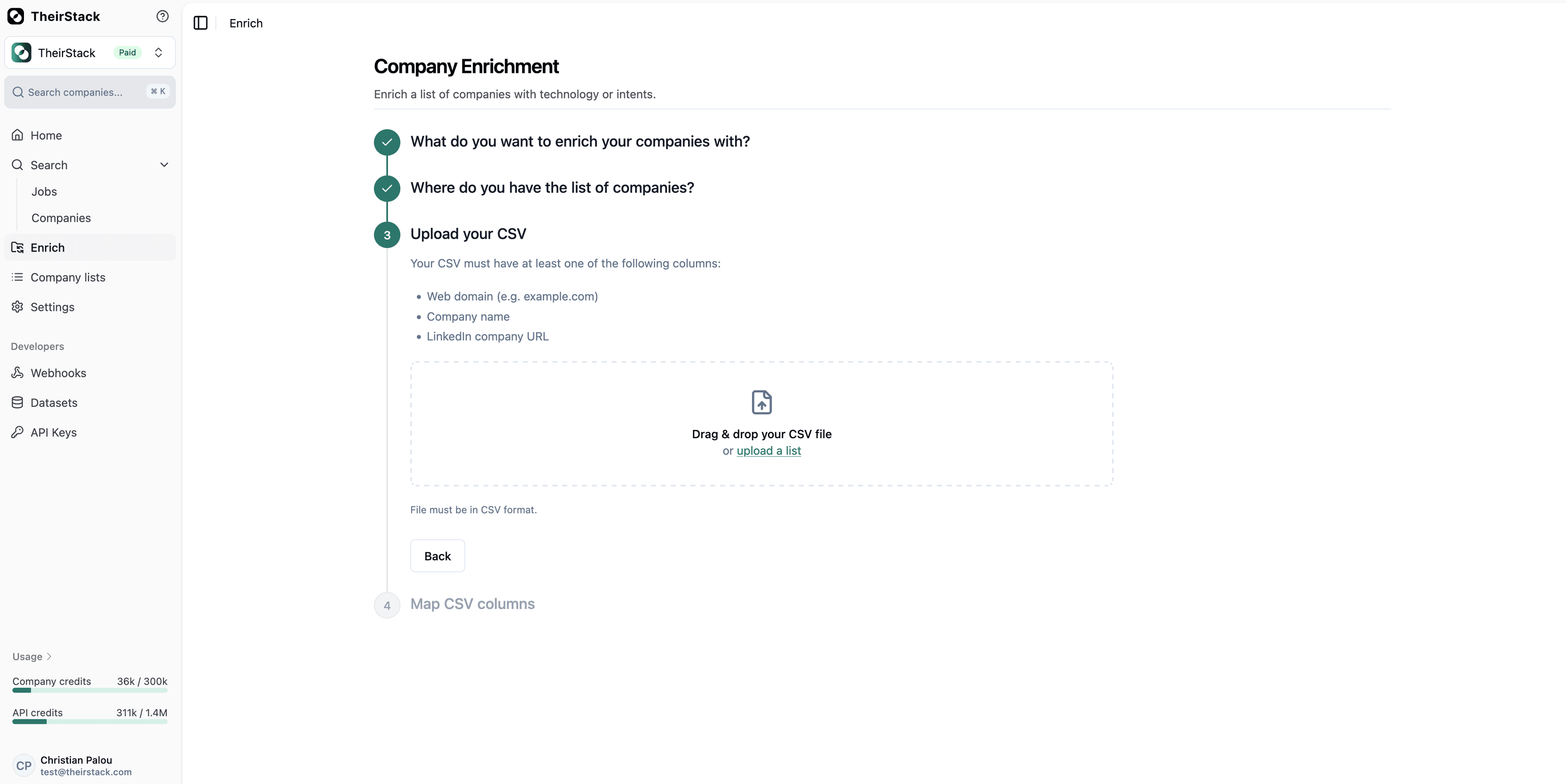
Upload a CSV file containing at least one of the following columns:
- Web domain: e.g.
example.com - Company name: e.g.
Acme Corp - LinkedIn URL: e.g.
linkedin.com/company/acme
Drag & drop your file or click upload a list to browse. The file must be in CSV format.
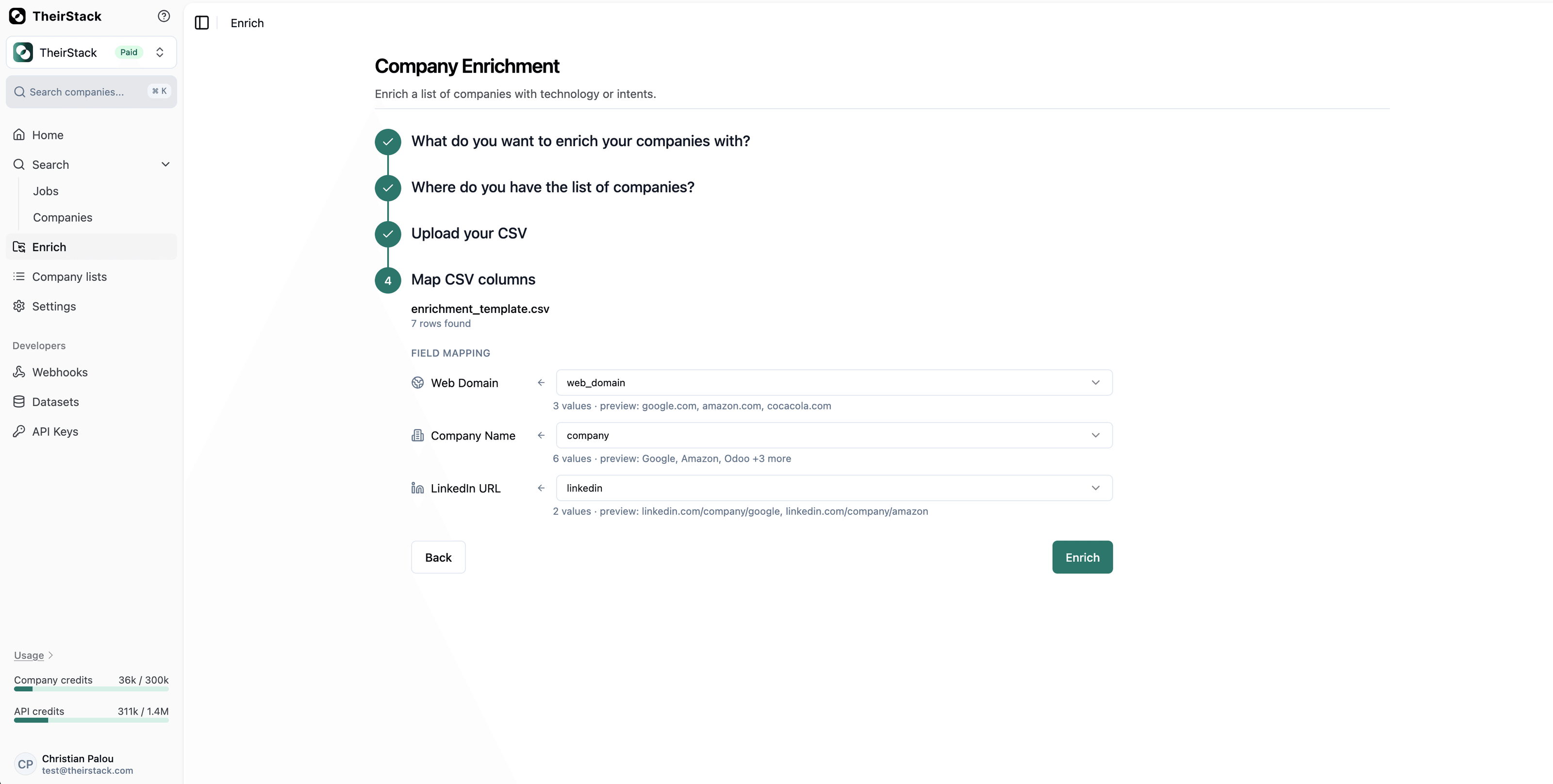
Once the file is parsed, the system tries to automatically map your CSV headers to the three supported fields based on common column names (e.g. a column named website or domain maps to Web Domain). If the auto-mapping doesn't match, you can adjust it manually using the dropdowns.
For each mapped column you'll see a count of non-empty values and a preview of the first entries, so you can verify the mapping is correct before running the enrichment.
Option B: Manual entry
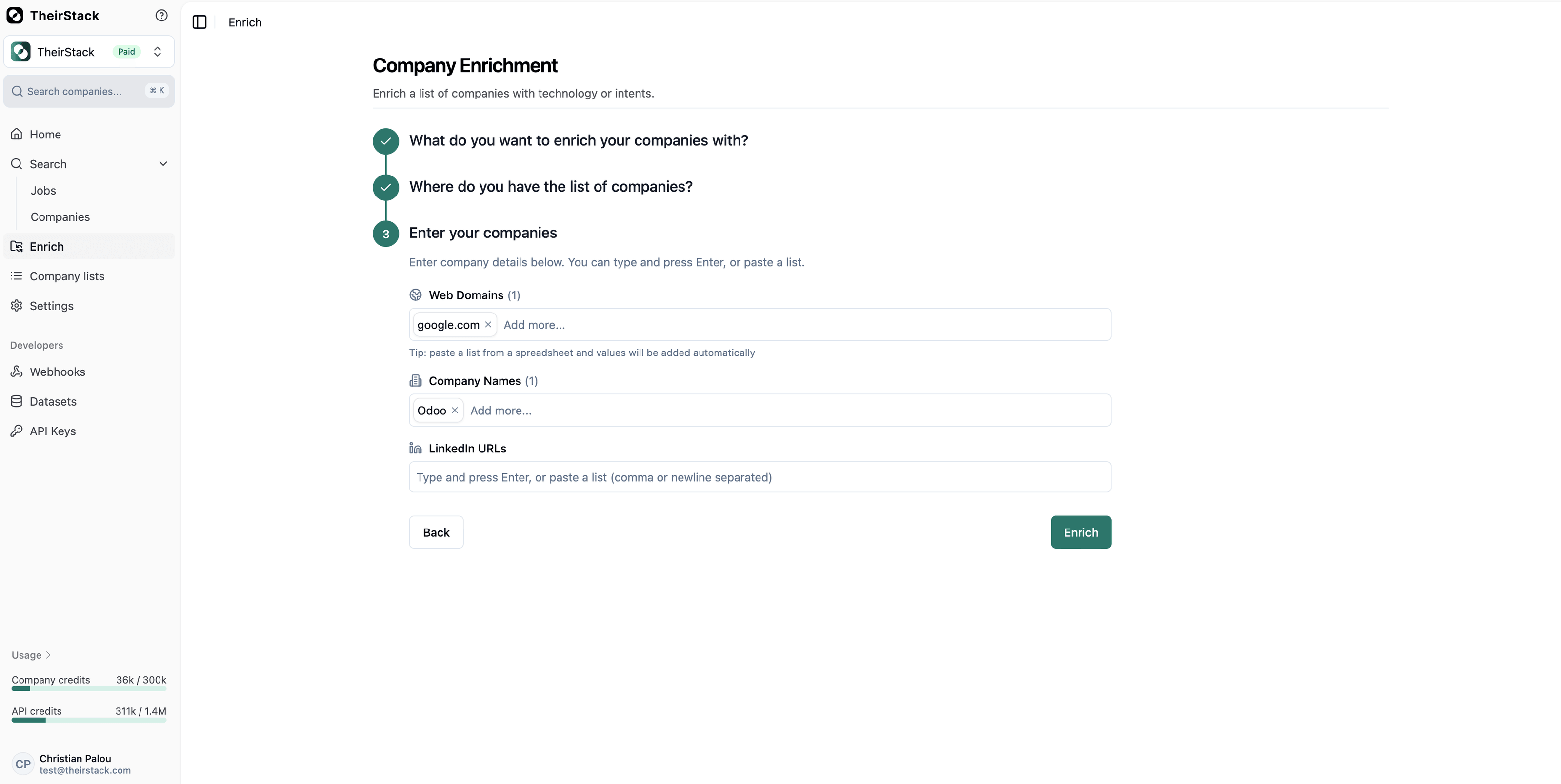
Enter company details using the three input fields: Web Domains, Company Names, and LinkedIn URLs. You can type and press Enter, or paste a list (comma or newline separated) — values from a spreadsheet are added automatically.
Explore the results
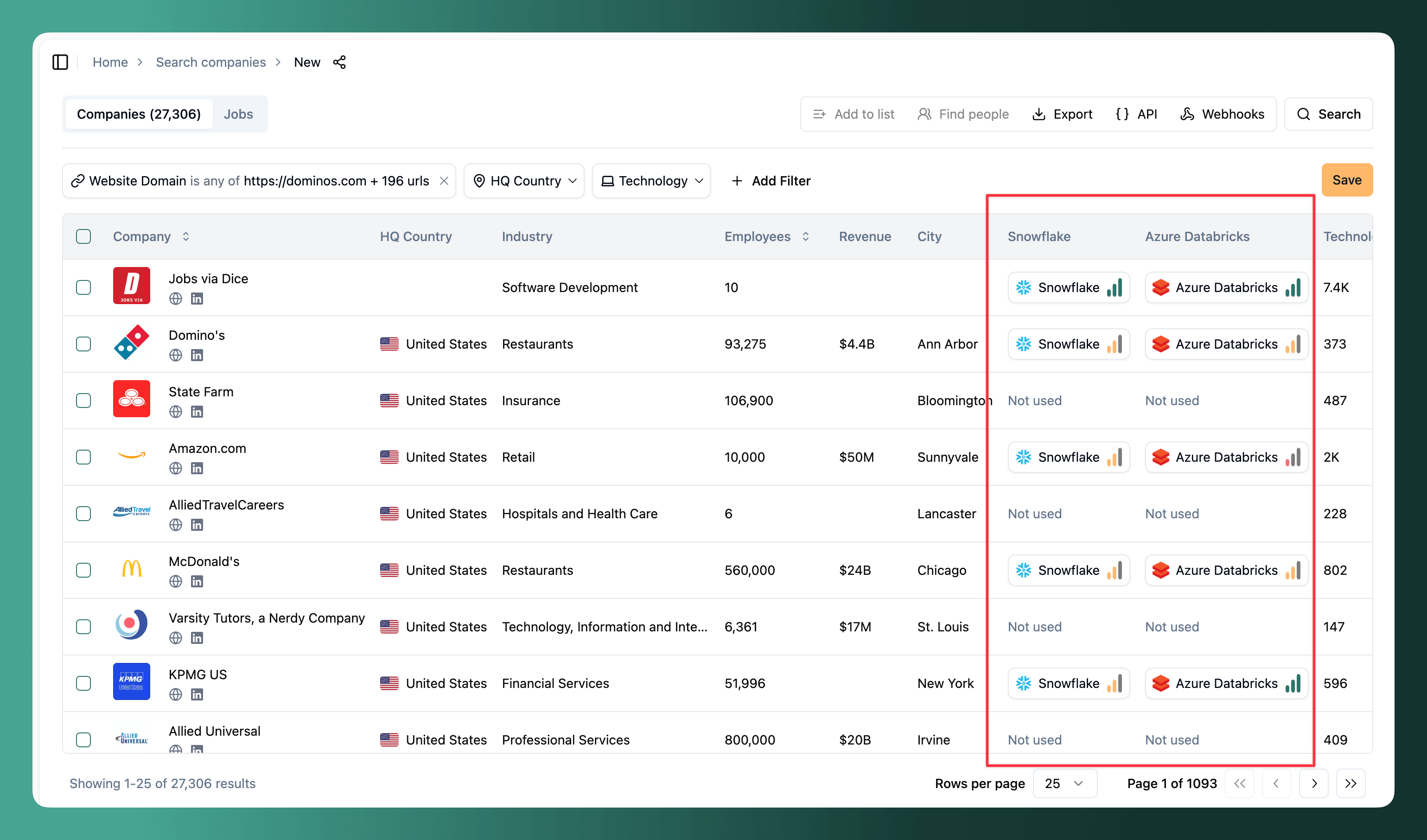
After clicking Enrich, a new tab opens with a company search filtered by your selection. Each selected technology appears as a column showing our confidence level (low, medium, high) or Not used when we have no signal.
Click any company to see the job postings that mention the technology — this is how TheirStack determines the confidence score, so you can verify exactly why a company was scored the way it was.
From there you can refine filters, export the enriched list, or save the results to a company list.
Compare HRIS tools or programming languages across companies in the app
If your question is “Which HRIS does each company use?” or “Which programming languages do these companies use?”, start with the category rather than guessing a vendor. The catalog calls the core HR systems category HRMS, which includes Workday, and the programming languages category Languages, which includes Python. Human Capital Management is a separate category worth checking for a broader view of HR software.
To inspect everything found in a category for one company:
- Open the company from your company search results.
- Open its technologies tab and use the Category filter to select HRMS, Languages, or Human Capital Management.
- Review the technologies found, their confidence levels, and the job postings behind the evidence. Repeat for the other companies in your list.
To compare selected tools side by side across several companies:
- Open Enrich. In the first step, restrict the Type to technologies and search for
HRMSorLanguages. The search also matches category names. - Select the individual tools you want to compare from the results. The enrichment wizard selects technologies individually; typing a category name does not automatically select every technology in it.
- Upload your company CSV or paste the domains, then click Enrich. The results include a column for each selected technology, so you can compare the signals across your company list and export them.
Keep the distinction between enrichment and prospecting in mind: the Keyword category filter in company search narrows the companies returned to those with a matching signal. Use the enrichment wizard when you want to check selected tools across your existing list, including companies where those tools were not detected. Use the company profile's category filter, or the API example below, when you want all detected tools in that category.
Enrich company list programmatically
Use the Technographics API to look up the technologies used by a company, then attach the results to your CRM account or signup record. For a company list, send one request per company.
Look up a company's technologies
Get your API key from API settings and set it as the THEIRSTACK_API_KEY environment variable. Send a POST request to /v1/companies/technologies with the company's domain:
curl --fail-with-body --request POST \
  'https://api.theirstack.com/v1/companies/technologies' \
  --header "Authorization: Bearer $THEIRSTACK_API_KEY" \
  --header 'Content-Type: application/json' \
  --data '{
    "company_domain": "microsoft.com"
  }'
You can use company_name or company_linkedin_url instead of company_domain. You only need one of these identifiers; company names must match exactly, including capitalization.
The response's data array contains one entry per technology found. Each entry includes technology.name, technology.slug, confidence (low, medium, or high), the number of jobs mentioning it, and first_date_found and last_date_found. Keep your input company identifier alongside the response so you can join it back to your list.
Without technology or category filters, the request returns all technologies found for that company. Pagination is optional on this endpoint: leave out limit, page, and offset to retrieve the full result. An absent technology means we have no matching signal under your filters, rather than proof that the company does not use it. See how we source tech stack data for how to interpret the evidence.
Find technology and category identifiers
The catalog uses slugs, such as python and relational-databases, as filter values. Copy the returned slugs exactly; display names such as Python are not interchangeable with them.
Search the keyword catalog for a technology. Set keyword_type=technology to exclude buying intent topics:
curl --fail-with-body --get \
  'https://api.theirstack.com/v0/catalog/keywords' \
  --header "Authorization: Bearer $THEIRSTACK_API_KEY" \
  --data-urlencode 'keyword_type=technology' \
  --data-urlencode 'name_pattern=Python' \
  --data-urlencode 'limit=10'
Each item in data includes its slug, category_slug, and parent_category_slug. To browse categories, use these endpoints:
curl --fail-with-body \
  'https://api.theirstack.com/v1/catalog/keywords/categories' \
  --header "Authorization: Bearer $THEIRSTACK_API_KEY"

curl --fail-with-body \
  'https://api.theirstack.com/v1/catalog/keywords/subcategories' \
  --header "Authorization: Bearer $THEIRSTACK_API_KEY"
Categories are the broad parent groups. Subcategories are the narrower groups within them. Both endpoints return their results in data. You can pass a parent slug as the category_slug query parameter to the subcategories endpoint to browse just that group.
Use the identifiers in your enrichment request as follows:
| What to return | Catalog value | Request filter |
|---|---|---|
| Specific technologies | A keyword's slug | keyword_slug_or |
| Technologies in a subcategory | A subcategory's slug, also returned as a keyword's category_slug | keyword_category_slug_or |
| Technologies in a parent category | A category's slug, also returned as a keyword's parent_category_slug | keyword_parent_category_slug_or |
For example, to return only relational databases found for Microsoft:
curl --fail-with-body --request POST \
  'https://api.theirstack.com/v1/companies/technologies' \
  --header "Authorization: Bearer $THEIRSTACK_API_KEY" \
  --header 'Content-Type: application/json' \
  --data '{
    "company_domain": "microsoft.com",
    "keyword_category_slug_or": ["relational-databases"]
  }'
To check Python instead, replace keyword_category_slug_or with "keyword_slug_or": ["python"]. Each _or filter accepts multiple slugs. Use the keyword_* names shown here; the older technology_slug_or, technology_category_slug_or, and technology_parent_category_slug_or filters are deprecated.
Enrich a list of companies
This Bash example requires jq. Replace the example domains with your list. It makes a request for each company and writes one JSON object per line to company-technographics.jsonl, with the input domain and the API response together:
set -euo pipefail

for domain in microsoft.com google.com; do
  jq -n --arg domain "$domain" '{company_domain: $domain}' \
    | curl --fail-with-body --request POST \
        'https://api.theirstack.com/v1/companies/technologies' \
        --header "Authorization: Bearer $THEIRSTACK_API_KEY" \
        --header 'Content-Type: application/json' \
        --data-binary @- \
    | jq -c --arg domain "$domain" \
        '{company_domain: $domain, response: .}'
done > company-technographics.jsonl
Add keyword_slug_or or a category filter to the JSON body if you only need selected technologies. For recurring CRM enrichment, store the results against the company domain or LinkedIn URL and handle failures using the API rate-limit guidance.
Return the HRIS tools or programming languages used by each company
Use keyword_category_slug_or to return all detected technologies in the categories you choose. These are subcategory slugs from the catalog:
| Question | Category shown in the app | keyword_category_slug_or |
|---|---|---|
| Which core HRIS/HRMS tools does each company use? | HRMS | ["hrms"] |
| Which programming languages does each company use? | Languages | ["languages"] |
| Which HRMS and human capital management tools are detected? | HRMS and Human Capital Management | ["hrms", "human-capital-management"] |
For example, list the technologies in HRMS before running enrichment:
curl --fail-with-body --get \
  'https://api.theirstack.com/v0/catalog/keywords' \
  --header "Authorization: Bearer $THEIRSTACK_API_KEY" \
  --data-urlencode 'keyword_type=technology' \
  --data-urlencode 'category_slug=hrms' \
  --data-urlencode 'page=0' \
  --data-urlencode 'limit=100'
The catalog response includes pagination metadata; increment page if more results remain. This tells you which tools belong to the category, while the enrichment request tells you which of them were detected for a company.
The following Bash example queries HRMS for each company and saves its matching tools, confidence, and evidence dates. It requires jq and the same API-key environment variable as the examples above. Replace the domains with your own list, or change categories to '["languages"]' to compare programming languages:
set -euo pipefail

categories='["hrms"]'

for domain in microsoft.com google.com; do
  jq -n --arg domain "$domain" --argjson categories "$categories" \
    '{company_domain: $domain, keyword_category_slug_or: $categories}' \
    | curl --fail-with-body --request POST \
        'https://api.theirstack.com/v1/companies/technologies' \
        --header "Authorization: Bearer $THEIRSTACK_API_KEY" \
        --header 'Content-Type: application/json' \
        --data-binary @- \
    | jq -c --arg domain "$domain" '{
        company_domain: $domain,
        technologies: [.data[] | {
          name: .technology.name,
          slug: .technology.slug,
          category_slug: .technology.category_slug,
          confidence,
          jobs,
          first_date_found,
          last_date_found
        }],
        metadata
      }'
done > company-category-technographics.jsonl
Each line retains the company domain, including responses with an empty technologies array. Treat an empty array as no matching evidence and check the response metadata for truncated results before treating the lookup as complete.
A company may mention several HR systems or programming languages. Use confidence, job counts, and recency to assess the evidence; do not automatically label the first result as the company's only or current HRIS. The generic buying intent topic HRIS identifies mentions of that product category, but does not name the vendor. To identify the tool, query the technologies in HRMS as shown above.
Next steps
- Export your enriched results to CSV, Excel, or webhook
- Find people at the enriched companies via Apollo, LinkedIn, or ContactOut
- Get the list using the API to reproduce your enrichment programmatically
- Set up webhooks to push enriched data to your CRM, Airtable, or Google Sheets
- Save your search and enable email alerts for new matches
How is this guide?
Last updated on
How to Discover Any Company's Tech Stack
Step-by-step guide to finding what technologies any company uses — from backend infrastructure to internal tools — using TheirStack's job-posting-based technographic data.
How to Exclude Specific Companies from a Search
Step-by-step guide to creating a blacklist of companies and excluding them from your company search results using TheirStack's company list filters.