
How to Automate Your Ad Chase as a Recruiting Agency
Learn how to automate ad chase — the process of monitoring job postings to find companies actively hiring and reach out before competitors. Set up filters, alerts, and workflows with TheirStack.
What is ad chase?
Ad chase (also called job chase) is a recruitment prospecting method where agencies systematically monitor job postings to identify companies with active hiring needs. When a company publishes a job ad, it signals three things: they have an immediate need, an approved budget, and urgency to fill the role. For a recruiting agency, that's the perfect moment to reach out and offer your services.
Ad chase works because it flips the traditional sales approach. Instead of cold-calling companies that might need recruiters, you're contacting companies that definitely need to hire — right now. The job posting is proof of demand.
The problem with manual ad chase
Most recruitment agencies still do ad chase manually: opening LinkedIn, Indeed, Glassdoor, and dozens of niche job boards every morning, scanning for new postings, copying them into spreadsheets, and trying to prioritize which companies to call first. This eats up 2+ hours per day of valuable business development time.
Worse, manual ad chase is slow. By the time you find a job posting, copy the details, research the company, and make the call, another agency may have already pitched the client. Speed is everything in recruitment BD.
Why automate it?
With TheirStack, you can set up automated ad chase in about 15 minutes. Once configured, you'll get notified the moment a company posts a job matching your criteria — across 327k+ job boards and career pages in 195 countries. No more manual scanning. No more missed opportunities.
How to set up automated ad chase with TheirStack
Define your target roles and market
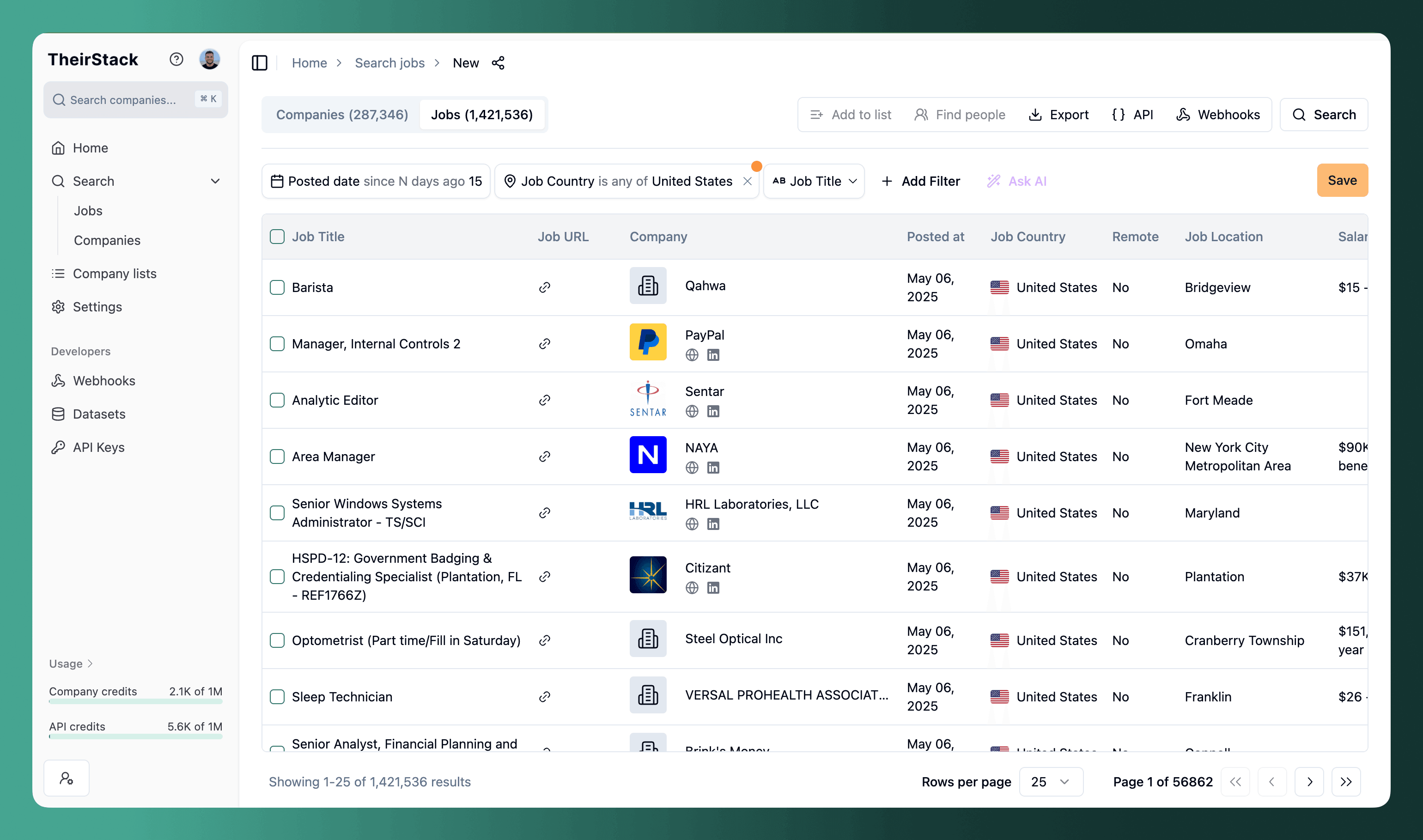
Go to Job Search and set up filters that match the types of roles you recruit for:
- Job title (contains any): Enter the roles you specialize in — e.g., "Software Engineer", "Data Analyst", "Account Executive"
- Location: Target your geographic market — country, state, or city
- Company industry: Focus on your niche verticals — e.g., "Financial Services", "Healthcare", "SaaS"
- Company size: Match your typical client profile — e.g., 50-500 employees for mid-market agencies
The more specific your filters, the higher quality your leads. Start narrow and expand later if needed.
Exclude other recruiting agencies
This is critical. You don't want to chase job postings from other staffing firms — you want direct employers only. TheirStack gives you several ways to filter agencies out:
- Company Type filter: Set to "Direct employer" to exclude staffing firms automatically
- Industry exclusion: Remove "Staffing and Recruiting" and "Human Resources" from results
- Company description keyword exclusion: Add terms like "recruitment", "outsourcing", "headhunting", "staffing", "talent acquisition services" to catch agencies that mislabel their industry
For a comprehensive list of keywords and company names to exclude, see our detailed guide on excluding recruiting agencies.

Add advanced filters to find the best opportunities
Go beyond basic job title and location. These filters help you identify the highest-value leads:
- Job description keywords: Filter by specific skills or technologies in your niche — e.g., "Kubernetes", "Salesforce", "SAP". This finds companies with very specific needs that generalist agencies can't fill.
- Technology filter: Find companies using specific tech stacks. If you recruit DevOps engineers, filter for companies using AWS, Terraform, or Docker. See our guide on adding technology filters to your search.
- Reposted jobs: Filter for jobs that have been reposted — these are roles the company is struggling to fill. They're more likely to need a recruiter's help and more willing to pay agency fees.
- Has hiring manager: Filter for jobs where TheirStack has identified the hiring manager. This means you can reach out directly to the decision-maker, not a generic HR inbox.
Save your search
Click the Save button to save your search with all filters configured. This is a prerequisite for setting up automated alerts and webhooks in the next step.
Give your search a descriptive name like "Senior Engineers - DACH - Direct Employers" so you can easily manage multiple ad chase searches for different niches.
Set up automated delivery
Now the key part — get notified automatically when new matching jobs appear. You have two options:
Option A: Email alerts (simplest)
Set up daily or weekly email digests with new matches. Low friction, no technical setup required.
- Daily alerts: Fresh matches every morning — great for high-volume niches
- Weekly alerts: Summary every Monday — better for niche or specialized searches
See Email Alerts to configure this.
Option B: Real-time webhooks (most powerful)
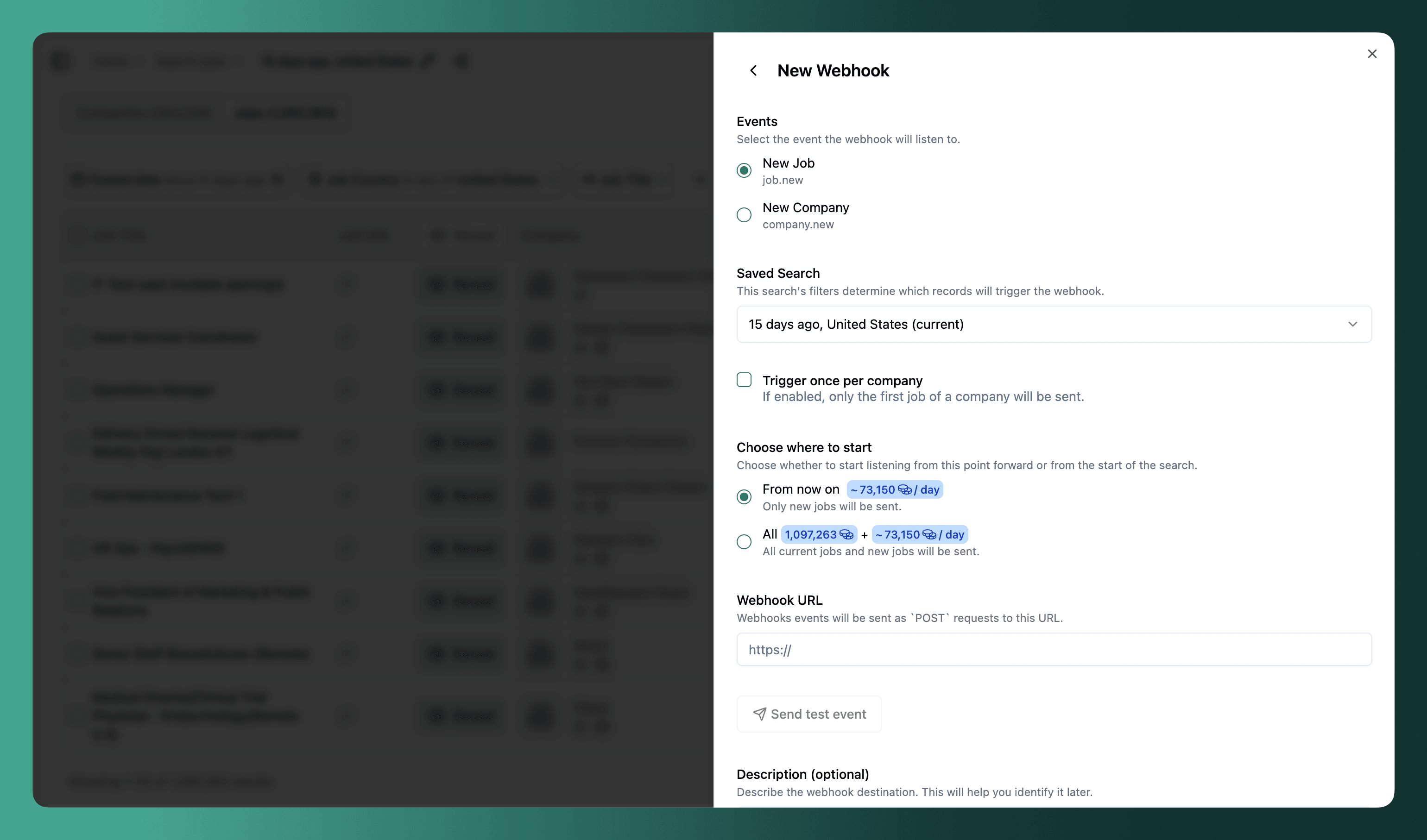
Push new job matches to Slack, your CRM, or any automation tool the moment TheirStack discovers them.
- The job.new event fires as soon as a matching job is detected — no waiting for daily digests
- "Trigger once per company" mode: Get one notification per company instead of one per job. Perfect for outreach workflows where you only need to know a company is hiring, not every individual role.
- Connect to Make, Zapier, or N8N to route alerts to any destination
See Webhooks documentation for setup instructions, or follow our step-by-step Slack integration guide if you want alerts in a team channel.
Identify hiring managers and decision-makers
Finding the job posting is only half the battle. You need to reach the right person. TheirStack helps you in two ways:
Hiring manager data
For many job postings, TheirStack identifies the hiring manager — the person who posted the role. You'll see their name, job title, and LinkedIn URL directly on the job listing. This lets you skip the HR gatekeeper and pitch directly to the person who owns the headcount.
Learn more: Hiring manager data
Find People integrations
For broader outreach, use TheirStack's Find People feature. Select one or more companies from your search results, click "Find People", and TheirStack will open your contact data tool of choice pre-filled with the company:
- Apollo.io — email addresses and phone numbers
- ContactOut — personal and work emails
- LinkedIn Sales Navigator — direct LinkedIn outreach
Learn more: Find People
Reach out before the competition
With your ad chase automated and contacts identified, it's time to close the loop:
- Export to CSV: Download matching companies and contacts for bulk outreach or CRM import
- Push to CRM via webhook: Use Make, Zapier, or N8N to automatically create leads in Salesforce, HubSpot, or Pipedrive when new jobs match your criteria
- Personalize your outreach: Use the job description details (role, tech stack, seniority, urgency) to craft pitches that reference the company's exact hiring need
The most effective recruiter outreach references the specific job posting: "I noticed you're hiring a Senior Backend Engineer with Go experience. We have 3 pre-qualified candidates who could start within 2 weeks."
For a complete autopilot workflow, see our guide on how to outreach on autopilot to companies actively hiring.
Ad chase use case variations
Monitor past client companies for new openings
Upload your existing client list to TheirStack and get alerted whenever they post new jobs. This is the easiest way to generate repeat business — you already have the relationship, and the client knows your quality.
Set up a saved search with your client company names and enable webhooks. Every time a past client posts a new role in your specialty, you'll know immediately.
See our guide: Monitoring open jobs from current and past customers
Track specific technologies or skills in your niche
If you specialize in a particular technology or skill set, use TheirStack's technology filter to find companies hiring for your exact niche. For example:
- SAP recruiters: Filter for companies using SAP and hiring consultants or developers
- Kubernetes/Cloud recruiters: Filter for companies using Kubernetes, AWS, or GCP
- Salesforce recruiters: Filter for companies on Salesforce hiring admins or developers
Technology-based ad chase is powerful because it narrows the field to companies where your specialized candidates are a perfect fit — and where generalist agencies can't compete.
Identify companies struggling to fill roles
Filter for reposted jobs or roles that have been open for 30+ days. These are companies that have tried and failed to hire on their own. They represent the highest-value recruitment leads because:
- They've already invested time and budget in the search
- They know the role is hard to fill
- They're more likely to accept agency fees
- They have urgency — the longer the role stays open, the more it costs them
Why TheirStack for ad chase
vs. manual job board browsing
Automate 2+ hours per day of repetitive work. TheirStack monitors 327k+ sources continuously so you never miss a posting. Your team can spend that time on what actually generates revenue: talking to clients and candidates.
vs. basic job alerts (Indeed, LinkedIn)
Job board alerts are limited to a single source with basic filters. TheirStack aggregates across all major job boards and career pages, with 30+ advanced filters including agency exclusion, technology stack, hiring manager data, and company firmographics. You get a complete picture, not fragments.
vs. browser plugins (JobGrabber)
Browser plugins require manual triggering — you still need to visit each job board and click to capture data. TheirStack runs in the background 24/7, delivering new matches via real-time webhooks. Plus you get global coverage across 195+ countries, not just the boards you remember to check.
vs. scheduled reports (Mantiks)
TheirStack offers real-time webhooks instead of waiting for periodic reports. You also get API access for custom integrations, technographic data to identify companies by their tech stack, and repost detection to find the hardest-to-fill roles. With ~295k new jobs discovered daily, you'll always have fresh leads.
Further reading
How to monitor job postings automatically
How to send a slack message for every new job found
Outreach companies actively hiring
Webhooks
Job Data
How is this guide?
Last updated on
How to fetch jobs periodically using the Jobs API
This guide demonstrates how to fetch jobs periodically from the TheirStack API, ensuring fresh data, avoiding duplicates, and minimizing API credit costs.
How to Build a Targeted Lead List Using Technographic Data
Step-by-step guide to building targeted sales lead lists by filtering companies based on their tech stack using TheirStack's [[total_technologies]]+ technology database.