
Support
How to open a support ticket from inside TheirStack, report a wrong record, request a missing technology, and how fast we typically reply.
Support runs on tickets you open from inside the app, not on an inbox. A ticket carries your workspace with it, so whoever picks it up can already see the search you ran and the records you were looking at — and you can follow its status instead of wondering whether an email landed.
Tickets are answered by the people who build TheirStack. There is no tier-one queue that escalates.
Open a ticket
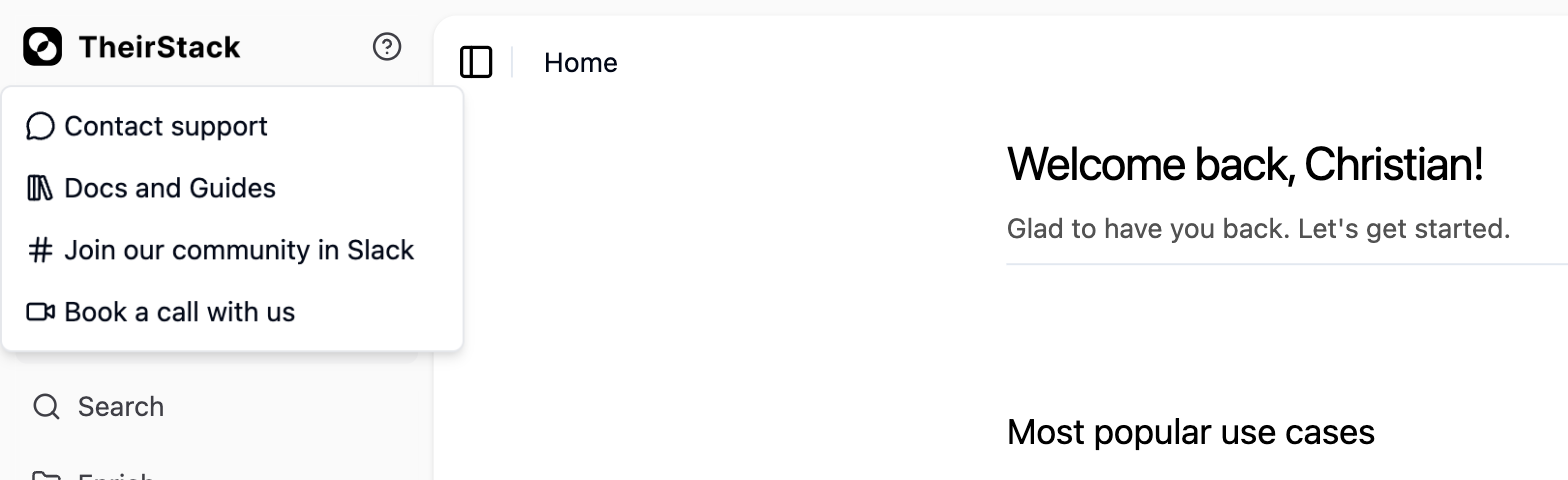
Click the ? button in the app and choose Contact support, or go straight to app.theirstack.com/support.
Click New ticket and pick the category that fits — needing help, reporting a bug, requesting a technology or keyword, requesting a feature, or general feedback. The category decides what the form asks you for, so picking the right one is the difference between one round trip and three.
Submit it. The same page lists every ticket in your workspace with its status, and you reply on the ticket itself.
We normally reply in under 24 hours. That is what happens in practice, not a contractual commitment: we deliberately publish no support SLA rather than publish one we would have to hedge. If you need a contractual response time, that belongs in an enterprise agreement — open a ticket and we will put it in writing.
Reporting a wrong record
Job postings and company data are scraped and enriched, so records can be wrong: an outdated headcount, a technology attributed to the wrong company, a posting that should have closed. Reporting those is the highest-leverage thing you can do for your own results — a fix usually lands for every customer, not just yours.
Two ways, both of which create a real ticket:
- In the app, open a ticket in the bug-report category. Where a record is on screen, the report action attaches it for you.
- Through the MCP server, without leaving your assistant.
report_data_bugfiles incorrect company or job-posting records — "Report that Acme Corp's employee count looks wrong" — andrequest_technologyasks for a technology missing from the catalogue, e.g. "Request that TheirStack add Bun (https://bun.sh)". Before requesting one, it is worth checking whether the technology already exists under a different name. To send general feedback, useshare_feedback.
What makes a report actionable, in rough order of usefulness:
- The identifier: the job
id, the company domain, or the company's LinkedIn URL. A company name alone is ambiguous — several companies share one. - The request you ran, if it came from the API: the endpoint and the JSON body. That lets us reproduce the result rather than guess at the filters.
- What you expected versus what you got. "This company uses Snowflake but it is not in the tech stack" is fixable; "the data is wrong" needs a round trip before anyone can start.
Other ways to reach us
The same ? menu in the app also offers:
- Our community Slack, open to everyone — the fastest place for a question that is not really a ticket.
- A call with us, if the thing is easier shown than written.
- Docs and guides, which is where you already are.
Before you open a ticket
Some questions have a faster answer than we can give you:
- A filter returns nothing. Try the same search in the app — it doubles as a playground that writes the API request for you, so it is the quickest way to see whether the problem is the filter or the data.
- A search cost more credits than expected. Credits are charged per deduplicated record revealed, and delta filters stop a recurring job re-billing records you already have.
- Coverage looks thinner than you expected in a country or a source. The known coverage limitations page names what we do and do not see, including why our volumes read lower than feeds that bill reposts.
Related
How is this guide?
Last updated on
Zapier
Learn how to connect TheirStack with Zapier — automate real-time job and company notifications through webhooks, and trigger any of Zapier's 7,000+ app integrations.
Users and Teams
Learn about users and teams in TheirStack — how passwordless sign-in works, and how to create and manage teams, invite members, assign roles, and share billing plans, saved searches, and company lists.