Searches are up to 9x faster at higher limits

Co-Founder at TheirStack
Until now, response times could climb sharply when you raised the result limit and asked for more companies or jobs in each query. We have optimized our backend so that requesting more results has a much smaller impact, and response times now stay much closer to constant as limits grow.
The improvement applies to searches in the app and through the API, and is especially visible at higher limits. Searches were about 3x faster overall, and the slowest company searches are now up to 9x faster.
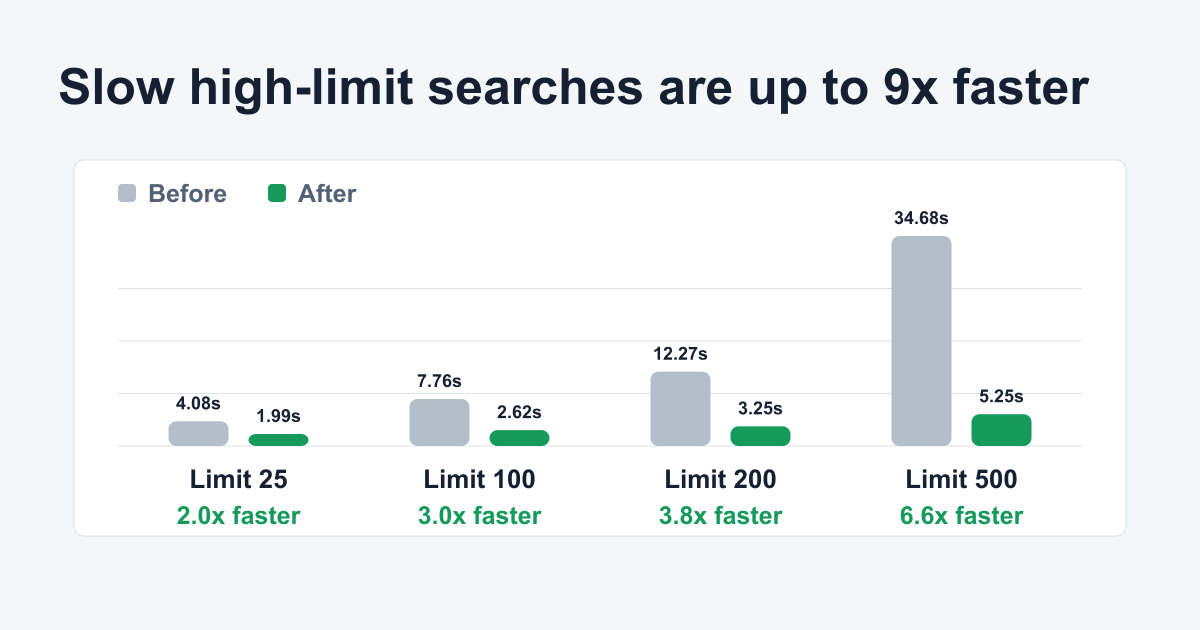
Average response times by requested result limit:
- Limit 25: 4.08s before -> 1.99s after, about 2.0x faster.
- Limit 100: 7.76s before -> 2.62s after, about 3.0x faster.
- Limit 200: 12.27s before -> 3.25s after, about 3.8x faster.
- Limit 500: 34.68s before -> 5.25s after, about 6.6x faster across the company-search queries measured at this limit.
How we measured it
The figures shown summarize 160 end-to-end requests: 64 company-search requests and 96 job-search requests. We tested four company-search types across limits 25, 100, 200, and 500, plus eight job-search types across limits 25, 100, and 200.
For every search type and limit, we sent four requests: two to our production deployment and two to a preview deployment running the optimized code. The order alternated between preview -> production -> production -> preview and production -> preview -> preview -> production, so both deployments appeared at the beginning and end of a run. This reduces the influence of hot-versus-cold queries and other order effects. Each before value is the average of the two production requests, and each after value is the average of the two preview requests.
Both deployments connected to the same production database, so they used the same underlying data and normal live workload rather than isolated copies.
Each measurement covers the complete HTTP request and response, not only the database query. Exact response times can still be higher or lower at different moments as database load changes, so the figures are benchmark averages rather than latency guarantees.
Why higher limits benefit more
Finding the matching rows in our database is only part of the request. The API still has to fetch, join, and build the response object for every company or job it returns.
The optimized search path reduces the work needed to fetch and prepare each response. That matters most when the response contains hundreds of rows: the fixed request overhead stays similar, but the per-row savings compound.
Company searches
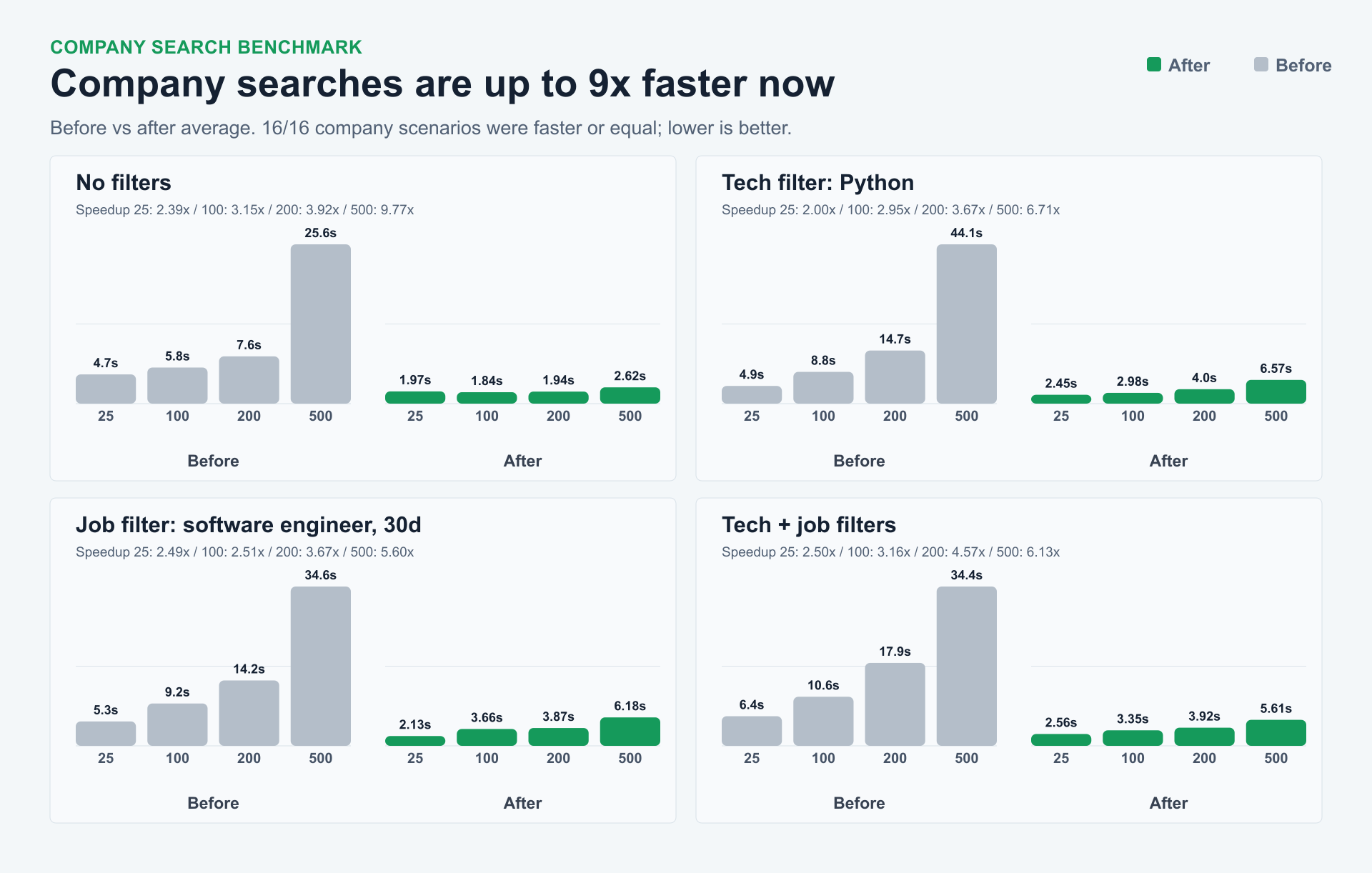
For company searches, the after run was faster or equal in all 16/16 measured rows. The largest gains appear at the higher limits, where the before numbers scaled up sharply and the after numbers stayed much flatter.
The benchmark covers common company search shapes: country filters, technology filters, job filters, and combined technology + job filters, measured at limits 25, 100, 200, and 500.
| Query | Limit 25 | Limit 100 | Limit 200 | Limit 500 |
|---|---|---|---|---|
| US companies | ✅ 4.7s -> 1.97s (2.39x) | ✅ 5.8s -> 1.84s (3.15x) | ✅ 7.6s -> 1.94s (3.92x) | ✅ 25.6s -> 2.62s (9.77x) |
| US companies using Python | ✅ 4.9s -> 2.45s (2.00x) | ✅ 8.8s -> 2.98s (2.95x) | ✅ 14.7s -> 4.00s (3.67x) | ✅ 44.1s -> 6.57s (6.71x) |
| US companies hiring software engineers, 30d | ✅ 5.3s -> 2.13s (2.49x) | ✅ 9.2s -> 3.66s (2.51x) | ✅ 14.2s -> 3.87s (3.67x) | ✅ 34.6s -> 6.18s (5.60x) |
| US companies using Python and hiring software engineers | ✅ 6.4s -> 2.56s (2.50x) | ✅ 10.6s -> 3.35s (3.16x) | ✅ 17.9s -> 3.92s (4.57x) | ✅ 34.4s -> 5.61s (6.13x) |
Each cell shows before -> after and the speedup for that limit. ✅ means the after run was faster or equal. Open a query to try the same measured filter shape in the app.
Job searches
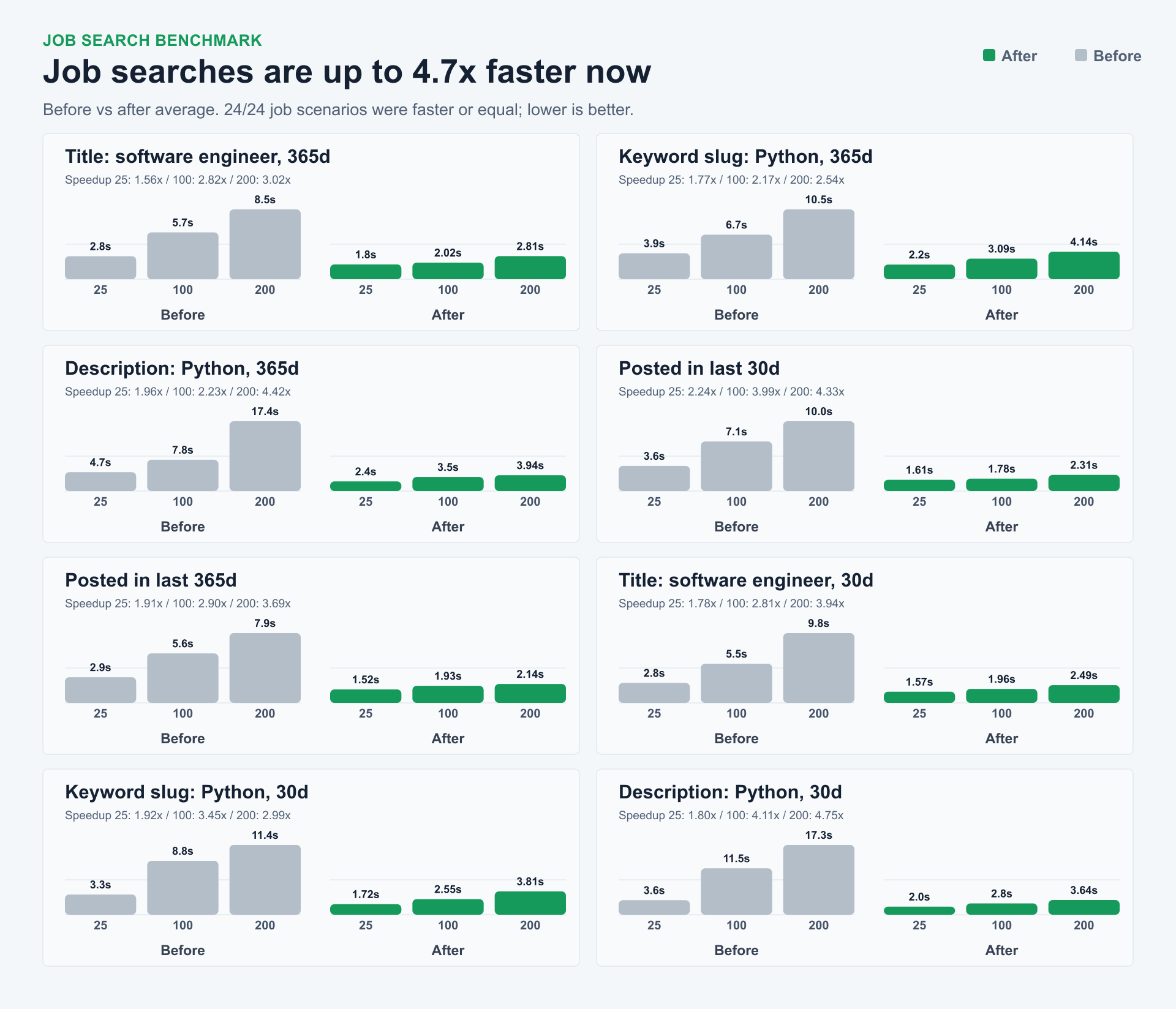
Job searches were faster or equal in all 24/24 measured rows across limits 25, 100, and 200.
We measured title filters, keyword filters, description filters, recent-posting filters, and the same query shapes with 30-day posting windows.
| Query | Limit 25 | Limit 100 | Limit 200 |
|---|---|---|---|
| Title: software engineer, 365d | ✅ 2.8s -> 1.80s (1.56x) | ✅ 5.7s -> 2.02s (2.82x) | ✅ 8.5s -> 2.81s (3.02x) |
| Keyword slug: Python, 365d | ✅ 3.9s -> 2.20s (1.77x) | ✅ 6.7s -> 3.09s (2.17x) | ✅ 10.5s -> 4.14s (2.54x) |
| Description: Python, 365d | ✅ 4.7s -> 2.40s (1.96x) | ✅ 7.8s -> 3.50s (2.23x) | ✅ 17.4s -> 3.94s (4.42x) |
| Posted in last 30d | ✅ 3.6s -> 1.61s (2.24x) | ✅ 7.1s -> 1.78s (3.99x) | ✅ 10.0s -> 2.31s (4.33x) |
| Posted in last 365d | ✅ 2.9s -> 1.52s (1.91x) | ✅ 5.6s -> 1.93s (2.90x) | ✅ 7.9s -> 2.14s (3.69x) |
| Title: software engineer, 30d | ✅ 2.8s -> 1.57s (1.78x) | ✅ 5.5s -> 1.96s (2.81x) | ✅ 9.8s -> 2.49s (3.94x) |
| Keyword slug: Python, 30d | ✅ 3.3s -> 1.72s (1.92x) | ✅ 8.8s -> 2.55s (3.45x) | ✅ 11.4s -> 3.81s (2.99x) |
| Description: Python, 30d | ✅ 3.6s -> 2.00s (1.80x) | ✅ 11.5s -> 2.80s (4.11x) | ✅ 17.3s -> 3.64s (4.75x) |
Each cell shows before -> after and the speedup for that limit. ✅ means the after run was faster or equal. Open a query to try the same filter shape in the app.
What you need to do
Nothing. The improvements apply automatically in the app and through the API, with no workflow or integration changes required.