
How to find companies by the commodities in their job ads
Map producers and traders of a commodity from their job ads in TheirStack: the Buying intent topic filter, a regex fallback, the API request and the export.
To find companies by the commodities named in their job ads, run a job search in TheirStack with the Buying Intent Topic filter, then use company search to export one row per company. If your commodity is missing from the catalog, search job descriptions with a regex and request the topic.
What do you get, and what do you need?
You get a list of the companies whose job ads name a commodity, with how many of their jobs mention it and when we first and last saw it. Read the ads to tell producers, processors, shippers, traders and service providers apart before you export the list as your map.
You need:
- A TheirStack account. Results show in preview mode with company names blurred; revealing or exporting a company costs 1 company credit, and that company stays revealed for 90 days (credits).
- The commodity's name as we track it. We classify 83 of our buying intent topics as commodities: plastics like polyethylene and polypropylene, energy like crude oil, natural gas and LNG, farm goods like maize, and certificates like renewable energy credits. Look one up in the buying intent catalog or by typing it into the filter.
- For the API, an API key. The Job Search endpoint costs 1 API credit per job returned, and the Company Search endpoint costs 3 per company.
How do you search job ads by commodity in the app?
- Open a new job search.
- Click Add Filter, choose Buying Intent Topic and type the commodity. Pick it from the autocomplete. In this example it's Liquified Natural Gas (LNG). If nothing comes up, the topic isn't in our catalog yet; skip to the regex section below.
- Set Posted date to the last 30 days.
- Set Job Closed to No, so you only get open jobs.
- Set Company Type to Direct employer, so recruiting agencies don't land on your map.
- Click Search. Each row is a job, and the Matching Phrases column shows the sentences that name the commodity. Click a title to read the posting and check that the commodity is what the company handles.
- Click API to copy the same search as a cURL request.
Using the TheirStack MCP, find open jobs posted in the last 30 days that mention liquefied natural gas:
- Buying intent topic: liquified-natural-gas-lng
- Date posted: last 30 days
- Job closed: open jobs only
- Company type: direct employer
Return the number of jobs and companies, then the first 10 jobs with their company.


curl -X POST "https://api.theirstack.com/v1/jobs/search" \
  -H "Authorization: Bearer <YOUR_API_KEY>" \
  -H "Content-Type: application/json" \
  -d '{
    "job_keyword_slug_or": ["liquified-natural-gas-lng"],
    "posted_at_max_age_days": 30,
    "is_closed": false,
    "company_type": "direct_employer",
    "limit": 10
}'- Buying Intent Topicis any of Liquified Natural Gas (LNG)
- Posted datelast 30 days
- Job ClosedNo
- Company TypeDirect employer
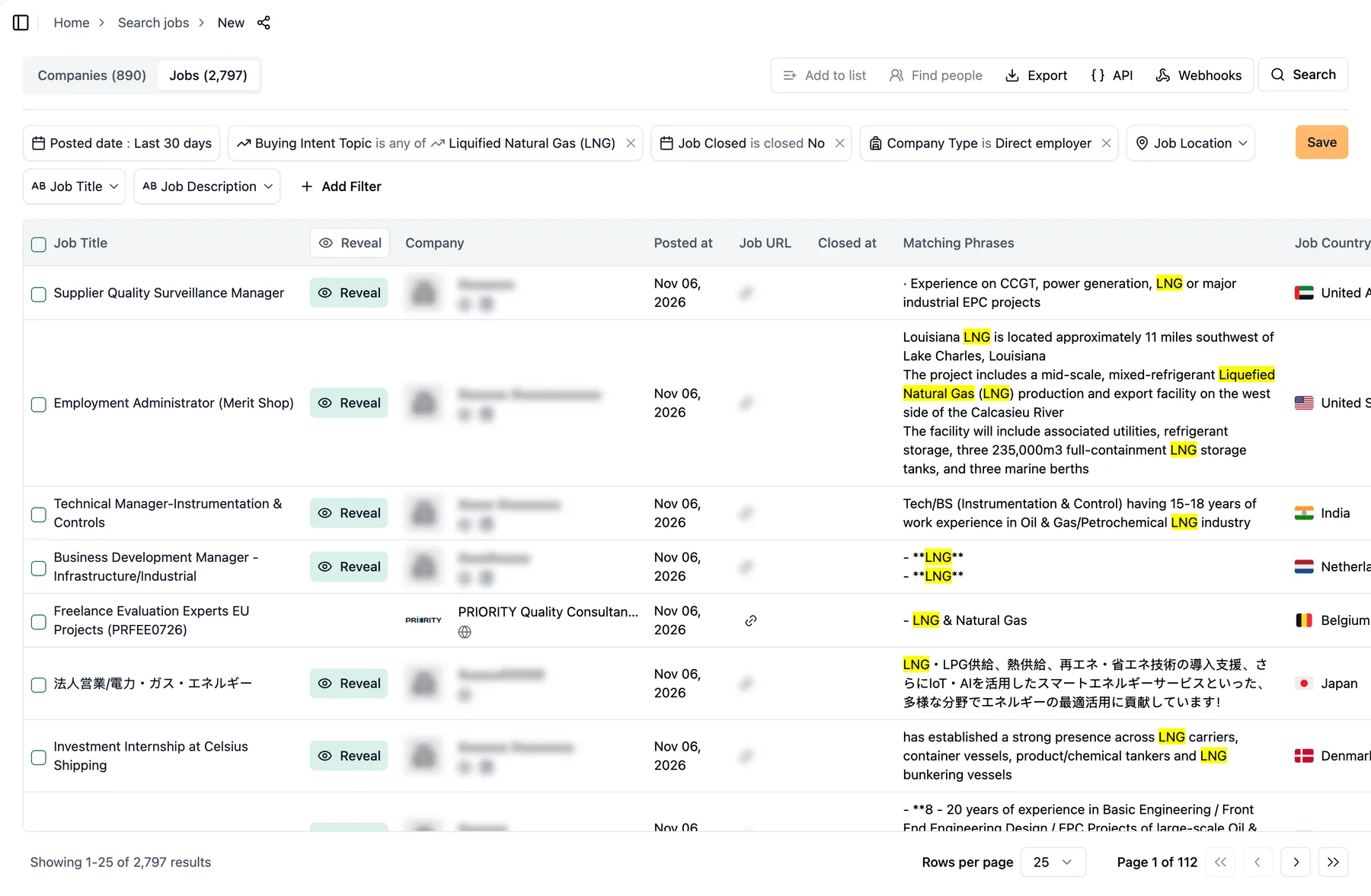
The job search above returns one row per open job that names LNG, with the sentences that matched, the date posted and the job's country.
How do you turn the jobs into a market map of companies?
A job list repeats companies. For a map you want one row per company, which the company search gives you:
- Open the company search for LNG. It filters on the LNG topic, keeps direct employers, and requires a job posted in the last 3 months that mentions LNG.
- For another commodity, open a new company search, add Buying Intent Topic with the commodity, and add the same topic to the job filters with a Job Posted date of the last 3 months. A Job Posted date on its own also keeps companies whose recent jobs have nothing to do with the commodity.
- Set Company Type to Direct employer and click Search.
- Read the Liquified Natural Gas (LNG) column, which shows each company's match on the topic, next to its HQ country, industry, employees and revenue.
- Click Export and pick CSV or Excel. The file always carries the firmographics (name, website, country, industry, employees, revenue), and one set of columns per topic you filtered by, with its confidence, job count and first and last date found (what the file contains).
Using the TheirStack MCP, map the direct employers that have named liquefied natural gas in job ads posted in the last 90 days:
- Company buying intent topic: liquified-natural-gas-lng
- Job filters: buying intent topic liquified-natural-gas-lng, posted in the last 90 days
- Company type: direct employer
Return the number of companies, then the first 10 with their country, industry and number of matching jobs.
curl -X POST "https://api.theirstack.com/v1/companies/search" \
  -H "Authorization: Bearer <YOUR_API_KEY>" \
  -H "Content-Type: application/json" \
  -d '{
    "company_keyword_slug_or": ["liquified-natural-gas-lng"],
    "company_type": "direct_employer",
    "job_filters": {
      "job_keyword_slug_or": ["liquified-natural-gas-lng"],
      "posted_at_max_age_days": 90
    },
    "limit": 10
}'- Company TypeDirect employer
- Buying Intent Topicis any of Liquified Natural Gas (LNG)
- Job Buying Intent Topicis any of Liquified Natural Gas (LNG)
- Job Posted datelast 3 months
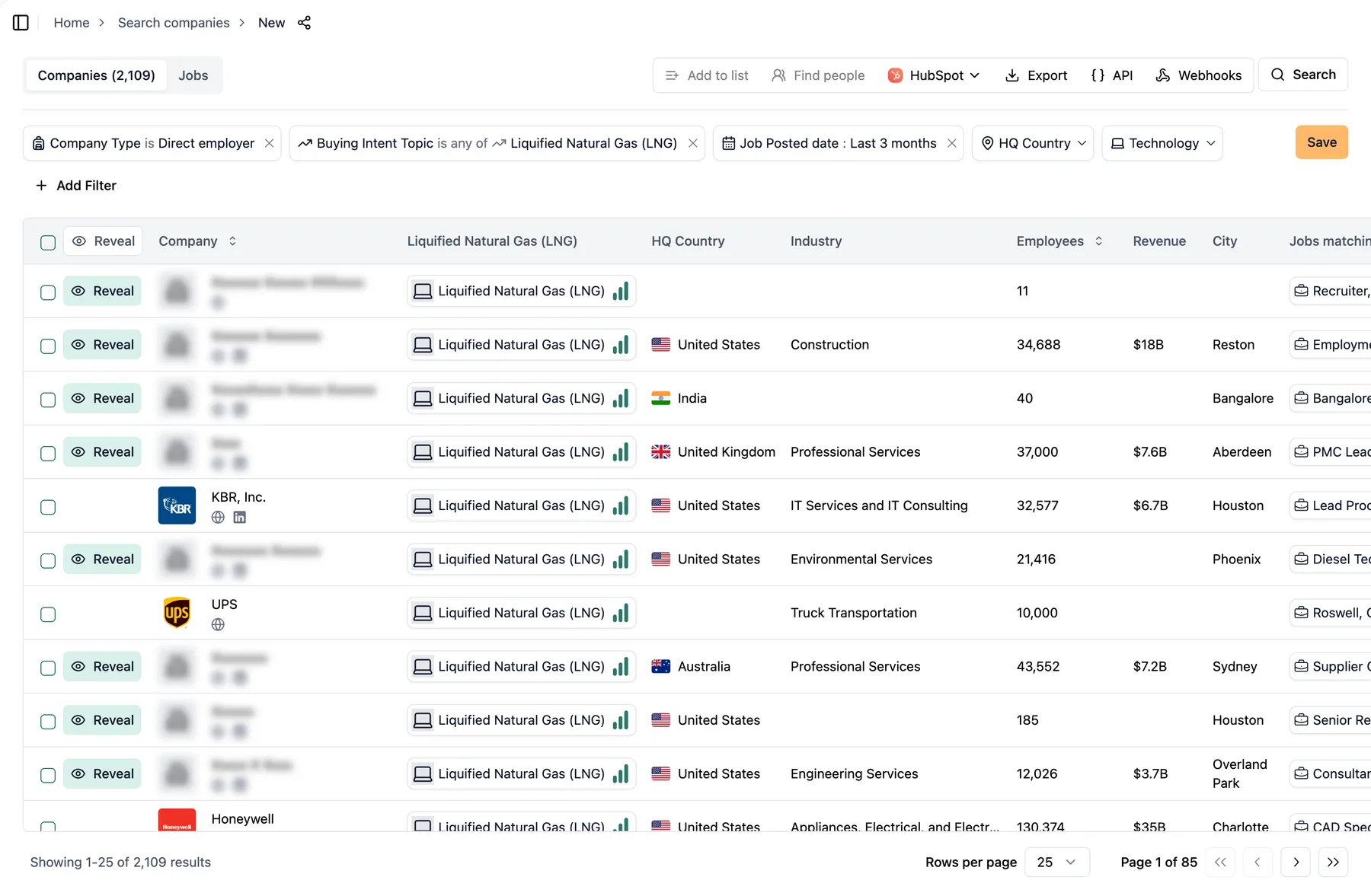
The company version of the search returns one row per company, with its LNG match, HQ country, industry, employees and revenue.
With the API, you pay 3 API credits per company returned, so ask for a small limit first and page from there. In the app, the export dialog shows its cost in company credits before you confirm.
What does a real commodity search return?
On 6 November 2026, the LNG job search returned 2,784 open jobs at 886 companies, posted in the last 30 days. The first five results were a mix: an engineering and construction contractor hiring an administrator, an engineering services firm hiring an instrumentation manager, an oil and gas services company hiring a business developer, a consultancy hiring EU project evaluators and a Japanese energy retailer hiring corporate sales staff.
The topic tells you the company writes about the commodity in its job ads. It doesn't tell you whether the company produces it, trades it, ships it, builds plants for it or sells services around it. Reading the ads, or narrowing as the next section shows, sorts the map into those groups.
The company version of the search, with the topic in at least one job posted in the last 90 days, returned 2,107 direct employers.
How do you narrow the map to producers or traders?
Each example adds one filter to the LNG job search from the first section, unless it says otherwise, so you can check its count against ours:
- Producers and operators: add Company industry for the sector that makes the commodity. For LNG we added Oil and Gas, Oil, Gas, and Mining, Natural Gas Extraction and Pipeline Transportation. That cut the search to 375 jobs at 106 companies.
- Traders: add Job Title with trader, trading, origination and commercial (contains any of). That left 81 jobs at 56 companies, among them a fuel trader role at a shipping group and a trading support role at an oil major. Consultancies hiring energy trading analysts also match, so read the list before you count it.
- Repeated mentions, seen recently: in the company search instead, with only the topic and Company Type, set Jobs mentioning keyword to at least 3 and Last date found to the last 90 days. On 6 November 2026 that kept 1,180 companies for LNG, out of 2,410 with three or more matching jobs at any time.
- Geography: add Job Location to see where the work happens, or HQ Country to see where the companies are based.
Using the TheirStack MCP, find open jobs for traders of liquefied natural gas posted in the last 30 days:
- Buying intent topic: liquified-natural-gas-lng
- Job title contains any of: trader, trading, origination, commercial
- Date posted: last 30 days
- Job closed: open jobs only
- Company type: direct employer
Return the number of jobs and companies, then the first 10 jobs with their company.
curl -X POST "https://api.theirstack.com/v1/jobs/search" \
  -H "Authorization: Bearer <YOUR_API_KEY>" \
  -H "Content-Type: application/json" \
  -d '{
    "job_keyword_slug_or": ["liquified-natural-gas-lng"],
    "job_title_or": ["trader", "trading", "origination", "commercial"],
    "posted_at_max_age_days": 30,
    "is_closed": false,
    "company_type": "direct_employer",
    "limit": 10
}'- Buying Intent Topicis any of Liquified Natural Gas (LNG)
- Job Titlecontains any of trader, trading, origination, commercial
- Posted datelast 30 days
- Job ClosedNo
- Company TypeDirect employer
What if our catalog misses your commodity?
Search the text of the job ads with a regex on the Job Description filter, and ask us to add the topic.
Cocoa is an example. It isn't one of our commodity topics, and the bare word also matches Apple's Cocoa framework in software job ads. A pattern that requires a cocoa product or activity after the word avoids that. On 6 November 2026 it found 145 open jobs at 35 companies in the last 30 days, among them production shifts at a chocolate and cocoa processor and procurement roles at food ingredient suppliers.
- In a new job search, add Job Description, choose the regex operator and paste the pattern below. Start it with
(?i)so it ignores case, because patterns are case-sensitive otherwise. - Keep Posted date, Job Closed and Company Type as in the first search.
- Read a few results to check the pattern only catches the commodity, and add a negative pattern (
job_description_pattern_notin the API) if it catches something else.
Using the TheirStack MCP, find open jobs posted in the last 30 days whose description names a cocoa product or activity:
- Job description matches the regex:
(?i)\bcocoa (beans?|butter|powder|liquor|origination|sourcing|trading|processing)\b
- Date posted: last 30 days
- Job closed: open jobs only
- Company type: direct employer
Return the number of jobs and companies, then the first 10 jobs with their company.
curl -X POST "https://api.theirstack.com/v1/jobs/search" \
  -H "Authorization: Bearer <YOUR_API_KEY>" \
  -H "Content-Type: application/json" \
  -d '{
    "job_description_pattern_or": ["(?i)\\bcocoa (beans?|butter|powder|liquor|origination|sourcing|trading|processing)\\b"],
    "posted_at_max_age_days": 30,
    "is_closed": false,
    "company_type": "direct_employer",
    "limit": 10
}'- Job Descriptionmatches regex (?i)\bcocoa (beans?|butter|powder|liquor|origination|sourcing|trading|processing)\b
- Posted datelast 30 days
- Job ClosedNo
- Company TypeDirect employer
To get the commodity as a proper topic, with company counts, the company-level filter and alerts, open the Support Center, choose Request a Technology or Buying Intent, and fill in its name, a URL that explains it and any synonyms (how to request a keyword). We'll tell you when it's in the catalog.
Where is this data thin, and what can go wrong?
- A mention isn't a role in the supply chain. The topic and the regex only find companies whose job ads name the commodity. Contractors, consultancies, insurers and software vendors show up next to producers and traders, so a map needs reading before it becomes a count.
- Companies that don't hire much stay invisible. A trading house with a small team that posts few jobs, or one whose ads never name what it trades, won't be on the map.
- Industry labels aren't perfect. In the cocoa search, a food ingredient supplier was filed under truck transportation. Use Company industry to narrow, but check what it drops before you trust it.
- A regex catches every sense of a word. Test a pattern on a few results before you export, and exclude the wrong senses with a negative pattern.
- A job export keeps at most 200 jobs per company; the API has no such cap and bills 1 API credit per job (why).
- Every number here is from 6 November 2026; run the linked search for today's.
For every filter and parameter, see the job search docs, the company search docs and the buying intent data page. To sort a map into producers, traders and buyers by role and country, see how to map commodity producers and traders from job data. To run these searches from Claude or Cursor, connect the TheirStack MCP server. Open the LNG job search in the app and swap in your commodity.
TheirStack: integrations with AI assistants, automations and CRMs
TheirStack works with the AI assistants, automation tools and CRMs you already use: ask Claude or ChatGPT through the MCP server, send new matches to Clay, n8n, Make or Zapier by webhook, and create leads in Salesforce or HubSpot.
AI assistants
Ask Claude, ChatGPT, Cursor or any MCP client to search jobs, companies and tech stacks through the TheirStack MCP server.
MCP server
https://api.theirstack.com/mcpAutomations
TheirStack sends every new matching company by webhook as soon as it finds it, to your automation platform or through it into your CRM and sales tools.
CRMs and sales tools
 VS Code
 Windsurf
 Cline
 OpenCode
 Gemini
 Hermes
 OpenClaw
 Clay
 n8n
 Make
 Zapier
 Databar
 Salesforce
 HubSpot
 Attio
 Pipedrive
 Apollo
 Instantly
 ContactOut
Find who works with your commodity
Search job ads for a commodity and get one row per company that names it, ready to export.
Start free: 200+ free credits.
How is this guide?
Last updated on
How to Find Companies by Technology Stack
Step-by-step guide to finding companies that use specific technologies. Build targeted lead lists by filtering companies based on their tech stack, combined with firmographic data like size, industry, and funding.
How to Find Companies With the Most Open Jobs
Learn how to find companies hiring at scale — those with more than a set number of open jobs — using the matching-jobs filter in Company Search, then export them for outbound.